What is a Regular Expression?
A regular expression (regex) is a sequence of characters that defines a search pattern. Regex patterns match text based on rules for characters, positions, and repetitions. They're used for input validation, search and replace, log parsing, data extraction, and text transformation across virtually every programming language.
Regular expressions are one of the most powerful tools in a developer's toolkit. A single regex tester pattern can validate an email, extract data from logs, or transform text in ways that would require dozens of lines of procedural code. Yet regex syntax intimidates many developers, leading to copy-paste from Stack Overflow without real understanding.
This guide teaches regex fundamentals through practical examples, giving you the confidence to write, test, and debug your own patterns.
Table of contents
- Regex syntax fundamentals
- Character classes and shortcuts
- Quantifiers and repetition
- Anchors and boundaries
- Common regex patterns
- Capture groups and backreferences
- Regex flags
- Testing and debugging regex
- Frequently asked questions
- Implementation considerations
- In summary
Regex syntax fundamentals
Regex patterns match text character by character, with special characters (metacharacters) providing matching rules. Most characters match themselves literally:
Pattern: cat
Matches: "cat" in "The cat sat on the mat"
The power comes from metacharacters that define flexible matching rules:
| Metacharacter | Meaning |
|---|---|
. |
Any character except newline |
* |
Zero or more of the previous |
+ |
One or more of the previous |
? |
Zero or one of the previous |
^ |
Start of string/line |
$ |
End of string/line |
| |
OR (alternation) |
() |
Grouping and capture |
[] |
Character class |
{} |
Quantifier |
\ |
Escape next character |
To match a metacharacter literally, escape it with backslash: \. matches a period, \* matches an asterisk.
Character classes and shortcuts
Character classes (square brackets) define sets of characters to match:
Pattern: [aeiou]
Matches: Any single vowel

Pattern: [0-9]
Matches: Any single digit

Pattern: [A-Za-z]
Matches: Any letter (upper or lowercase)

Pattern: [^0-9]
Matches: Any character that is NOT a digit
The ^ inside brackets negates the class. Outside brackets, it means "start of string."
Shorthand character classes
Common patterns have shortcuts that make regex more readable:
| Shorthand | Equivalent | Meaning |
|---|---|---|
\d |
[0-9] |
Digit |
\D |
[^0-9] |
Non-digit |
\w |
[A-Za-z0-9_] |
Word character |
\W |
[^A-Za-z0-9_] |
Non-word character |
\s |
[ \t\n\r\f] |
Whitespace |
\S |
[^ \t\n\r\f] |
Non-whitespace |
These shortcuts work across most regex flavors. When parsing JSON data, \s effectively matches any JSON whitespace.
Quantifiers and repetition
Quantifiers specify how many times a pattern should match:
| Quantifier | Meaning | Example |
|---|---|---|
* |
0 or more | a* matches "", "a", "aaa" |
+ |
1 or more | a+ matches "a", "aaa" (not "") |
? |
0 or 1 | a? matches "" or "a" |
{n} |
Exactly n | a{3} matches "aaa" |
{n,} |
n or more | a{2,} matches "aa", "aaa", ... |
{n,m} |
Between n and m | a{2,4} matches "aa", "aaa", "aaaa" |
Greedy vs lazy matching
By default, quantifiers are "greedy" - they match as much as possible:
Text: <div>Hello</div>
Pattern: <.*>
Matches: <div>Hello</div> (entire string)
Add ? after the quantifier to make it "lazy" - matching as little as possible:
Text: <div>Hello</div>
Pattern: <.*?>
Matches: <div> and </div> (separate matches)
This distinction matters when parsing HTML content or extracting data from structured text.
Anchors and boundaries
Anchors match positions rather than characters:
| Anchor | Meaning |
|---|---|
^ |
Start of string (or line with m flag) |
$ |
End of string (or line with m flag) |
\b |
Word boundary |
\B |
Non-word boundary |
Word boundaries are particularly useful for matching whole words:
Pattern: cat
Matches: "cat" in "category" and "cat"

Pattern: \bcat\b
Matches: "cat" only as a complete word (not "category")
Use anchors to ensure full-string validation:
Pattern: \d+
Matches: "123" in "abc123def"

Pattern: ^\d+$
Matches: Only if the entire string is digits
Common regex patterns
These battle-tested patterns cover everyday validation needs. Test them with a regex tester before using in production.
Email validation
^[a-zA-Z0-9._%+-]+@[a-zA-Z0-9.-]+\.[a-zA-Z]{2,}$
This practical pattern handles most valid emails. For strict RFC 5322 compliance, use your language's email validation library.
URL validation
^https?:\/\/[^\s]+$
Simple and effective. For complex URL parsing, consider the URL Parser tool which handles edge cases like query strings and fragments.
Phone numbers (US)
^(\+1[-.\s]?)?(\(?\d{3}\)?[-.\s]?)?\d{3}[-.\s]?\d{4}$
Matches: 555-123-4567, (555) 123-4567, +1 555 123 4567
Date formats
YYYY-MM-DD (ISO 8601):
^\d{4}-(0[1-9]|1[0-2])-(0[1-9]|[12]\d|3[01])$
MM/DD/YYYY:
^(0[1-9]|1[0-2])\/(0[1-9]|[12]\d|3[01])\/\d{4}$
For timestamp conversion, the Timestamp Converter handles Unix timestamps and ISO 8601 formats.
IPv4 addresses
^((25[0-5]|2[0-4]\d|1\d{2}|[1-9]?\d)\.){3}(25[0-5]|2[0-4]\d|1\d{2}|[1-9]?\d)$
This validates IP octets are 0-255. A simpler pattern ^\d{1,3}(\.\d{1,3}){3}$ matches the format but allows invalid values like 999.999.999.999.
Hex colors
^#?([A-Fa-f0-9]{6}|[A-Fa-f0-9]{3})$
Matches: #FFF, #ffffff, ABC123. The Color Tools handle color format conversions including hex, RGB, and HSL.
Password strength
At least 8 characters with uppercase, lowercase, and number:
^(?=.*[a-z])(?=.*[A-Z])(?=.*\d)[a-zA-Z\d]{8,}$
For generating strong passwords, use the Password Generator which includes entropy calculation.
Capture groups and backreferences
Parentheses create groups that "capture" matched content for extraction or backreference.
Basic capture groups
Pattern: (\d{3})-(\d{4})
Input: 555-1234

Group 0 (full match): 555-1234
Group 1: 555
Group 2: 1234
Named groups
Improve readability with named captures:
(?<area>\d{3})-(?<number>\d{4})
Non-capturing groups
Use (?:...) when you need grouping without capture:
(?:https?:\/\/)?www\.example\.com
Backreferences
Reference captured content within the same pattern:
Pattern: (\w+)\s+\1
Matches: "the the" or "hello hello" (repeated words)
In replacements
Use $1, $2 (or \1, \2) to reference groups in replacement strings:
"John Smith".replace(/(\w+)\s(\w+)/, "$2, $1")
// Result: "Smith, John"
Regex flags
Flags modify regex behavior:
| Flag | Name | Effect |
|---|---|---|
g |
Global | Find all matches, not just first |
i |
Case-insensitive | A matches a |
m |
Multiline | ^ and $ match line boundaries |
s |
Single-line | . matches newlines |
u |
Unicode | Full Unicode support |
Examples
// Case-insensitive
/hello/i.test("HELLO") // true

// Global - find all matches
"cat cat cat".match(/cat/g) // ["cat", "cat", "cat"]

// Multiline
/^world/m.test("hello\nworld") // true (without m: false)
Testing and debugging regex
Effective regex testing follows a systematic approach:
The debugging process
- Start simple - Begin with a pattern that matches the most basic case
- Test incrementally - Add complexity one piece at a time
- Create test strings - Include both matching and non-matching examples
- Check edge cases - Empty strings, special characters, boundaries
- Validate captures - Ensure groups extract what you expect
Common mistakes
Forgetting to escape metacharacters:
// Wrong - matches any character before "com"
/example.com/

// Right - matches literal dot
/example\.com/
Greedy matching surprises:
// Greedy - captures too much
/<.*>/.exec("<a><b>")  // ["<a><b>"]

// Lazy - captures each tag
/<.*?>/.exec("<a><b>") // ["<a>"]
Catastrophic backtracking:
// Dangerous - exponential time on certain inputs
/(a+)+$/

// This will hang:
"aaaaaaaaaaaaaaaaaaaaab".match(/(a+)+$/)
Missing anchors:
/\d+/.test("abc123")  // true (matches "123")
/^\d+$/.test("abc123") // false (requires full match)
Use a dedicated regex tester
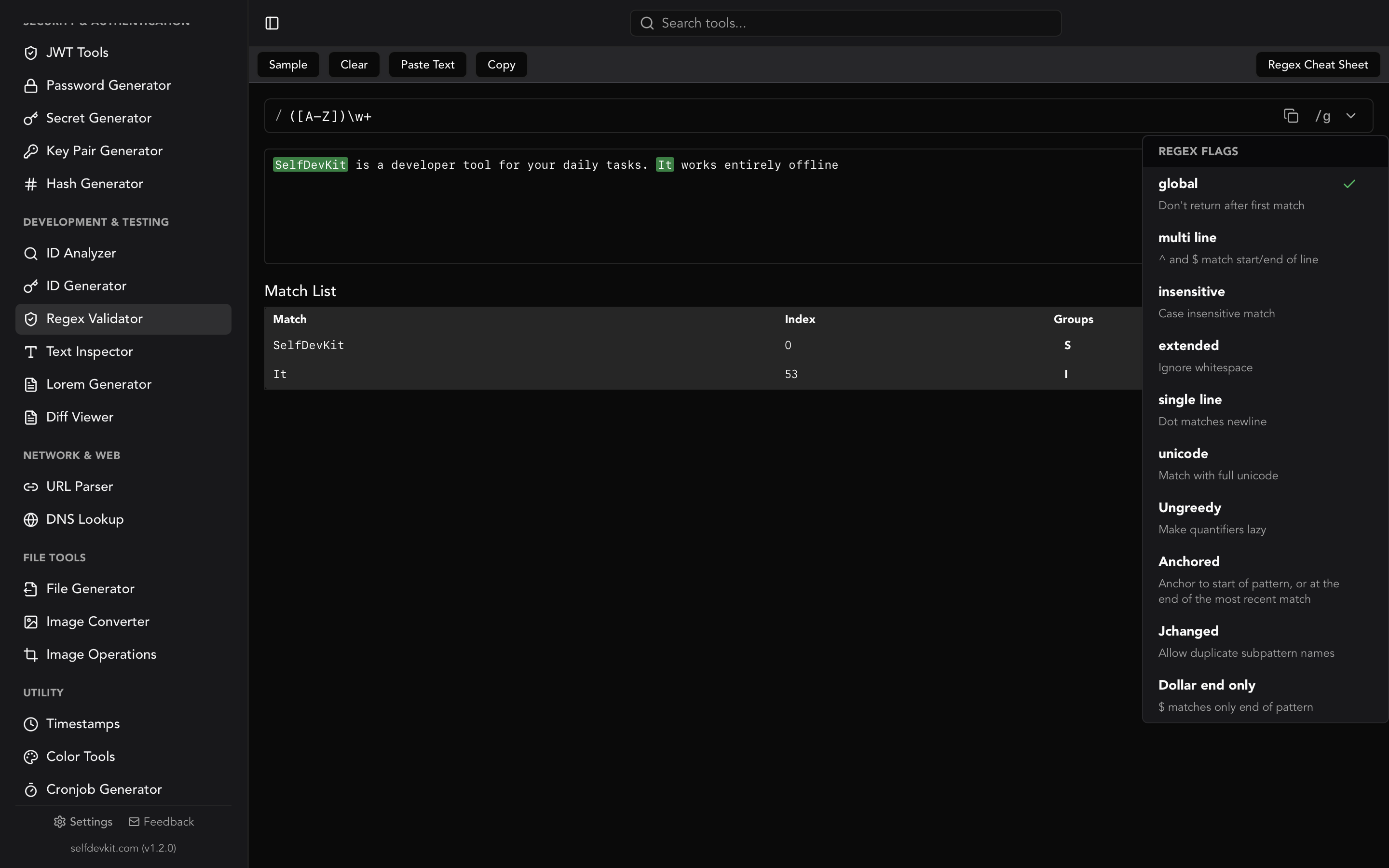
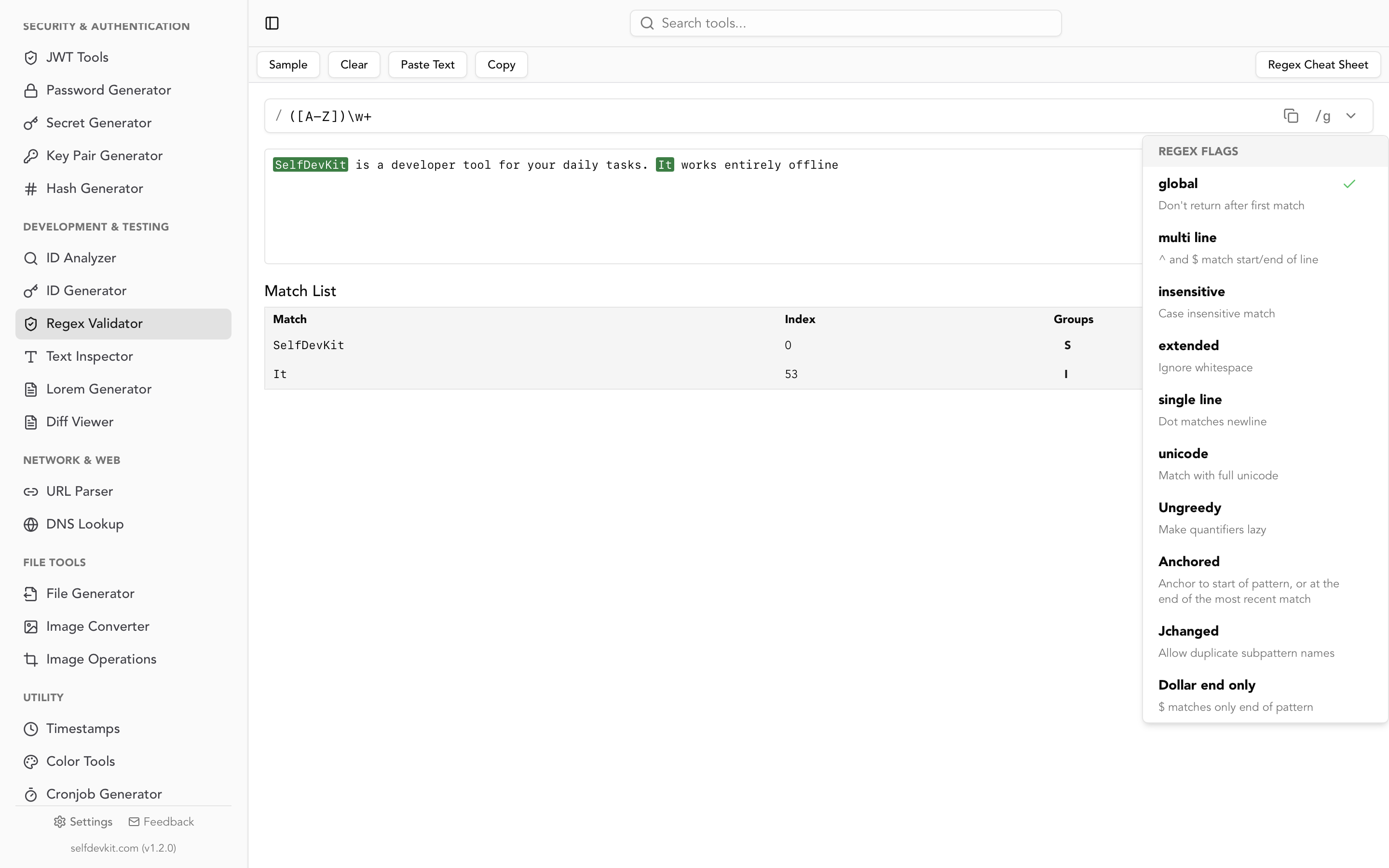
Console testing shows only the result, not the process. A visual regex tester like SelfDevKit's Regex Validator shows:
- All matches highlighted in your test string
- Captured group contents
- Real-time feedback as you modify patterns
- Whether patterns match partial or full strings
Frequently asked questions
Why doesn't my regex match across multiple lines?
By default, . doesn't match newlines and ^/$ only match string boundaries. Use the m flag for multiline mode (where ^/$ match line boundaries) and the s flag for single-line mode (where . matches newlines).
How do I match a literal backslash?
Escape it with another backslash: \\ in the pattern matches \ in the text. In JavaScript string literals, you need four backslashes: "\\\\" produces the regex \\. See the Text Inspector for debugging escape sequences.
What's the difference between * and +?
* matches zero or more occurrences, so a* matches empty string, "a", or "aaa". + requires at least one, so a+ matches "a" or "aaa" but not empty string. When validating required fields, use +.
How do I make regex case-insensitive?
Add the i flag: /hello/i matches "hello", "HELLO", and "HeLLo". This works in most languages. In Python, use re.IGNORECASE or the (?i) inline flag.
Implementation considerations
When using regex in production applications, consider these practical factors:
Performance: Complex patterns with nested quantifiers can cause exponential backtracking. Test patterns against adversarial inputs. Tools like regex101 show step counts to identify performance issues.
Validation vs extraction: Use anchors (^...$) for validation to ensure the entire string matches. Without anchors, you're testing whether the pattern exists anywhere in the string.
Unicode handling: Enable Unicode mode (u flag) when working with non-ASCII text. Without it, patterns may split multi-byte characters incorrectly. Test with international characters if your application supports them.
Security: Never use user-provided regex patterns without sanitization - they can cause denial of service through catastrophic backtracking. Consider using a timeout or restricted regex engine.
Maintainability: Complex patterns become unreadable. Use named groups, add comments with the x flag (where supported), or break patterns into documented pieces. Future maintainers (including yourself) will thank you.
Offline testing: When testing regex against production data containing sensitive information, use offline tools like the Regex Validator. Your test data shouldn't pass through external servers. See Why Offline-First Developer Tools Matter.
In summary
Regular expressions provide powerful pattern matching for validation, extraction, and transformation:
Core concepts:
- Metacharacters define matching rules:
.*+?^$ - Character classes match sets:
[abc][^abc]\d\w\s - Quantifiers control repetition:
{n}{n,m}*+ - Anchors match positions:
^$\b - Groups capture content:
(...)(?:...)(?<name>...) - Flags modify behavior:
gimsu
Common patterns:
| Purpose | Pattern |
|---|---|
^[a-zA-Z0-9._%+-]+@[a-zA-Z0-9.-]+\.[a-zA-Z]{2,}$ |
|
| URL | ^https?:\/\/[^\s]+$ |
| Phone (US) | ^\+?1?[-.\s]?\(?\d{3}\)?[-.\s]?\d{3}[-.\s]?\d{4}$ |
| Hex color | `^#?([A-Fa-f0-9]{6} |
Test patterns incrementally, check edge cases, and use a visual regex tester for complex debugging. SelfDevKit's Regex Validator provides real-time matching with group extraction, running entirely offline for testing sensitive data.
Ready to test regex patterns offline?
SelfDevKit includes a comprehensive regex tester with real-time matching, flag toggles, and capture group display. Test patterns against production-like data without privacy concerns - everything runs locally on your machine.
Download SelfDevKit — available for macOS, Windows, and Linux.
Or explore the full toolkit at selfdevkit.com/features to see all available tools including the JSON formatter, Text Inspector, and Diff Viewer.