JSON Web Tokens power authentication across the modern web. Every time you log into an application, there's a good chance a JWT is flying between your browser and the server. But when authentication breaks, you need to see inside these tokens quickly and safely. This guide covers everything developers need to know about decoding, validating, and debugging JWTs.
Authentication issues rank among the most frustrating bugs to debug. The token looks valid. The request seems correct. But something is wrong, and you need to know what. A JWT decoder lets you peek inside these opaque strings to understand exactly what's happening with your authentication flow.
The challenge is that most developers reach for online JWT decoders without considering what they're pasting into a stranger's website. That production token contains user identities, permissions, and session data. This guide will show you how JWTs work, how to decode and validate them, and why doing this offline matters for security.
Table of contents
- What is a JWT
- JWT structure explained
- JWT decoder: See inside any token
- JWT validator: Verify signatures
- Understanding JWT claims
- JWT algorithms explained
- Online vs offline JWT decoders
- Getting started with SelfDevKit
What is a JWT
A JSON Web Token (JWT) is a compact, URL-safe way to represent claims between two parties. JWTs are widely used for authentication and authorization in web applications, APIs, and microservices.
When you log into an application, the server typically:
- Verifies your credentials (username/password, OAuth, etc.)
- Creates a JWT containing information about you
- Signs the token with a secret or private key
- Sends the token back to your browser
- Your browser includes this token in subsequent requests
The server can then verify the token's signature to confirm it hasn't been tampered with and extract the user information without querying a database on every request.
JWTs became popular because they're stateless. The server doesn't need to store session data. Everything needed to authenticate the request is contained within the token itself.
JWT structure explained
Every JWT consists of three parts separated by dots:
header.payload.signature
Here's a real example:
eyJhbGciOiJIUzI1NiIsInR5cCI6IkpXVCJ9.eyJzdWIiOiIxMjM0NTY3ODkwIiwibmFtZSI6IkpvaG4gRG9lIiwiaWF0IjoxNTE2MjM5MDIyfQ.SflKxwRJSMeKKF2QT4fwpMeJf36POk6yJV_adQssw5c
Those three Base64-encoded sections decode to:
Header:
{
  "alg": "HS256",
  "typ": "JWT"
}
The header specifies the algorithm used to sign the token and the token type.
Payload:
{
  "sub": "1234567890",
  "name": "John Doe",
  "iat": 1516239022
}
The payload contains the claims, which are statements about the user and additional metadata.
Signature:
The signature is created by taking the encoded header, encoded payload, a secret, and the algorithm specified in the header:
HMACSHA256(
  base64UrlEncode(header) + "." + base64UrlEncode(payload),
  secret
)
This signature ensures the token hasn't been modified. If anyone changes a single character in the header or payload, the signature verification will fail.
JWT decoder: See inside any token
A JWT decoder parses the token and displays its contents in readable format. Since the header and payload are simply Base64-encoded (not encrypted), decoding is straightforward. The value comes from presenting this information clearly.
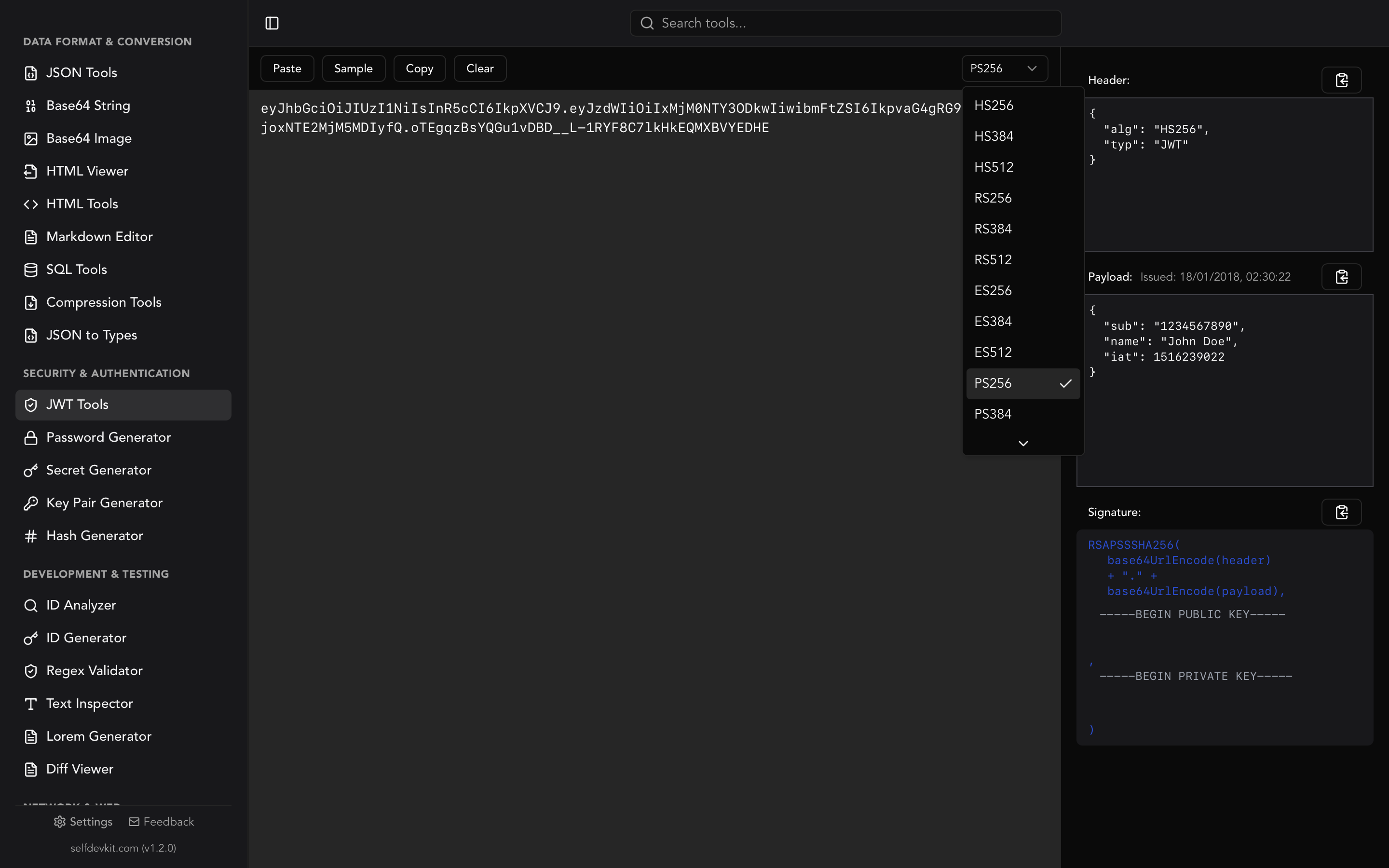
SelfDevKit's JWT Tools provide instant decoding with a clean interface:
Header section shows the algorithm and token type. When you paste a token, the tool automatically detects the algorithm (HS256, RS256, ES256, etc.) and adjusts the verification interface accordingly.
Payload section displays all claims in formatted JSON. The tool also shows the "Issued At" timestamp in human-readable format, so you can immediately see when the token was created.
Signature section shows the raw signature and provides verification options.
What you can learn from decoding
Decoding a JWT reveals:
- Algorithm used: Is it HMAC (shared secret) or asymmetric (RSA/ECDSA)?
- Token type: Standard JWT or something else?
- User identity: Subject (sub), name, email, user ID
- Permissions: Roles, scopes, groups
- Timing: When issued, when it expires
- Issuer: Which service created this token
- Audience: Which service should accept it
This information is invaluable when debugging authentication issues. You can immediately see if a token is expired, if it has the wrong permissions, or if it was issued by the wrong service.
JWT validator: Verify signatures
Decoding shows you what's in a token. Validation confirms the token is authentic and unmodified.
Why signature verification matters
Anyone can create a JWT with any claims they want. The signature is what proves the token was created by someone with the secret key. Without signature verification, you're just trusting that the token is legitimate.
Three verification modes
SelfDevKit's JWT Tools support three ways to verify signatures:
Secret mode (for HMAC algorithms):
Enter the shared secret used to sign the token. If the signature matches, you'll see "signature verified" in green. If not, "invalid signature" appears in red.
HMACSHA256(
  base64UrlEncode(header) + "." + base64UrlEncode(payload),
  your-256-bit-secret
)
Public/Private key mode (for RSA, ECDSA, RSA-PSS):
For asymmetric algorithms, you need the public key to verify (or private key to sign). Paste your PEM-formatted keys:
-----BEGIN PUBLIC KEY-----
MIIBIjANBgkqhkiG9w0BAQEFAAOCAQ8AMIIBCgKCAQEA...
-----END PUBLIC KEY-----
JWK mode (automatic key fetching):
This is where SelfDevKit shines. The tool is fully automatic. Just paste your token and everything happens instantly:
- Detects the algorithm from the header (RS256, ES256, etc.)
- Automatically switches to JWK mode for asymmetric tokens with an issuer
- Extracts the issuer (iss) claim from the payload
- Fetches the JSON Web Key Set from
{issuer}/.well-known/jwks.json - Matches the key ID (kid) from the header to the correct key
- Verifies the signature automatically
No clicking, no configuration, no manual key copying. Paste a token from Auth0, Cognito, Okta, or any OIDC provider and watch it verify instantly.
Understanding JWT claims
Claims are the key-value pairs in the JWT payload. The JWT specification defines several registered claims, and you can add your own custom claims.
Registered claims
| Claim | Name | Description |
|---|---|---|
iss |
Issuer | Who created and signed the token |
sub |
Subject | The user or entity the token represents |
aud |
Audience | Intended recipient of the token |
exp |
Expiration | Unix timestamp when token expires |
nbf |
Not Before | Token not valid before this time |
iat |
Issued At | When the token was created |
jti |
JWT ID | Unique identifier for the token |
Common custom claims
Applications often add their own claims:
name,email,picture: User profile informationroles,groups,permissions: Authorization datascope: OAuth 2.0 scopescognito:groups: AWS Cognito group membershiphttps://example.com/custom: Namespaced custom claims
Debugging with claims
When authentication fails, check these claims first:
- exp: Is the token expired? Compare to current Unix timestamp
- aud: Does it match your application's expected audience?
- iss: Is it from the expected identity provider?
- scope/roles: Does the user have required permissions?
SelfDevKit's JWT decoder displays all claims in formatted JSON with the issued timestamp converted to a readable date, making it easy to spot issues.
JWT algorithms explained
JWTs support multiple signing algorithms. Understanding the differences helps you choose the right one and debug issues.
HMAC algorithms (symmetric)
HS256, HS384, HS512
Uses a shared secret for both signing and verification. Fast and simple, but requires securely sharing the secret between parties.
- HS256: HMAC with SHA-256 (most common)
- HS384: HMAC with SHA-384
- HS512: HMAC with SHA-512
Best for: Single applications where the same service signs and verifies tokens.
RSA algorithms (asymmetric)
RS256, RS384, RS512
Uses a private key to sign and a public key to verify. The public key can be shared freely.
- RS256: RSA signature with SHA-256 (most common for OIDC)
- RS384: RSA signature with SHA-384
- RS512: RSA signature with SHA-512
Best for: Distributed systems where multiple services need to verify tokens but only one service signs them.
ECDSA algorithms (asymmetric)
ES256, ES384, ES512
Elliptic Curve Digital Signature Algorithm. Smaller keys than RSA with equivalent security.
- ES256: ECDSA with P-256 curve and SHA-256
- ES384: ECDSA with P-384 curve and SHA-384
- ES512: ECDSA with P-521 curve and SHA-512
Best for: Mobile and IoT where bandwidth and storage are limited.
RSA-PSS algorithms (asymmetric)
PS256, PS384, PS512
RSA with Probabilistic Signature Scheme. More secure than standard RSA signatures.
- PS256: RSA-PSS with SHA-256
- PS384: RSA-PSS with SHA-384
- PS512: RSA-PSS with SHA-512
Best for: High-security applications requiring the latest RSA standards.
SelfDevKit supports all 12 algorithms and automatically detects which one a token uses.
Online vs offline JWT decoders
Most developers use online JWT decoders without a second thought. But consider what you're pasting into these websites.
What's in your JWTs
Production JWTs typically contain:
- User identifiers: Email, user ID, username
- Permissions: Admin roles, feature flags, group memberships
- Session data: Login time, device info, IP addresses
- Business data: Organization ID, subscription tier, custom claims
This is sensitive information. Combined, it could enable account takeover, privilege escalation, or data breach.
The problem with online decoders
When you paste a JWT into an online decoder:
- The token is transmitted over the internet
- It may be logged by the server for debugging or analytics
- Third-party scripts on the page can access your input
- The token might be cached or stored
- You have no visibility into their data handling practices
Even well-intentioned services can have security incidents. Their servers get breached. Analytics tools capture sensitive fields. A misconfigured cache exposes your tokens.
The offline advantage
SelfDevKit's JWT Tools run entirely on your machine:
- Zero network requests: Decoding and verification happen locally
- No logging: Your tokens are never stored or transmitted
- Works offline: Debug tokens on an airplane or in a secure facility
- Same features: Full decoding, all algorithms, JWK verification
For a deeper dive into why local processing matters, read our guide on why offline-first developer tools are essential.
Enterprise and compliance considerations
Many organizations prohibit sending production tokens to external services:
- SOC 2 compliance: Requires controls over sensitive data handling
- HIPAA: Healthcare tokens cannot go to arbitrary websites
- PCI DSS: Payment-related tokens need strict controls
- Client contracts: May prohibit sending authentication data externally
Offline tools eliminate these concerns entirely.
Getting started with SelfDevKit
Ready to decode and validate JWTs securely? Here's how to get started with SelfDevKit's JWT Tools.
Quick start
- Open SelfDevKit and select JWT Tools from the sidebar
- Paste your JWT into the input area
- View the decoded header, payload, and signature instantly
Verify a signature
For HMAC tokens (HS256/384/512):
- Paste your JWT
- Enter your secret in the signature section
- See "signature verified" if valid
For RSA/ECDSA tokens (RS/ES/PS algorithms):
- Paste your JWT
- Switch to "Secret/Key" mode
- Paste your public key
- Verify the signature
For OIDC provider tokens:
- Paste your JWT
- Switch to "JWK" mode
- The tool automatically fetches keys from the issuer
- Signature verified automatically
Try the sample
Click the Sample button to load a test JWT. This lets you explore all features without needing a real token.
Related tools
SelfDevKit includes other security tools that complement JWT work:
- Secret Generator: Create secure JWT signing secrets
- Key Pair Generator: Generate RSA key pairs for asymmetric signing
- Hash Generator: Verify HMAC computations
Get SelfDevKit
Download SelfDevKit to start decoding and validating JWTs locally. Your authentication secrets deserve better than random websites.
For a complete walkthrough of all 50+ developer tools, check out our Getting Started Guide.