To convert M4A to MP3, decode the audio inside the M4A (usually AAC, sometimes Apple Lossless) and re-encode it with an MP3 encoder such as LAME. With ffmpeg it's one line:
ffmpeg -i input.m4a -c:a libmp3lame -b:a 192k output.mp3
That works. What the one-liner hides is that most M4A files are already lossy, so you're compressing audio a second time, and the right bitrate depends on what's inside the file. It also copies iTunes metadata into the MP3 in ways you might not expect, including the iTunes Store account field.
Every number below comes from running ffmpeg 8.1.3 (with LAME) on a public-domain Musopen recording of Mozart's Figaro overture (4:01, stereo), first turned into M4A files, and on small test files built for specific cases. Tags were read back with mutagen 1.48.1. These are single-file measurements, so treat them as worked examples, not averages. FFmpeg 9.0 changes one result, the padding at the end of a track, which is covered below.
How to convert M4A to MP3
You can convert M4A to MP3 with ffmpeg, a desktop app, Apple's Music app, or an online converter. They all decode and re-encode; they differ in which settings you get and where the file goes.
ffmpeg (Windows, macOS, Linux). Install it from ffmpeg.org or a package manager (brew install ffmpeg, sudo apt install ffmpeg, winget install Gyan.FFmpeg):
# Constant bitrate
ffmpeg -i input.m4a -c:a libmp3lame -b:a 320k output.mp3

# Variable bitrate (LAME V0)
ffmpeg -i input.m4a -c:a libmp3lame -q:a 0 output.mp3
Without -b:a or -q:a, ffmpeg encodes at 128 kbps CBR, which is too low for a 256 kbps iTunes file.
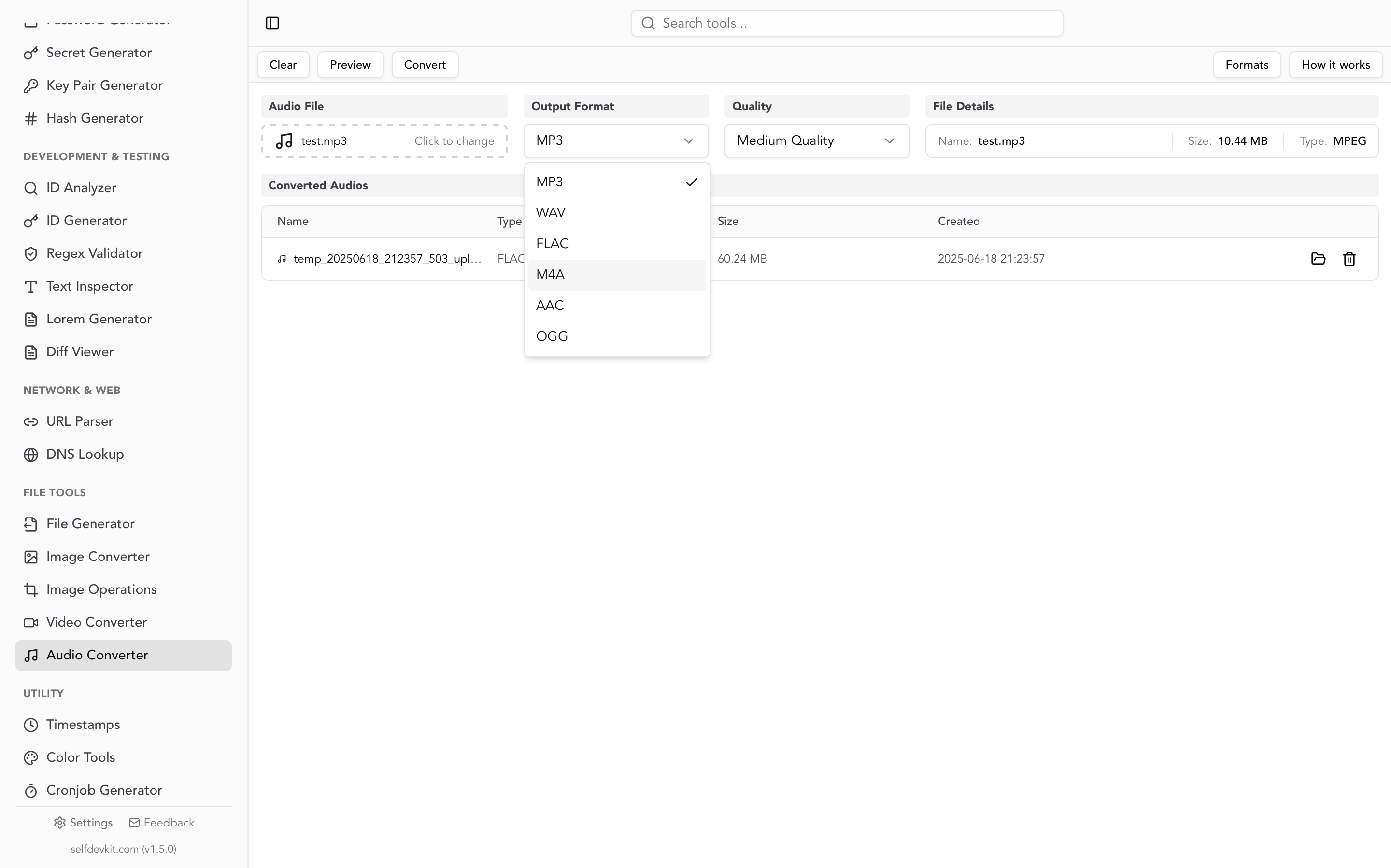
SelfDevKit. Open Audio Converter, select the M4A, set Output Format to MP3, choose a quality (High is 320 kbps, Medium 192 kbps, Low 128 kbps), and click Convert. It runs FFmpeg on your machine, so nothing is uploaded.
Music app on a Mac. Apple's instructions: choose Music > Settings > Files > Import Settings, set Import Using to MP3 Encoder, select the songs, then File > Convert > Create MP3 Version. The MP3 appears in your library next to the original.
Online converters upload the file to a server, which matters more for M4A than for most formats. The metadata section explains why.
Check what's inside the M4A first
An M4A file is an MPEG-4 audio container. It usually holds lossy AAC, but it can also hold lossless ALAC (Apple Lossless). Those need different bitrate choices, and the file extension won't tell you which one you have. ffprobe will:
ffprobe -v error -select_streams a:0 \
  -show_entries stream=codec_name,profile,bit_rate,sample_rate,channels \
  -of default=nw=1 input.m4a
codec_name=aac
profile=LC
sample_rate=44100
channels=2
bit_rate=255708
aac with a bit rate around 256,000 is typical of an iTunes Store purchase (Apple's 256 kbps iTunes Plus format). alac means lossless, so the conversion is a single lossy step, exactly like converting a WAV to MP3. Voice memos can be either: the Voice Memos Audio Quality setting switches between Compressed and Lossless, so check before picking a bitrate. Swap in -of json and the output is easy to scan in a JSON viewer when you check many files.
Which bitrate for M4A to MP3?
Use 320 kbps (or VBR V0) when the M4A is a 256 kbps AAC file, and 192 kbps when it's 128 kbps AAC or lower. Going higher than that buys file size, not quality, because the MP3 can't recover what the AAC encoder already discarded.
To measure it, the same CD-quality WAV was encoded to AAC at 256 and 128 kbps and to ALAC, then each M4A was converted to MP3 at three bitrates. Each MP3 was subtracted from the original WAV, and the table shows how loud that difference is. Lower (more negative) means closer to the original. The music itself sits at −20.0 dB RMS.
| Source M4A | M4A alone | MP3 128k | MP3 192k | MP3 320k |
|---|---|---|---|---|
| ALAC (lossless) | exact | −41.5 dB | −47.3 dB | −56.7 dB |
| AAC 256 kbps | −53.9 dB | −41.2 dB | −46.1 dB | −52.1 dB |
| AAC 128 kbps | −40.8 dB | −38.0 dB | −39.8 dB | −40.7 dB |
| MP3 file size | 3.86 MB | 5.79 MB | 9.64 MB |
The ALAC row matched a direct WAV-to-MP3 encode to the sixth decimal place. ALAC is lossless, so there's nothing to lose before the MP3 encoder runs.
From 256 kbps AAC, 320 kbps lands within 2 dB of the M4A itself. That's as close as a second lossy generation gets.
From 128 kbps AAC, no bitrate helps. The 320 kbps MP3 (−40.7 dB) is no closer to the original than the 128 kbps AAC was (−40.8 dB), at 2.5 times the size. 192 kbps lands nearly as close for 60% of the bytes. Matching the source bitrate is the real mistake: the 128 kbps MP3 drifted 2.8 dB further from the original than the AAC it came from.
Two caveats. This difference measure is a waveform comparison, not a model of hearing, so it ranks settings but doesn't say what's audible. And the AAC files came from ffmpeg's built-in encoder, not Apple's, so the absolute numbers for an iTunes file will differ. The shape of the result is what carries over: a second generation can at best match the first. A rerun with FFmpeg 9.0.1 shifted some figures by up to a few dB but kept the same pattern. VBR followed the same pattern; V0 from the 256 kbps file averaged about 250 kbps and landed at −51.5 dB.
Tags: what carries over and what lands in the wrong place
ffmpeg copies iTunes metadata from the M4A into the MP3's ID3 tag by default, but it doesn't map every field to the frame players read. A test M4A was tagged the way iTunes tags a purchase, then converted with the plain command (no -map flags, which is also what SelfDevKit runs):
| iTunes atom (M4A) | ffmpeg name | ID3 frame in the MP3 |
|---|---|---|
| ©nam, ©ART, ©alb, aART, ©wrt, ©gen, cprt | title, artist, ... | TIT2, TPE1, TALB, TPE2, TCOM, TCON, TCOP (correct) |
| trkn 3 of 12, disk 1 of 2 | track, disc | TRCK 3/12, TPOS 1/2 (correct) |
| ©day | date | TDRC (correct) |
| ©cmt | comment | TXXX:comment, not COMM |
| ©lyr | lyrics | TXXX:USLT, not a real USLT frame |
| soar (sort artist) | sort_artist | TXXX:sort_artist, not TSOP |
| cpil (compilation) | compilation | TXXX:TCMP, not TCMP |
| apID | account_id | TXXX:account_id |
| purd | purchase_date | TXXX:purchase_date |
| covr (76 KB JPEG) | attached picture | APIC re-encoded as 69 KB PNG, type "Other" |
| file brand | major_brand, ... | TXXX:major_brand, minor_version, compatible_brands |
| iTunSMPB (Apple-encoded files) | iTunSMPB | TXXX:iTunSMPB |
The plain fields are fine. Comments, lyrics, sort order, and the compilation flag all end up as custom TXXX text frames, which most players ignore. A player that relies on the compilation flag may then list a various-artists album as several separate albums.
The Apple ID field
apID is the iTunes Store account atom, and ffmpeg's MP4 reader maps it to a tag named account_id. In the test, an example address written there came out the other side as TXXX:account_id in the MP3, along with the purchase date. The EFF reported in 2007 that Apple embeds "the name and email address of the purchaser" in its AAC files, DRM-free ones included. If you convert an old iTunes purchase to share it, check the MP3. The conversion doesn't clean anything up.
Cover art
The cover in an M4A is a JPEG or PNG in the covr atom. ffmpeg exposes it as an attached-picture video stream, and the MP3 muxer's default video codec is PNG, so the image gets re-encoded. It's also written with the picture type "Other" instead of "Front cover". Copying the stream and setting the type fixes both.
A conversion command that keeps the right tags
ffmpeg -i input.m4a -map 0:a -map '0:v?' \
  -c:a libmp3lame -b:a 320k \
  -c:v copy -metadata:s:v comment="Cover (front)" \
  -metadata account_id= -metadata purchase_date= \
  -metadata major_brand= -metadata minor_version= -metadata compatible_brands= \
  -metadata iTunSMPB= -id3v2_version 3 output.mp3
-c:v copy kept the original 76,664-byte JPEG, and the comment value made it a front cover. An empty -metadata key= deletes that tag. -id3v2_version 3 writes ID3v2.3 for older car stereos and players. To drop every source tag instead, use -map_metadata -1.
That still leaves comments, lyrics, sort artist, and compilation in TXXX frames. ffmpeg has no flag to remap those, but a short mutagen script (pip install mutagen) moves them into the frames players read, and can run after the SelfDevKit conversion too:
import sys
from mutagen.id3 import ID3, COMM, USLT, TSOP, TCMP

MOVES = {
    'TXXX:comment': lambda v: COMM(encoding=3, lang='eng', desc='', text=v),
    'TXXX:USLT': lambda v: USLT(encoding=3, lang='eng', desc='', text=v[0]),
    'TXXX:sort_artist': lambda v: TSOP(encoding=3, text=v),
    'TXXX:TCMP': lambda v: TCMP(encoding=3, text=v),
    'TXXX:compilation': lambda v: TCMP(encoding=3, text=v),
}
DROP = ('TXXX:account_id', 'TXXX:purchase_date', 'TXXX:major_brand',
        'TXXX:minor_version', 'TXXX:compatible_brands', 'TXXX:iTunSMPB')

for path in sys.argv[1:]:
    tags = ID3(path)
    for key, make in MOVES.items():
        if key in tags:
            tags.add(make(tags[key].text))
            del tags[key]
    for key in DROP:
        tags.delall(key)
    tags.save(path, v2_version=tags.version[1])
Run it as python fixtags.py *.mp3. On the test file it produced real COMM, USLT, TSOP, and TCMP frames and removed the account and purchase fields. It saves each file in the ID3 version it already had; mutagen otherwise writes ID3v2.4 and would undo -id3v2_version 3. To confirm, dump the tags with ffprobe -show_entries format_tags -of json before and after and compare the two in a diff viewer.
Audiobooks: M4B to MP3 keeps the chapters
An M4B is an M4A with chapter markers, used for audiobooks. ffmpeg carries those chapters into the MP3 as ID3 chapter frames (CHAP plus a CTOC table of contents) without any extra flags. A three-chapter test M4B converted with the plain command came out with all three chapters, titles and timestamps intact. Whether your player shows them is a separate question; MP3 chapter support varies, so check before you convert a whole library.
Bitrate matters more here because of length. A 10-hour book at 64 kbps is about 288 MB; as a 128 kbps MP3 it's about 576 MB. Check the source with ffprobe, and if it's a low-bitrate mono speech file, match it rather than doubling the size:
ffmpeg -i book.m4b -c:a libmp3lame -ac 1 -b:a 64k book.mp3
The extra few milliseconds at the end of a track
AAC encodes in 1,024-sample frames, so an AAC file usually contains a little padding after the real audio ends. Whether that padding ends up in the MP3 depends on your ffmpeg version. ffmpeg 8.1 and earlier trim the priming at the start but not the padding at the end, so the MP3 encoder treats the padding as audio. FFmpeg 9.0, released in August 2026, trims both. Run ffmpeg -version to see which one you have.
With ffmpeg 8.1.3, a 1.000-second test tone (44,100 samples) encoded to M4A decoded to 45,056 samples. Its MP3 decoded to 45,056 as well, 956 samples (22 ms) longer than the source. The Figaro M4A gained 1,020 samples, about 23 ms. For files tagged by Apple's encoder, the ffmpeg 8.1.3 source reads only the priming value from the iTunSMPB tag and ignores the padding count. The 9.0 source uses the padding count too, and FFmpeg 9.0.1 decoded both the ffmpeg-made test tone and an Apple-encoded one (made with macOS afconvert) to exactly 44,100 samples. On older versions the MP3's own LAME header can't help, because by then the padding is part of the audio it was given.
You won't notice on a pop single. On a gapless album (live recordings, DJ mixes, classical movements that run into each other), each affected track boundary can gain a short pause. On ffmpeg 8.x or earlier, if the M4A records its true length, trim to it:
n=$(ffprobe -v error -select_streams a:0 -show_entries stream=duration_ts -of csv=p=0 input.m4a)
ffmpeg -i input.m4a -af "atrim=end_sample=$n" -c:a libmp3lame -b:a 320k output.mp3
On the ffmpeg-made test tone that gave exactly 44,100 samples back. Apple-encoded files are different: their duration_ts can include the priming and padding (47,104 samples for the 1-second Apple test tone). ffmpeg's parser reads the second, third, and fourth hex fields of iTunSMPB as priming, padding, and original sample count, so take the length from the fourth field instead:
n=$((16#$(ffprobe -v error -show_entries format_tags=iTunSMPB -of csv=p=0 input.m4a | awk '{print $4}')))
Protected M4A and M4P files won't convert
Converters can't decode DRM-protected AAC, which usually has the .m4p extension. Apple's support article says "Older purchased songs are encoded in a Protected AAC format that prevents them from being converted." Songs downloaded through an Apple Music subscription are copy-protected too, so they won't convert either. DRM-free M4A files are not affected and convert normally.
Batch convert M4A to MP3
To batch convert, loop over the files and run the same ffmpeg command on each. This bash version (macOS, Linux, WSL) checks the codec and picks the bitrate from the measurements above:
for f in *.m4a; do
  codec=$(ffprobe -v error -select_streams a:0 -show_entries stream=codec_name -of csv=p=0 "$f")
  rate=$(ffprobe -v error -select_streams a:0 -show_entries stream=bit_rate -of csv=p=0 "$f")
  rate=${rate//[^0-9]/}
  if [ "$codec" = "alac" ] || [ "${rate:-0}" -ge 192000 ]; then br=320k; else br=192k; fi
  ffmpeg -nostdin -n -i "$f" -map 0:a -map '0:v?' -c:a libmp3lame -b:a "$br" \
    -c:v copy -metadata:s:v comment="Cover (front)" -id3v2_version 3 "${f%.m4a}.mp3"
done
In PowerShell:
Get-ChildItem *.m4a | ForEach-Object {
  ffmpeg -nostdin -n -i $_.FullName -map 0:a -map '0:v?' -c:a libmp3lame -b:a 320k `
    -c:v copy -id3v2_version 3 ($_.BaseName + ".mp3")
}
-n skips MP3s that already exist, so an interrupted run picks up where it stopped. Delete the half-written file first. Then run the mutagen script over the folder to fix the TXXX tags.
M4A to MP3 in SelfDevKit
SelfDevKit's Audio Converter runs FFmpeg with the LAME encoder locally, so a voice memo, interview, or purchased track never leaves your computer and the conversion works offline. What it does and doesn't do:
- Bitrates: High 320 kbps, Medium 192 kbps (default), Low 128 kbps, all CBR. Pick High for 256 kbps AAC or ALAC sources, Medium for 128 kbps AAC.
- Tags use ffmpeg's default mapping, so everything in the tag table applies: account and purchase fields come along, comments land in TXXX, and the cover becomes a PNG. Run the mutagen script on the result if that matters.
- End padding depends on the FFmpeg build the app uses: 9.0 and later trim it, older builds leave the tail. For gapless albums on an older build, use the
atrimcommand. - One file at a time, loaded fully into memory. Fine for songs and memos; for a library or a multi-hour audiobook, use the batch loop.
- FFmpeg must be present. The Audio Converter doesn't download it itself. It uses the FFmpeg binary that SelfDevKit's Video Converter downloads on first use, or an
ffmpegit finds on the system PATH. - Output names are generated (
temp_<timestamp>_upload_<timestamp>.mp3) and the files are saved in the app's data folder. Use Reveal in folder to find the MP3, and rename it before sharing.
The same tool converts to WAV, FLAC, AAC, M4A, and OGG. The FLAC to MP3 guide covers tag mapping from Vorbis comments, and why offline tools matter makes the case for keeping recordings off upload sites.
Download SelfDevKit for Windows, macOS, or Linux to convert M4A to MP3 on your own machine, alongside 50+ other developer tools that also run offline.