A sample CSV file is a small, shareable comma-separated file you use to test an importer, a parser, a spreadsheet upload or a data pipeline. If you only need one, copy the five lines in the next section into a file called sample.csv and you are done.
If you are testing code, one clean file proves almost nothing. Real CSV exports arrive with byte order marks, semicolons, Windows-1252 accents, short rows and quotes in the wrong place. This guide gives you a 15-file edge-case set (as a script that writes the exact bytes) and shows what six common parsers did with each file. Several of them returned wrong data without raising any error.
The results come from running the files locally in November 2026 with Python 3.12 csv, pandas 3.1.1, DuckDB 2.0.0, Papa Parse 5.7.0, csv-parse 7.0.3 and PostgreSQL 18.6 COPY (running in PGlite). They describe those versions with default settings, not every release.
A clean sample CSV file you can copy
This sample CSV file follows RFC 4180 exactly: a header row, comma delimiters, CRLF line endings and plain ASCII text (which is also valid UTF-8) with no byte order mark.
id,name,email,country,signup_date,balance
1,Ada Lovelace,ada@example.com,GB,2024-03-01,120.50
2,Linus Torvalds,linus@example.org,FI,2024-03-02,0.00
3,"Hopper, Grace",grace@example.net,US,2024-03-03,75.25
4,Margaret Hamilton,margaret@example.com,US,2024-03-04,1999.99
Row 3 is there on purpose. The name contains a comma, so the field is wrapped in double quotes. RFC 4180 rule 6 says "Fields containing line breaks (CRLF), double quotes, and commas should be enclosed in double-quotes," and rule 7 says a quote inside a quoted field "must be escaped by preceding it with another double quote." Backslash escaping is not part of the format.
The emails use example.com, example.org and example.net, which RFC 2606 reserves for use as examples, so a test run can never email a real person.
Copying from a web page usually gives you LF line endings rather than CRLF. Every parser tested here accepts both, so that difference rarely matters. The rest of this guide is about the differences that do.
Why a clean sample CSV is not enough for testing
CSV has a standard, but much of the software that writes CSV ignores it. RFC 4180 was published in October 2005 as an Informational document, not a requirement, and spreadsheet exports, database dumps and hand-rolled join(',') code often predate or skip it. A parser that handles your clean sample CSV has only proven it handles the files that never cause trouble.
The failures fall into five groups: encoding, delimiter, quoting, row shape, and values that look like numbers or nulls but are neither. The set below covers each group with at least one file.
The 15-file edge-case sample CSV set
Each file isolates one problem so that a failure points at a single cause. They are tiny on purpose: two or three data rows are enough to trigger every behavior shown in the results table.
| File | Contents | What it tests |
|---|---|---|
01-clean.csv |
RFC 4180, CRLF, UTF-8 | Baseline |
02-bom.csv |
UTF-8 with EF BB BF prefix |
BOM leaking into the first header |
03-quoted-newline.csv |
"line one\nline two" |
Line break inside a quoted field |
04-semicolon.csv |
1;Café;3,50 |
Semicolon delimiter, decimal comma |
05-windows1252.csv |
Müller as byte 0xFC |
Non-UTF-8 encoding |
06-ragged.csv |
One short row, one long row | Inconsistent field counts |
07-leading-zeros.csv |
ZIP 02134, SKU 007 |
Numeric-looking identifiers |
08-big-id.csv |
9007199254740993, a 20-digit ID |
Integers above 2^53 |
09-na-strings.csv |
Country NA (Namibia), NULL, None |
Default missing-value strings |
10-backslash-quote.csv |
"She said \"hi\"" |
Backslash escaping (not RFC 4180) |
11-bare-quote.csv |
5'11" unquoted |
Quote inside an unquoted field |
12-space-before-quote.csv |
1, "Hello, world" |
Space before the opening quote |
13-duplicate-headers.csv |
id,name,name |
Repeated column names |
14-trailing-blank-lines.csv |
Two empty lines at the end | Blank lines |
15-cr-only.csv |
Bare \r line endings |
Classic Mac line endings |
Copying, pasting and re-saving lose bytes. Clipboards and editors can normalize line endings, strip BOMs and re-encode text, which destroys exactly the properties these files exist to test. A script that writes raw bytes avoids that. Run it with any Python 3:
from pathlib import Path

FILES = {
    "01-clean.csv": "id,name,country,signup_date,balance\r\n1,Ada Lovelace,GB,2024-03-01,120.50\r\n2,Linus Torvalds,FI,2024-03-02,0.00\r\n",
    "02-bom.csv": "\ufeffid,name\r\n1,Ada\r\n2,Linus\r\n",
    "03-quoted-newline.csv": 'id,note\r\n1,"line one\nline two"\r\n2,plain\r\n',
    "04-semicolon.csv": "id;name;price\r\n1;Café;3,50\r\n2;Bäckerei;12,00\r\n",
    "05-windows1252.csv": "id,name\r\n1,Müller\r\n2,Renée\r\n".encode("cp1252"),
    "06-ragged.csv": "id,name,city\r\n1,Ada,London\r\n2,Linus\r\n3,Grace,Arlington,VA\r\n",
    "07-leading-zeros.csv": "id,zip,sku\r\n1,02134,007\r\n2,90210,042\r\n",
    "08-big-id.csv": "id,amount\r\n9007199254740993,1\r\n12345678901234567890,2\r\n",
    "09-na-strings.csv": "id,country,middle_name\r\n1,NA,NULL\r\n2,US,\r\n3,DE,None\r\n",
    "10-backslash-quote.csv": 'id,quote\r\n1,"She said \\"hi\\""\r\n2,ok\r\n',
    "11-bare-quote.csv": "id,height\r\n1,5'11\"\r\n2,6'0\"\r\n",
    "12-space-before-quote.csv": 'id,title\r\n1, "Hello, world"\r\n2,ok\r\n',
    "13-duplicate-headers.csv": "id,name,name\r\n1,Ada,Lovelace\r\n",
    "14-trailing-blank-lines.csv": "id,name\r\n1,Ada\r\n\r\n\r\n",
    "15-cr-only.csv": "id,name\r1,Ada\r2,Linus\r",
}

out = Path("csv-edge-cases")
out.mkdir(exist_ok=True)
for name, data in FILES.items():
    raw = data if isinstance(data, bytes) else data.encode("utf-8")
    (out / name).write_bytes(raw)
    print(f"{name:30} {len(raw):4} bytes")
Commit the output folder next to your tests. The files total 633 bytes.
How six parsers handled each sample CSV file
No parser handled all 15 files correctly with default settings. "Silent" means the parser returned data with no exception, and the data was wrong.
| File | Python csv |
pandas | DuckDB | Papa Parse | csv-parse | Postgres COPY |
|---|---|---|---|---|---|---|
| 01 clean | OK | OK | OK | OK | OK | OK |
| 02 BOM | Silent: key is \ufeffid |
OK | OK | OK | Silent: key is \ufeffid |
OK |
| 03 quoted newline | OK | OK | OK | OK | OK | OK |
| 04 semicolon | Silent: split on the decimal comma | Silent: 1 column, values 50 and 0 |
Detected; price stays text 3,50 |
Detected; price string | Error | Needs DELIMITER ';' |
| 05 Windows-1252 | Error | Error | Error | Silent: M�ller |
Silent: M�ller |
Error |
| 06 ragged | Jagged lists | Error on long row only | Silent: returned 1 of 3 rows | Flags errors, keeps rows | Error | Error |
| 07 leading zeros | OK | Silent: 2134, 7 |
OK (kept as text) | OK | OK | OK |
| 08 big ID | OK | OK (uint64) |
OK (HUGEINT) |
OK | OK | OK |
| 09 NA strings | OK | Silent: NA, NULL, None become NaN |
OK | OK | OK | OK |
| 10 backslash | Silent: She said \hi\"" |
Silent: same | OK (sniffed escape) | Error, swallows rest of file | Error | Silent: She said \hi\ |
| 11 bare quote | OK | OK | OK | OK | Error | Silent: 2 rows merged into 1 |
| 12 space before quote | Silent: 3 fields | Silent: columns shifted | OK | Flags extra field | Error | Keeps leading space |
| 13 duplicate headers | OK | Renames name.1 |
Renames name_1 |
Renames name_1 |
Silent: Ada overwritten |
OK |
| 14 blank lines | Empty rows | OK | OK | Phantom rows | Error | Error |
| 15 CR only | OK | OK | OK | OK | OK | OK |
A few notes on how to read it. Postgres COPY loads into a table you define, so type inference does not apply there; every column was text. Papa Parse and csv-parse receive text that JavaScript already decoded as UTF-8, which is where the replacement character in row 05 comes from. In a browser, FileReader.readAsText() also decodes as UTF-8 unless you pass an encoding or the file's MIME type declares a charset, so the result is usually the same. Papa Parse also has one behavior that touches every row of the table; it gets its own section below.
Errors are the good outcome. An exception stops the import and tells you something is wrong. The cells marked Silent are the ones most likely to reach production.
The silent failures, and the setting that fixes each
Most silent failures in the table have a one-line fix, and each fix below was re-run against the same files to confirm it works. Two do not: Windows-1252 bytes need the right encoding when the file is read, and Postgres has no option for a stray quote.
pandas: leading zeros, NA strings and shifted columns
pandas guesses types and missing values by default, and both guesses destroy identifiers. 02134 becomes the integer 2134. The country code for Namibia, NA, becomes NaN, along with the literal strings NULL and None.
The space-before-quote file is worse. pandas saw three fields under two headers, quietly used the first field as the row index, and shifted everything left. The id column ended up holding ' "Hello'.
import pandas as pd

df = pd.read_csv(
    "data.csv",
    dtype=str,                # keep identifiers as text; cast real numbers later
    keep_default_na=False,    # only treat what you list as missing
    na_values=[""],
    skipinitialspace=True,    # fixes 1, "Hello, world"
)
For semicolon files, pass the delimiter and decimal explicitly: pd.read_csv(path, sep=";", decimal=",") returned 3.5 and 12.0. The auto-detect option sep=None, engine="python" found the semicolon but left prices as the strings "3,50".
For the backslash file, escapechar="\\" gives back She said "hi".
Python csv: the BOM and the encoding
Opening a BOM file with encoding="utf-8" keeps U+FEFF glued to the first header, so row["id"] raises KeyError even though the header looks like id when printed. Use encoding="utf-8-sig", which strips a BOM when present and reads plain UTF-8 the same as before. Also pass newline="" as the csv module docs require; without it, line breaks inside quoted fields are not read correctly.
For Windows-1252 input, encoding="cp1252" reads Müller correctly in both Python and pandas. Detecting which encoding you have is a separate problem; when you cannot know in advance, decode as UTF-8 first and fall back only on a decode error.
DuckDB: the sniffer can give up on commas
DuckDB's auto-detection was the strongest performer overall. Its one silent failure is also the most dangerous one in the table. On the ragged file, the sniffer decided the first three lines were preamble, skipped them, and returned only Grace's row, with columns named column0 to column3.
On a 100-row file with a single short row in the middle, it failed differently: it stopped treating commas as delimiters and returned all 100 lines as one text column named id,name,city. Again, no error.
Pinning the dialect turns that silent failure into a loud one:
-- Errors instead of guessing
SELECT * FROM read_csv('data.csv', delim = ',', header = true);

-- Keeps short rows and fills missing fields with NULL
SELECT * FROM read_csv('data.csv', delim = ',', header = true, null_padding = true);

-- Loads the good rows and logs the bad ones
SELECT * FROM read_csv('data.csv', delim = ',', header = true, store_rejects = true);
SELECT * FROM reject_errors;  -- 'MISSING COLUMNS', '51,short'
Setting header = true alone was not enough. The result was still one text column holding whole lines.
Papa Parse: a phantom row for every file
Papa Parse returned one extra row, {"id": ""}, for every file that ends with a line break, which is most CSV files. The cause is its default skipEmptyLines: false. RFC 4180 rule 2 says "The last record in the file may or may not have an ending line break," so the file is valid; the empty row comes from the parser.
Papa.parse(text, { header: true, skipEmptyLines: 'greedy' })
If you turn on dynamicTyping, leading zeros disappear exactly as in pandas (02134 became 2134). Large IDs were safe; the Papa Parse docs state that values beyond ±2^53 "will not be converted to numbers to preserve precision," and the test confirmed it.
csv-parse: duplicate headers overwrite data
With columns: true, csv-parse built an object per row, and the second name column silently replaced the first. Ada was gone. Use group_columns_by_name: true to get name: ["Ada", "Lovelace"], and bom: true to strip the BOM. Be careful with relax_column_count: true: it stops the ragged-row error, but on the long row it dropped VA without a word.
Postgres COPY: quotes anywhere toggle quoting
Postgres treats a double quote anywhere in a CSV field as a quote character, not only at the start. The unquoted 5'11" opened a quoted section that ended at the next row's ", merging two rows into one value: 5'11\r\n2,6'0. Nothing in COPY fixes a file like that. Validate before loading, or route those rows elsewhere.
The backslash file loads correctly with ESCAPE '\' in the COPY options.
Check what a CSV round trip changes
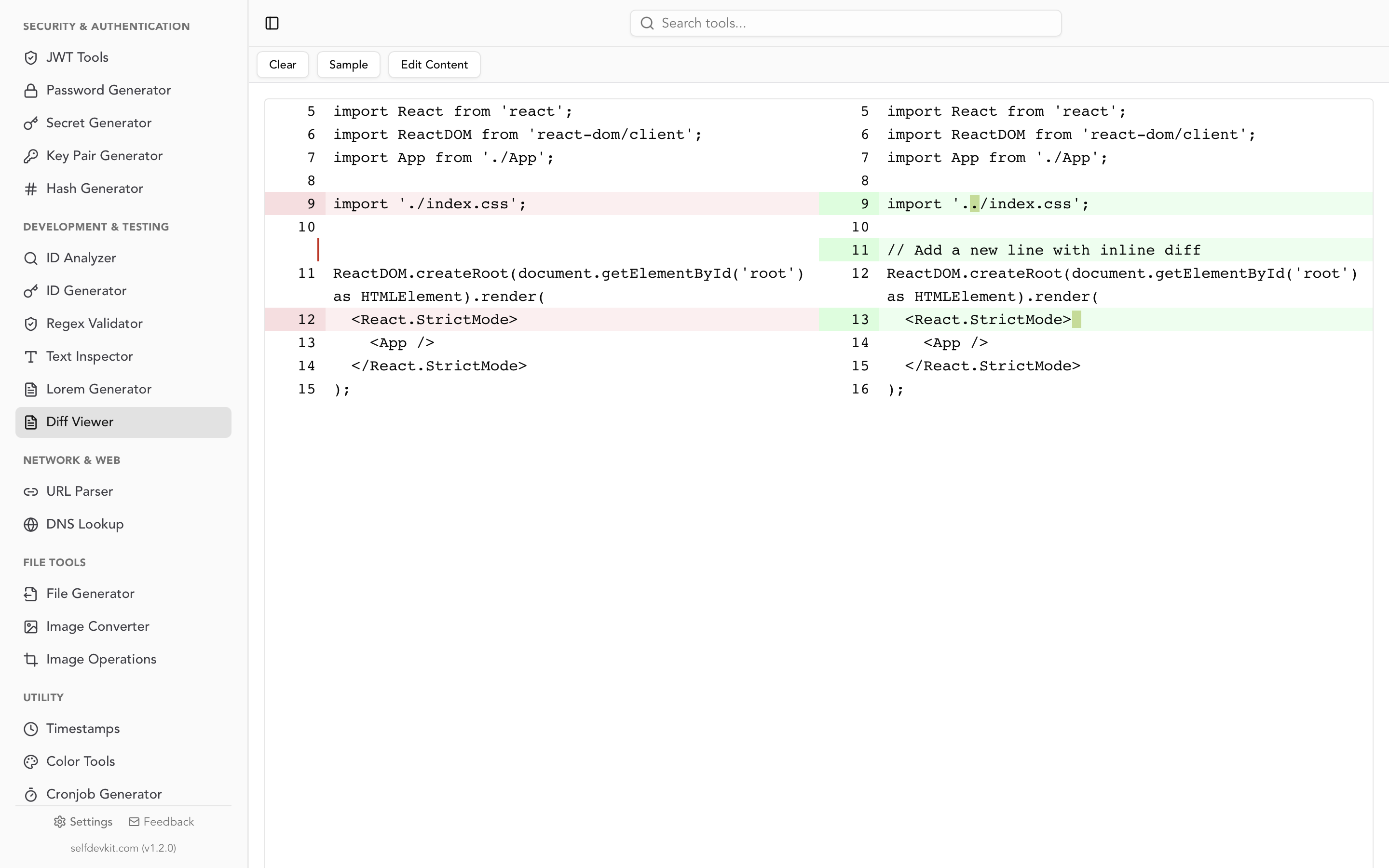
A round-trip diff shows exactly what your parser changes. Load the file, write it back with no edits, and compare the two. This three-row file went through pandas read_csv and to_csv with default settings:
 id,zip,country,note,balance
-1,02134,NA,NULL,10.10
-2,90210,US,,7.00
-3,00501,DE,None,3.5
+1,2134,,,10.1
+2,90210,US,,7.0
+3,501,DE,,3.5
Every data row changed. ZIP codes lost their zeros, Namibia vanished, NULL and None turned into empty strings, and 10.10 became 10.1. With dtype=str, keep_default_na=False, the output was byte-for-byte identical to the input.
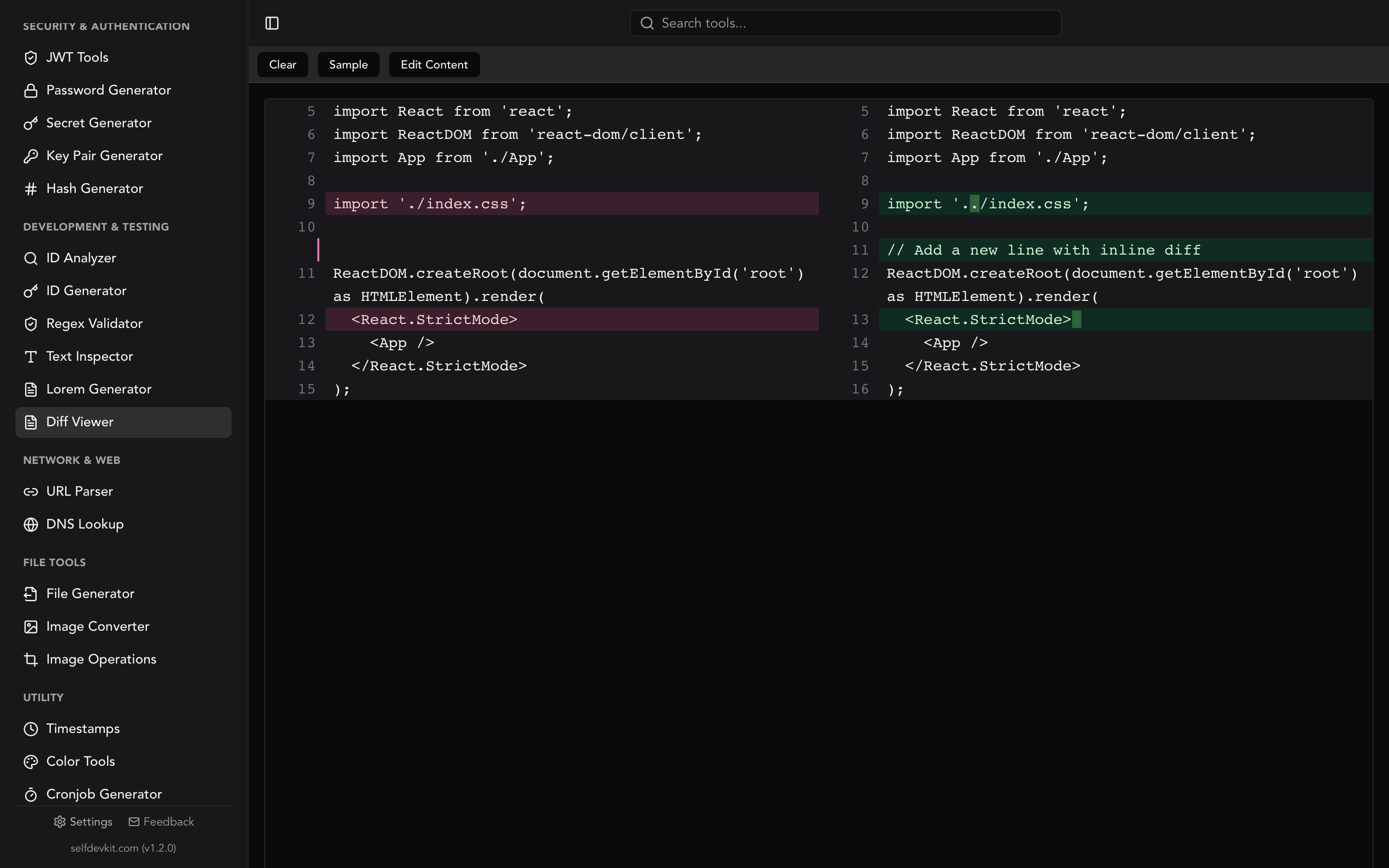
Run the same check on your own importer with any diff tool. The Diff Viewer in SelfDevKit shows the two versions side by side and marks the edited part of each changed line, which makes a dropped leading zero easy to spot in a 30-column row. The text compare guide covers diffing more generally.
Two quick byte-level checks catch most problems before you parse anything:
head -c 3 data.csv | xxd          # efbb bf = UTF-8 BOM
head -n 3 data.csv | cat -e       # ^M$ = CRLF, $ alone = LF
iconv -f WINDOWS-1252 -t UTF-8 data.csv > data.utf8.csv
Line counts help too. If a file has 1,000 records and a header but more than 1,001 physical lines, some quoted fields contain line breaks, or there are blank lines at the end. Paste the file into SelfDevKit's Text Inspector to see total lines next to non-empty lines and whether the text is plain ASCII. One limit: pasted text is already decoded, so it cannot tell you whether the original bytes were Windows-1252.
Generate a realistic sample CSV with more rows
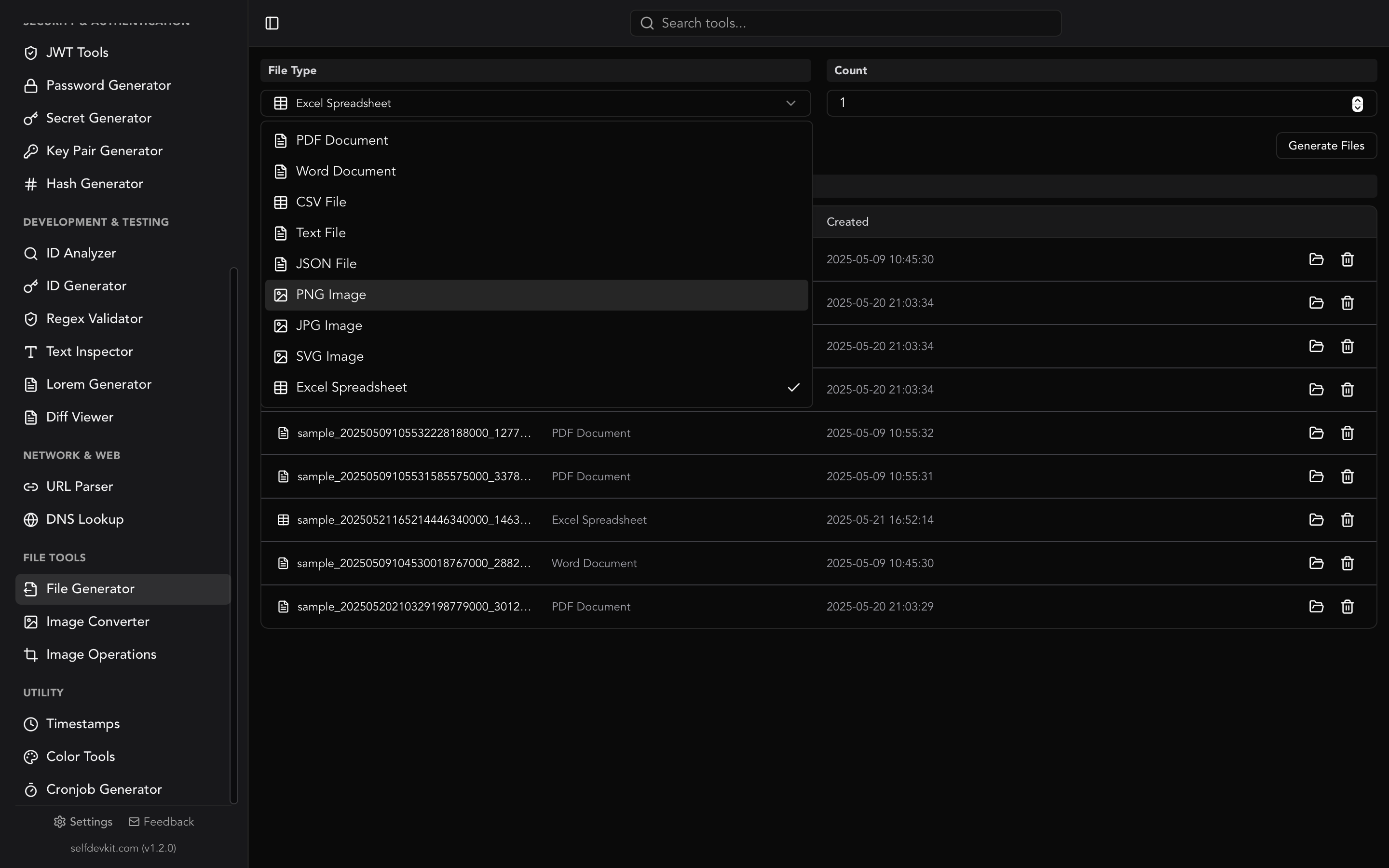
For realistic-looking test data rather than edge cases, SelfDevKit's File Generator writes sample CSV files filled with fake employee records. Generation happens locally in the desktop app, so nothing is uploaded and no real personal data is involved.
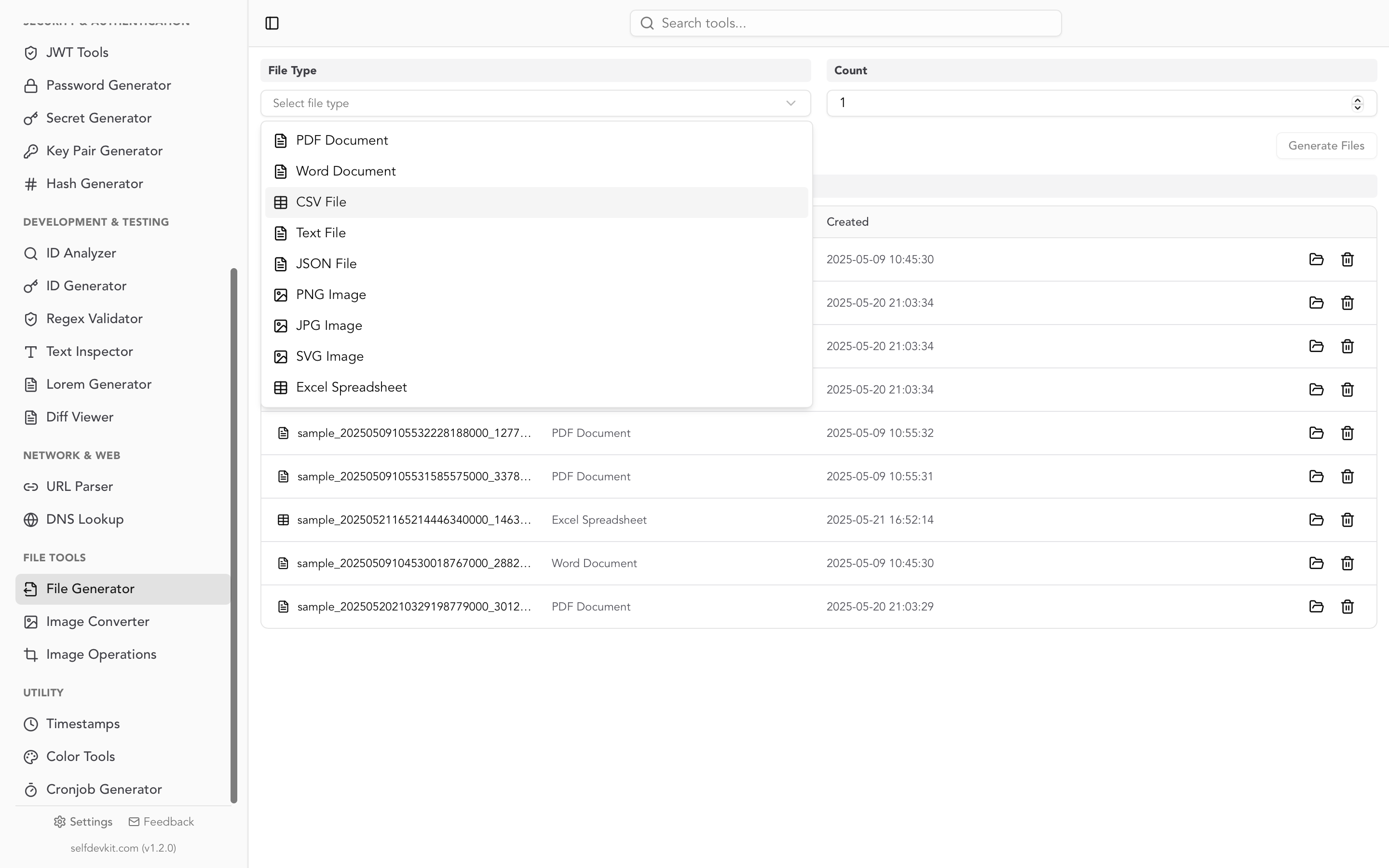
Each file has 25 columns: ID (EMP0001 onward), first and last name, email, phone, mobile, company, job title, department, a full address split across six columns, currency, salary, hire date, status, manager, team size, projects, skills, education and certifications. The Count setting controls both the number of files and the rows per file, so a count of 100 produces 100 files with 100 rows each, about 29 KB per file.
To see what the output looks like to a parser, the same generator code (run outside the app) produced 2,000 rows, which were then profiled:
- Line endings are LF, there is no BOM, and every value is plain ASCII.
- About 1.5 fields per row contain commas and are correctly quoted, for example
"sapiente, maxime"in the Skills column. - About three rows in four have an empty Certifications field, which exercises empty-value handling.
- About one ZIP code in ten starts with
0, and so do about one in ten building numbers. pandas read both columns asint64and dropped the zeros; DuckDB kept them as text. - Phones mix formats such as
(812) 960-7777 x04449and1-547-236-1486. Salaries are text like$80245, and hire dates are ISOYYYY-MM-DD.
The values look plausible one at a time but are not internally consistent. Job Title holds a generated person's name, Department holds a company name, and a city might read Ward ton. That is fine for testing upload flows, column mapping and table rendering. It is not a dataset for analytics demos.
The generated files are clean, valid CSV, so pair them with the edge-case set above. The same tool also produces XLSX and JSON files with similar fake records, which helps when one importer accepts several formats. If you are converting nested JSON into CSV for an importer, the JSON to CSV guide covers flattening, CSV injection and what Excel does to correct files.
Making a million-row sample CSV file
Row counts beyond a few thousand are easier to script. DuckDB writes one in a single statement:
COPY (
  SELECT i AS id,
         'user_' || i AS name,
         'user' || i || '@example.com' AS email,
         DATE '2020-01-01' + ((i - 1) % 1826)::INT AS signup_date,
         round(random() * 1000, 2) AS balance
  FROM range(1, 1000001) t(i)
) TO 'million.csv' (HEADER, DELIMITER ',');
This produced a 59 MB file with one million rows in about half a second on the test machine. Swap the SELECT columns for your own schema, and remove random() if you need identical files across test runs.
Where to download real sample CSV datasets
For data with real-world shape rather than test fixtures, these sources are reliable:
| Source | What you get |
|---|---|
| Datablist sample CSVs | Generated customers, people, organizations and products, from 100 to 2,000,000 rows |
| TrueFileSize CSV files | Files from 100 to 1,000,000 rows, plus semicolon and TSV variants, CC0 |
| FSU CSV data directory | 33 small classic datasets (airtravel, hurricanes, mlb_players) |
| Kaggle Datasets | Real public datasets of any size; check each license |
Check what you download before you trust it. Run the head and cat -e checks above on a downloaded file, and you will know whether it has a BOM and which line endings it uses before your parser has to guess.
Test the ugly files first
The clean sample CSV file at the top of this page is where testing starts. The 15 edge cases are where it gets useful, because most of the parsers tested here returned wrong data at least once with no warning. Pin the delimiter, the encoding and the column types, and check the result with a round-trip diff.
SelfDevKit puts the File Generator, Diff Viewer and Text Inspector in one offline desktop app, alongside 50+ other developer tools. Download SelfDevKit to generate test files and inspect them without uploading anything.