In 2025, credential theft has surged 160% with over 2 billion email addresses exposed in credential stuffing lists. A study of 19 billion leaked passwords found that 94% are reused across multiple accounts. Despite decades of security guidance, "123456" and "password" still top the list of most commonly used passwords. Yet here's the real irony: developers who know better are generating their secure passwords on random websites that could be logging every character they type. Your credentials deserve better than a stranger's server.
A password generator seems simple enough. Click a button, get a random string. But the difference between a truly secure password and one that merely looks secure comes down to cryptographic randomness, proper entropy, and where that generation actually happens. This guide covers everything developers need to know about password security in 2025, including the critical privacy considerations most generators ignore.
Table of contents
- What makes a password truly secure
- Password length vs complexity: The 2025 guidelines
- Understanding password entropy
- Password strength analysis explained
- Online vs offline password generators: The privacy problem
- Getting started with SelfDevKit
What makes a password truly secure
A secure password isn't about clever substitutions or memorable patterns. It's about unpredictability. The moment a pattern exists, attackers can exploit it.
The randomness requirement
Humans are terrible at generating randomness. When asked to create a "random" password, we fall into predictable patterns:
- Capital letter at the start
- Numbers at the end
- Common substitutions (@ for a, 3 for e, 0 for o)
- Keyboard patterns (qwerty, 123456)
- Personal information (birthdays, names, pets)
Attackers know these patterns. Modern password cracking tools don't just try every combination. They use rule-based attacks that apply common human patterns to dictionary words. A password like "Summer2025!" feels secure but falls to these targeted attacks in minutes.
True security requires cryptographic randomness, where each character is selected independently with equal probability from the available character set. No patterns, no preferences, no human bias.
Why "P@ssw0rd!" is terrible
This password meets most complexity requirements: uppercase, lowercase, numbers, and symbols. Many systems would accept it as "strong." Yet it's among the first passwords any attacker would try.
The problem is predictability. Starting with a capital letter, using common substitutions, ending with a symbol and number. These aren't random choices; they're the exact patterns humans use when forced to meet complexity requirements.
A truly random 8-character password like k7#mQ2&x is vastly more secure than P@ssw0rd! despite both meeting the same complexity rules. The difference is entropy, which we'll explore shortly.
Common password attacks
Understanding how passwords get cracked helps you appreciate why randomness matters:
Brute force: Trying every possible combination. A 6-character lowercase password has 308 million combinations, which sounds like a lot until you realize modern GPUs can test billions per second.
Dictionary attacks: Using lists of common words, passwords, and phrases. "sunshine," "football," and "iloveyou" all fall instantly.
Rule-based attacks: Applying transformations to dictionary words. "Sunshine" becomes "Sunsh1ne!" becomes "$unsh1n3!" The attack knows the patterns humans use.
Credential stuffing: Using breached passwords from other sites. If you reused a password anywhere that got breached, attackers already have it.
Rainbow tables: Pre-computed hash lookups for common passwords. Fast and effective against unsalted hashes.
The only defense against all these attacks is sufficient length and true randomness, ideally from a machine, not a human.
Password length vs complexity: The 2025 guidelines
The security industry has fundamentally shifted its thinking on password requirements. The old advice about mandatory complexity (uppercase, lowercase, numbers, symbols) has given way to a simpler truth: length matters most.
What the authorities say
NIST (National Institute of Standards and Technology) updated their Digital Identity Guidelines to recommend passwords of at least 15 characters. More importantly, they explicitly advise against mandatory complexity requirements that lead to predictable patterns.
CISA (Cybersecurity and Infrastructure Security Agency) recommends at least 16 characters, noting that every additional character exponentially increases the time needed to crack a password.
UK National Cyber Security Centre recommends using password managers and generating passwords of 12+ characters with a mix of character types.
The consensus is clear: longer passwords beat complex shorter ones.
Why 16+ characters matter
The math is compelling. Time to crack with modern hardware (assuming 100 billion guesses per second):
| Password Length | Lowercase Only | Mixed Case + Numbers | All Character Types |
|---|---|---|---|
| 8 characters | Instant | 1 hour | 8 hours |
| 12 characters | 2 weeks | 200 years | 34,000 years |
| 16 characters | 16 million years | Billions of years | Heat death of universe |
At 16 characters with mixed character types, brute force becomes computationally infeasible even with future hardware improvements. This is why modern guidance emphasizes length.
Passphrases vs random strings
Two approaches to long passwords:
Random strings: k7#mQ2&xP9$nL4@w - Maximum entropy per character but harder to type.
Passphrases: correct-horse-battery-staple - Easier to remember, still strong if words are truly random.
For machine-generated passwords stored in a password manager, random strings are ideal. For passwords you need to remember (like your password manager's master password), random word combinations work well.
SelfDevKit's Password Generator creates random strings by default, with a configurable length up to 128 characters. For generating secure passphrases, the randomness of selection matters more than the format.
Understanding password entropy
Entropy measures the unpredictability of a password in bits. Higher entropy means more guesses required to crack it. Understanding entropy helps you make informed decisions about password configuration.
What entropy means
A password with N bits of entropy requires an average of 2^(N-1) guesses to crack (half of all possibilities). Some reference points:
| Entropy (bits) | Guesses Required | Security Level |
|---|---|---|
| 40 | ~550 billion | Weak (crackable) |
| 60 | ~576 quadrillion | Moderate |
| 80 | ~6 × 10^23 | Strong |
| 100 | ~6 × 10^29 | Very strong |
| 128 | ~1.7 × 10^38 | Cryptographic |
For reference, 128 bits is the standard for encryption keys. Most security experts recommend passwords with at least 60-80 bits of entropy for important accounts.
Character set impact
Entropy per character depends on the character set size:
| Character Set | Characters | Entropy per Character |
|---|---|---|
| Digits only | 10 | 3.32 bits |
| Lowercase only | 26 | 4.70 bits |
| Mixed case | 52 | 5.70 bits |
| Mixed case + digits | 62 | 5.95 bits |
| All printable ASCII | 95 | 6.57 bits |
A 16-character password using all character types has approximately 105 bits of entropy, well into the "cryptographically secure" range.
Why excluding similar characters is still secure
SelfDevKit's password generator can exclude visually similar characters (0/O, 1/l/I) to prevent transcription errors. This reduces the character set slightly but the security impact is negligible.
Removing these characters from a 95-character set leaves roughly 88 characters, reducing entropy from 6.57 to 6.46 bits per character. For a 16-character password, that's 103 bits instead of 105, both far beyond what any attacker could crack.
The usability benefit of avoiding transcription errors outweighs this minimal entropy reduction.
Password strength analysis explained
A good password generator doesn't just create passwords; it analyzes them. Understanding what makes a password strong helps you configure generators appropriately and evaluate existing passwords.
SelfDevKit's strength scoring
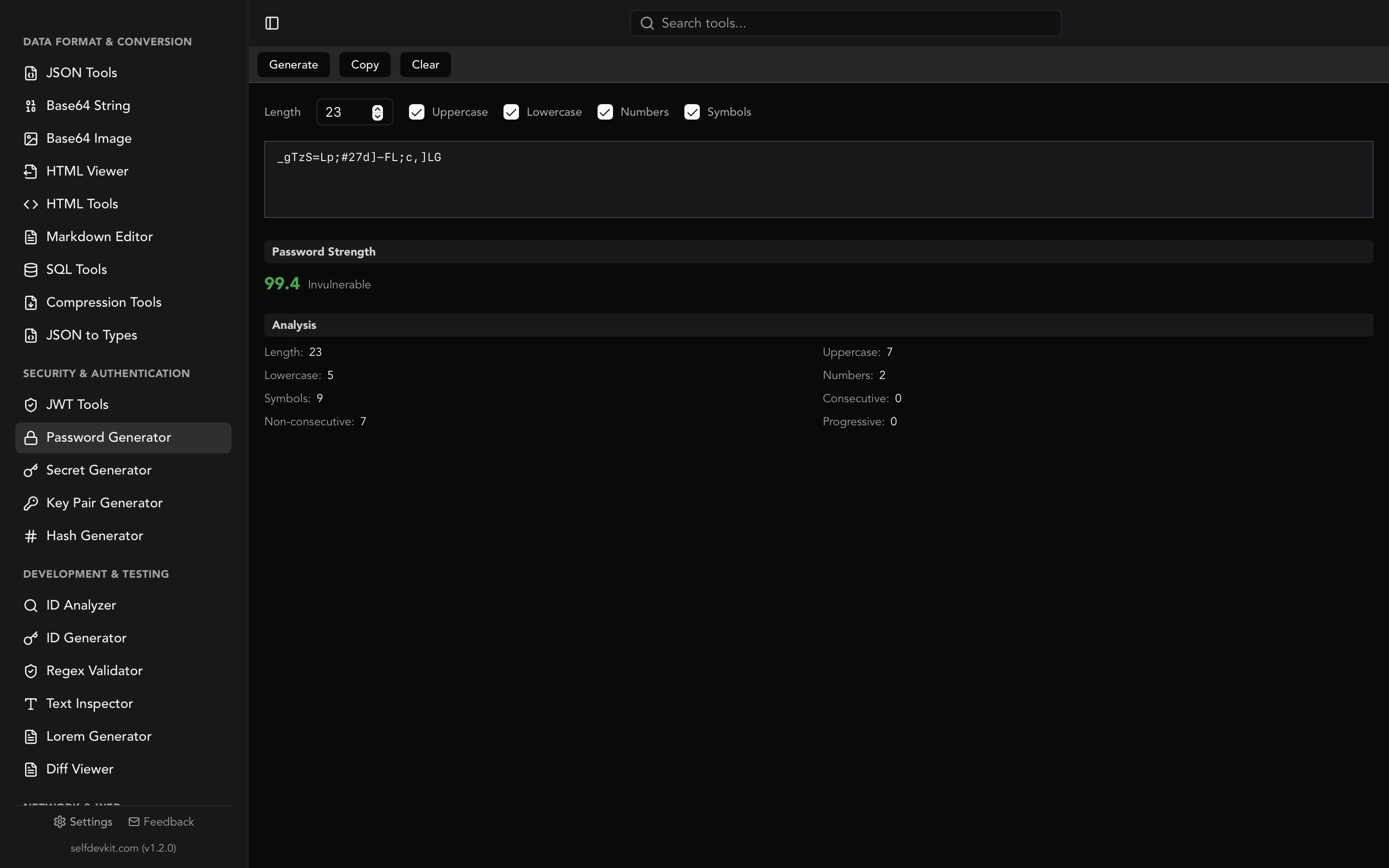
The Password Generator uses an 8-level scoring system that evaluates multiple factors:
| Score Range | Label | Color |
|---|---|---|
| 99+ | Invulnerable | Green |
| 95-98 | Very Strong | Green |
| 90-94 | Strong | Green |
| 80-89 | Good | Yellow |
| 60-79 | Weak | Orange |
| 40-59 | Very Weak | Orange |
| 20-39 | Dangerous | Red |
| 0-19 | Very Dangerous | Red |
The scoring algorithm considers multiple factors beyond just length and character variety.
What the analysis checks
Length: The most important factor. Each additional character exponentially increases crack time.
Character diversity: Using uppercase, lowercase, numbers, and symbols increases the search space attackers must explore.
Consecutive patterns: Sequences like "aaa" or "111" reduce effective entropy. The analyzer counts and penalizes these.
Progressive patterns: Sequences like "abc" or "789" are predictable and reduce security. The analyzer detects these.
Common password detection: The generator checks against lists of commonly used passwords. If your generated password happens to match a known weak password, you'll see a warning.
Understanding the detailed breakdown
When you generate a password in SelfDevKit, you see a complete analysis:
- Total length - Character count
- Uppercase count - A-Z characters
- Lowercase count - a-z characters
- Number count - 0-9 digits
- Symbol count - Special characters
- Consecutive count - Repeated character sequences
- Non-consecutive count - Varied characters (good)
- Progressive count - Sequential patterns (bad)
This transparency helps you understand exactly why a password scores the way it does and adjust your configuration accordingly.
Online vs offline password generators: The privacy problem
Here's the uncomfortable truth most developers don't consider: every password you generate on an online tool could be captured, logged, and stored on servers you don't control.
What happens when you use online generators
When you click "Generate" on a web-based password tool:
-
JavaScript executes in your browser - Hopefully using crypto.getRandomValues(), but you can't verify this.
-
The password exists in browser memory - Accessible to any script on the page.
-
Analytics scripts may capture input - Tools like FullStory, Hotjar, and others record user interactions. Your generated password might be in someone's session replay.
-
Error logging might include it - If something goes wrong, error reports often include page state.
-
The site owner can log anything - Server-side logging could capture requests, form submissions, or client-side state.
-
Third-party scripts have access - Ads, analytics, A/B testing, chat widgets. Each is code you didn't audit running on a page with your password.
Even with good intentions, data breaches happen. That "secure" password generator's server logs get compromised, and your credentials are exposed.
The trust problem
When you use an online password generator, you're trusting:
- The site owner's intentions and competence
- Their hosting provider's security
- Every third-party script embedded on the page
- Their logging and data retention practices
- Their ability to resist breaches indefinitely
That's a lot of trust for a password meant to protect your accounts.
Enterprise and compliance concerns
Many organizations have policies that prohibit processing sensitive data through external services:
-
SOC 2 compliance requires controls over data handling. "We generated production credentials on a random website" fails audits.
-
HIPAA prohibits sending protected health information to unauthorized services. Passwords protecting healthcare systems need better handling.
-
PCI DSS requires strict controls around credentials for payment systems.
-
Client contracts often prohibit sending any client-related data to third parties.
Offline tools eliminate these compliance concerns entirely.
Air-gapped environments
Some secure facilities operate without internet access. Financial institutions, government agencies, defense contractors, and security researchers often work in air-gapped environments.
Online password generators simply don't work there. Offline tools like SelfDevKit function identically whether connected or completely isolated.
The offline advantage
SelfDevKit's Password Generator runs entirely on your machine:
- Zero network requests - Password generation happens in local Rust code
- Cryptographic RNG - Uses your system's cryptographically secure random number generator
- No analytics or telemetry - Nothing is logged, tracked, or transmitted
- Works offline - Generate passwords on an airplane or in a secure facility
- Verifiable privacy - No network traffic means no data exfiltration possible
Your passwords exist only in local memory during generation and in your clipboard when you copy them. They never touch a network.
Getting started with SelfDevKit
Ready to generate passwords securely? Here's how to use SelfDevKit's Password Generator.
Quick start
- Open SelfDevKit and select Password Generator from the sidebar
- Set your desired password length (default is 16 characters)
- Toggle character types: uppercase, lowercase, numbers, symbols
- Click Generate or press
Cmd+Enter/Ctrl+Enter - Click Copy to copy to clipboard
The generated password appears immediately with its strength analysis.
Configuration options
Password length: Slide from 4 to 128 characters. For most purposes, 16-24 characters provides excellent security with reasonable length.
Character types: Toggle independently:
- Uppercase (A-Z)
- Lowercase (a-z)
- Numbers (0-9)
- Symbols (!@#$%^&*...)
Similar character exclusion: Enabled by default. Removes 0/O, 1/l/I to prevent transcription errors.
Recommended settings by use case
| Use Case | Length | Characters | Notes |
|---|---|---|---|
| Web accounts | 16+ | All types | Stored in password manager |
| Database passwords | 24+ | All types | Never typed manually |
| API keys | 32+ | Alphanumeric | Often have format requirements |
| WiFi passwords | 20+ | Alphanumeric | May need to type on devices |
| Master password | 20+ | All types or passphrase | The one password you memorize |
Related security tools
SelfDevKit includes other tools that complement password generation:
Secret Generator: Create specialized secrets like API keys, JWT signing secrets, webhook secrets, and encryption keys with proper formatting and prefixes.
Key Pair Generator: Generate RSA-2048 key pairs for asymmetric encryption, SSH keys, or JWT signing.
Hash Generator: Compute MD5, SHA-1, SHA-256, SHA-512, BLAKE2, and 15+ other hash algorithms locally.
JWT Tools: Decode and verify JSON Web Tokens without sending your authentication tokens to external servers.
Get SelfDevKit
Download SelfDevKit to start generating passwords securely. Your credentials are too important to trust to random websites.
For a complete walkthrough of all 50+ developer tools, check out our Getting Started Guide. To understand why offline tools matter for all your development work, read Why Offline-First Developer Tools Matter.
Your passwords protect everything. Generate them somewhere that protects you.