What is a SQL formatter?
A SQL formatter is a tool that takes raw or poorly indented SQL and restructures it with consistent indentation, keyword casing, and line breaks. The result is a query that is easier to read, review, and debug without changing its meaning or behavior.
Every developer who works with databases has stared at a wall of unformatted SQL. Maybe it was a 200-line query pulled from a slow query log. Maybe a colleague pasted it in Slack with no line breaks. A good SQL formatter turns that mess into something readable in seconds.
This guide covers how SQL formatting works, what conventions matter, how to format queries programmatically, and why formatting SQL locally is safer than you might think.
Table of contents
- Why SQL formatting matters
- SQL formatter in action: before and after
- Formatting complex SQL patterns
- SQL formatting conventions and style guides
- How to format SQL programmatically
- Why your SQL deserves offline formatting
- Frequently asked questions
- Format your SQL locally
Why SQL formatting matters
Formatted SQL is easier to read, easier to review, and easier to debug. That is the entire argument, and it is a strong one.
Consider a production incident. You pull a query from the slow query log. It looks like this:
SELECT u.id,u.email,o.total,o.created_at FROM users u INNER JOIN orders o ON u.id=o.user_id WHERE o.status='completed' AND o.created_at>='2024-01-01' AND u.account_type IN ('pro','enterprise') ORDER BY o.created_at DESC LIMIT 50;
Good luck spotting the filtering logic at a glance. Now compare:
SELECT
    u.id,
    u.email,
    o.total,
    o.created_at
FROM users u
INNER JOIN orders o ON u.id = o.user_id
WHERE o.status = 'completed'
    AND o.created_at >= '2024-01-01'
    AND u.account_type IN ('pro', 'enterprise')
ORDER BY o.created_at DESC
LIMIT 50;
Same query. Completely different reading experience. You can immediately see which tables are joined, what the filter conditions are, and how the results are sorted.
Formatting also prevents bugs during code review. When a teammate changes a WHERE clause in a 90-line unformatted query, the diff is nearly impossible to review. Formatted SQL produces clean, line-by-line diffs where the actual change stands out.
SQL formatter in action: before and after
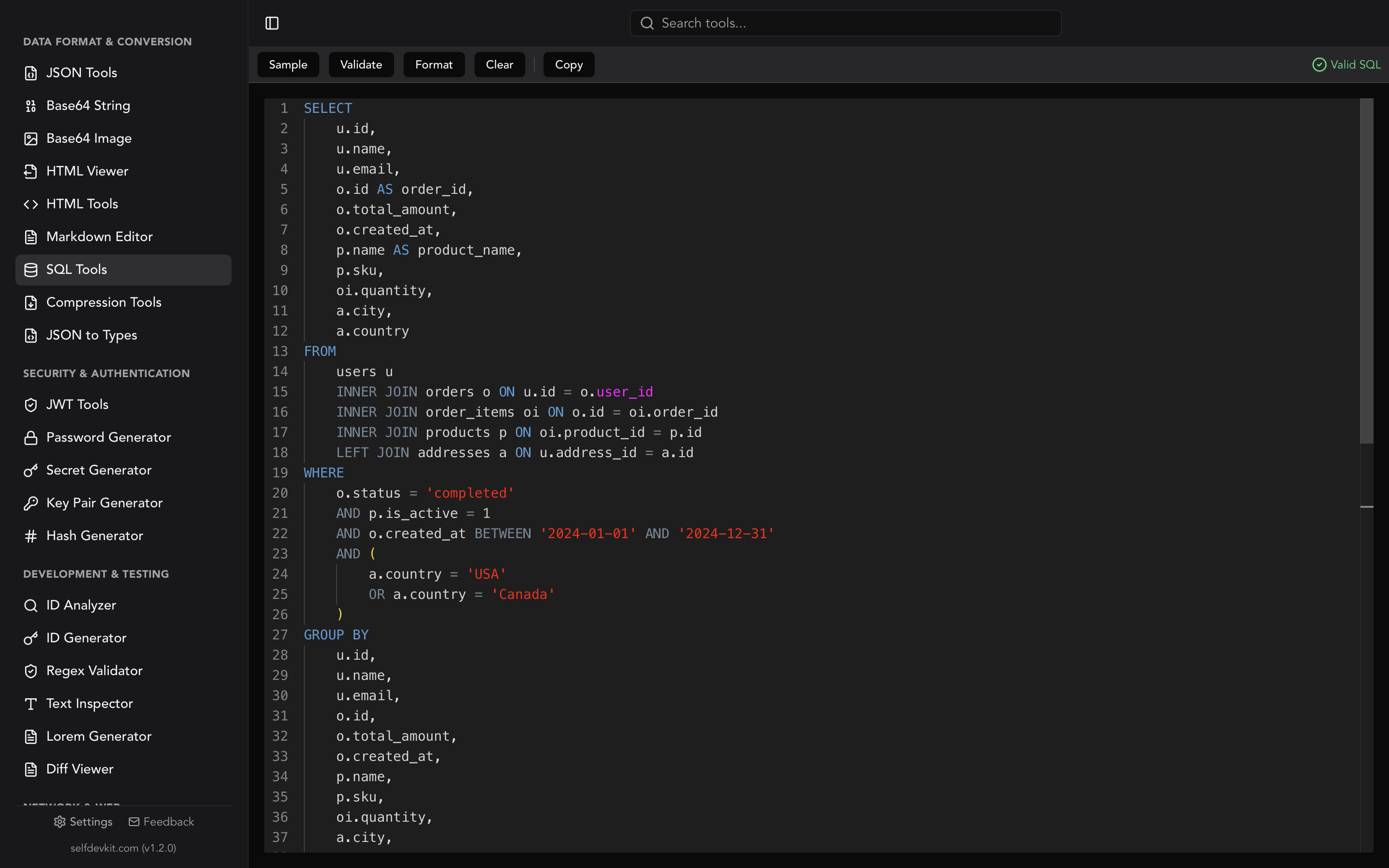
A SQL formatter parses the input query and rewrites it with consistent structure. Most formatters uppercase keywords (SELECT, FROM, WHERE), indent column lists and conditions, and place each major clause on its own line.
Here is a moderately complex query before and after formatting.
Before:
select p.name,p.price,c.category_name,count(oi.id) as times_ordered,sum(oi.quantity) as total_quantity from products p join categories c on p.category_id=c.id left join order_items oi on p.id=oi.product_id where p.active=true and p.created_at>='2024-06-01' group by p.name,p.price,c.category_name having count(oi.id)>5 order by total_quantity desc;
After:
SELECT
    p.name,
    p.price,
    c.category_name,
    COUNT(oi.id) AS times_ordered,
    SUM(oi.quantity) AS total_quantity
FROM products p
JOIN categories c ON p.category_id = c.id
LEFT JOIN order_items oi ON p.id = oi.product_id
WHERE p.active = TRUE
    AND p.created_at >= '2024-06-01'
GROUP BY
    p.name,
    p.price,
    c.category_name
HAVING COUNT(oi.id) > 5
ORDER BY total_quantity DESC;
The formatted version is roughly three times more lines, but each line carries exactly one piece of information. That tradeoff is always worth it during development.
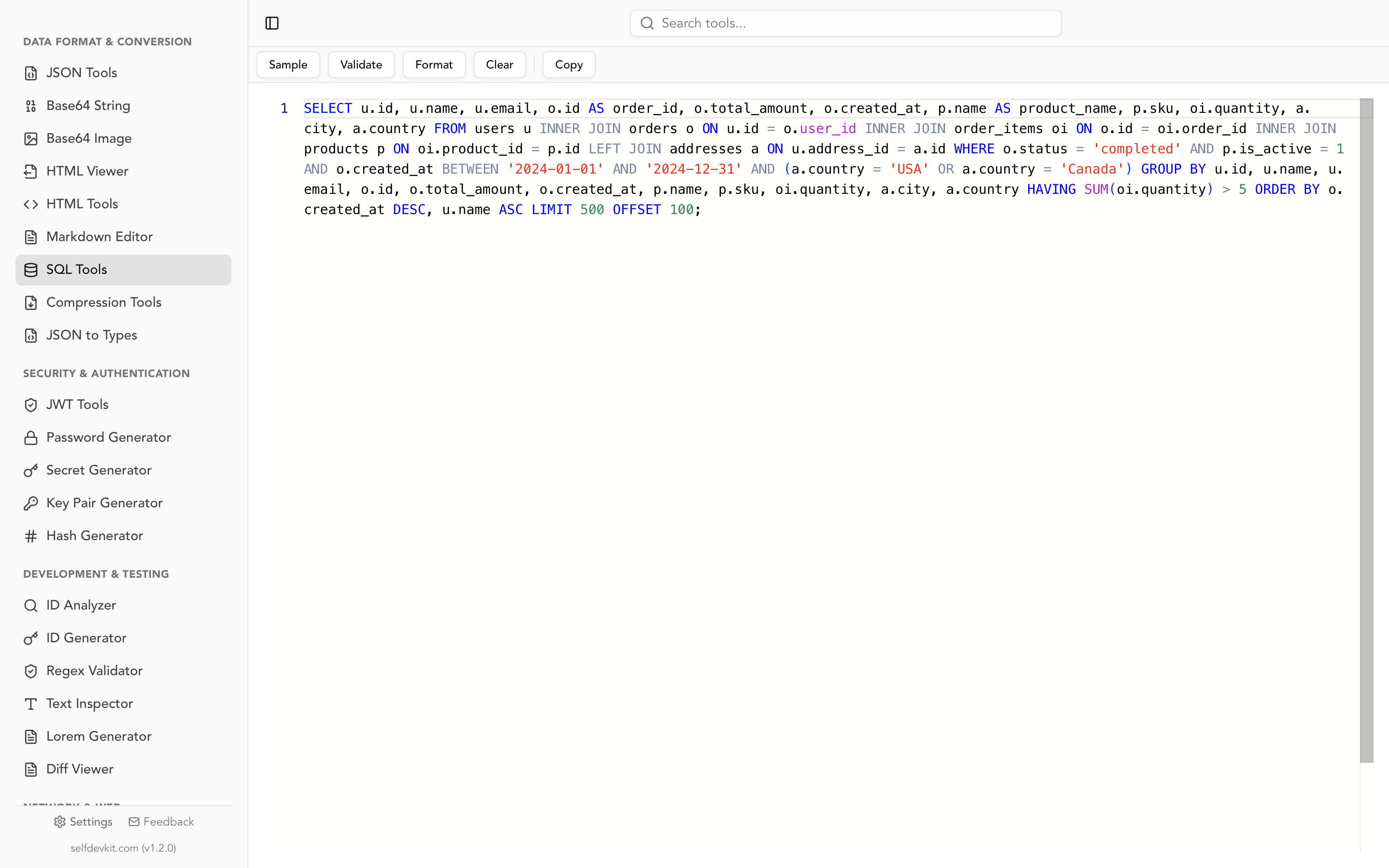
SelfDevKit's SQL Tools handle this formatting with a single click, uppercasing keywords and applying 4-space indentation automatically.
Formatting complex SQL patterns
Most SQL formatter guides stop at simple SELECT/JOIN examples. Real queries are messier. Here is how formatting applies to the patterns that actually trip people up.
Common Table Expressions (CTEs)
CTEs deserve special attention because poor formatting makes them almost unreadable. A well-formatted CTE separates each named subquery visually:
WITH monthly_revenue AS (
    SELECT
        DATE_TRUNC('month', created_at) AS month,
        SUM(total) AS revenue
    FROM orders
    WHERE status = 'completed'
    GROUP BY DATE_TRUNC('month', created_at)
),
revenue_growth AS (
    SELECT
        month,
        revenue,
        LAG(revenue) OVER (ORDER BY month) AS prev_revenue,
        ROUND(
            (revenue - LAG(revenue) OVER (ORDER BY month))
            / LAG(revenue) OVER (ORDER BY month) * 100,
            2
        ) AS growth_pct
    FROM monthly_revenue
)
SELECT
    month,
    revenue,
    prev_revenue,
    growth_pct
FROM revenue_growth
WHERE growth_pct IS NOT NULL
ORDER BY month;
The key conventions: indent the body of each CTE, place the comma before the next CTE name, and keep the final SELECT at the same indentation level as WITH.
CASE statements
CASE expressions nested inside SELECT lists become confusing fast. Format them with each WHEN/THEN on its own line:
SELECT
    employee_id,
    department,
    salary,
    CASE
        WHEN salary >= 150000 THEN 'senior'
        WHEN salary >= 100000 THEN 'mid'
        WHEN salary >= 60000 THEN 'junior'
        ELSE 'entry'
    END AS salary_band
FROM employees
WHERE active = TRUE;
Without formatting, that CASE block collapses into an unreadable inline expression. With it, each branch is immediately visible.
Subqueries
Subqueries in WHERE or FROM clauses need clear indentation to show scope:
SELECT
    u.name,
    u.email
FROM users u
WHERE u.id IN (
    SELECT DISTINCT user_id
    FROM purchases
    WHERE amount > 100
        AND created_at >= '2024-01-01'
)
ORDER BY u.name;
The indentation makes it obvious where the subquery starts and ends. Compare that to WHERE u.id IN (SELECT DISTINCT user_id FROM purchases WHERE amount > 100 AND created_at >= '2024-01-01') on a single line.
Window functions
Window functions often span multiple lines when they include PARTITION BY and ORDER BY:
SELECT
    department,
    employee_name,
    salary,
    RANK() OVER (
        PARTITION BY department
        ORDER BY salary DESC
    ) AS dept_rank,
    AVG(salary) OVER (
        PARTITION BY department
    ) AS dept_avg
FROM employees;
Formatting the OVER clause across lines prevents horizontal scrolling and makes the partitioning logic clear at a glance.
SQL formatting conventions and style guides
There is no single "correct" SQL style. But a few conventions have broad adoption. Choose one and apply it consistently within your team.
Keyword casing
Uppercase SQL keywords is the most common convention: SELECT, FROM, WHERE, JOIN. It visually separates keywords from identifiers (table and column names, which stay lowercase).
Some teams prefer all-lowercase. The SQL Style Guide by Simon Holywell recommends uppercase for reserved words. The Mozilla SQL Style Guide does the same. Most formatters default to uppercase.
Indentation
Two schools of thought exist:
| Style | Example | Common in |
|---|---|---|
| Clause-aligned | Each clause (SELECT, FROM, WHERE) starts at column 0, columns indented beneath | Most SQL formatters, general use |
| Right-aligned | Keywords right-aligned so column lists line up vertically | Simon Holywell's guide, some analytics teams |
Clause-aligned is far more common in practice and is what most automated formatters produce. Right-aligned looks elegant but is harder to maintain manually and not well supported by tooling.
Commas: leading vs trailing
This one sparks debates. Trailing commas are more common in application code:
SELECT
    id,
    name,
    email
Leading commas make diffs cleaner because adding a column changes only one line:
SELECT
    id
    , name
    , email
Both are valid. Pick one for your team and enforce it with a formatter.
WHERE clause style
Stack conditions vertically with the logical operator (AND/OR) at the beginning of each line:
WHERE status = 'active'
    AND created_at >= '2024-01-01'
    AND account_type IN ('pro', 'enterprise')
This makes it easy to comment out individual conditions during debugging without restructuring the query.
How to format SQL programmatically
Sometimes you need to format SQL inside a build pipeline, a pre-commit hook, or a script. Here are working examples in popular languages.
Python
The sqlparse library is the standard choice:
import sqlparse

raw = "select id,name,email from users where active=true order by name;"

formatted = sqlparse.format(
    raw,
    reindent=True,
    keyword_case='upper',
    indent_width=4
)
print(formatted)
Output:
SELECT
    id,
    name,
    email
FROM
    users
WHERE
    active = TRUE
ORDER BY
    name;
Install it with pip install sqlparse. It also ships with a CLI: sqlformat --reindent --keywords upper input.sql.
JavaScript / Node.js
The sql-formatter package supports 15+ SQL dialects:
import { format } from 'sql-formatter';

const raw = "select id,name,email from users where active=true order by name;";

const formatted = format(raw, {
  language: 'postgresql',
  keywordCase: 'upper',
  tabWidth: 4,
});
console.log(formatted);
Install with npm install sql-formatter. It supports PostgreSQL, MySQL, BigQuery, SQLite, Transact-SQL, and many more. The library also works from the command line: npx sql-formatter --language postgresql < query.sql.
CLI with built-in tools
Many database CLIs can help format output, but they do not reformat the query itself. For dedicated CLI formatting:
# Python sqlformat CLI
sqlformat --reindent --keywords upper --indent_width 4 query.sql

# Node.js sql-formatter CLI
npx sql-formatter --language mysql < query.sql

# pgFormatter (Perl, PostgreSQL-focused)
pg_format --spaces 4 --keyword-case 2 query.sql
For pre-commit hooks, sqlfmt is another option popular in the dbt/analytics community. It takes an opinionated approach similar to Black for Python, reducing configuration to zero.
Integrating into CI/CD
You can enforce consistent SQL formatting in your pipeline:
# .pre-commit-config.yaml
repos:
  - repo: https://github.com/tconbeer/sqlfmt
    rev: v0.21.0
    hooks:
      - id: sqlfmt
This catches unformatted SQL before it reaches code review, saving everyone time. If you are working with JSON configuration files alongside your SQL, automated formatting for both keeps your codebase consistent.
Why your SQL deserves offline formatting
SQL queries are not just syntax. They are a blueprint of your data model, your business logic, and sometimes your access patterns. Pasting them into online formatters carries real risk.
What SQL queries reveal
Think about what a typical query contains:
- Table and column names that expose your database schema
- WHERE conditions that reveal business rules and access patterns
- Connection strings if copied from configuration files
- Customer identifiers in test queries with real data
- Internal API endpoints in comments
A competitor or attacker who sees your schema can infer a lot about your product. Table names like subscription_tiers, feature_flags, or ab_test_variants are business intelligence in plain text.
The online formatter problem
When you paste SQL into a web-based formatter:
- The query travels over HTTPS to their server
- It may be logged for debugging, analytics, or "improving" the service
- Third-party scripts on the page (ads, analytics) could potentially access the input
- You have no control over data retention or access policies
Most online formatters are built by small teams or individuals. They are not malicious, but they are also not SOC 2 audited. If you work at a company with any compliance requirements (GDPR, HIPAA, SOC 2, or even a basic NDA), sending internal SQL to external services is a policy violation waiting to happen.
This is the same privacy concern that applies to HTML formatting and JSON formatting. Any tool that processes your code should ideally run on your own machine.
The offline alternative
Offline formatters process everything locally. Your SQL never leaves your device. SelfDevKit's SQL Tools run entirely on your machine, powered by Rust. No network requests, no logs, no third-party scripts.
This matters for teams too. When your company policy says "do not paste source code into external services," an offline formatter means developers do not have to choose between following the rules and doing their job efficiently.
For developers who also handle API authentication tokens or encoded data, having all your formatting and decoding tools in one offline app eliminates the need to use multiple online services.
Frequently asked questions
Does formatting SQL change how the query runs?
No. SQL formatters only modify whitespace, line breaks, and keyword casing. The database engine ignores all whitespace, so a formatted query produces the exact same execution plan and results as the original.
Which SQL dialects do formatters support?
Most formatters handle standard SQL (SQL-92/SQL:2016) and common dialects: PostgreSQL, MySQL, SQL Server (T-SQL), Oracle PL/SQL, SQLite, and BigQuery. SelfDevKit uses a generic SQL dialect parser, so it works with the vast majority of queries regardless of your database.
Should I use tabs or spaces for SQL indentation?
Either works. Four spaces is the most common convention in SQL style guides, and it is what most formatters default to. The important thing is consistency within your team. If your project already uses 2-space indentation for other languages, using 2 spaces for SQL is perfectly reasonable.
Can I format SQL in my editor instead of using a separate tool?
Yes. VS Code, IntelliJ, and DataGrip all have SQL formatting extensions. However, a standalone formatter like SelfDevKit is useful when you are working with SQL outside your editor, such as queries from logs, Slack messages, documentation, or database admin panels. It is also faster for quick one-off formatting when you do not want to open an IDE.
How do I format stored procedures and PL/pgSQL blocks?
Most general-purpose SQL formatters handle standard DML (SELECT, INSERT, UPDATE, DELETE) well but struggle with procedural extensions like PL/pgSQL, T-SQL stored procedures, or Oracle PL/SQL. The control flow statements (IF/THEN, LOOP, BEGIN/END blocks) don't follow the same grammar as standard SQL.
For stored procedures, your best approach is to format the SQL statements inside the procedure body individually while keeping the procedural wrapper formatted manually. Tools like pgFormatter handle PL/pgSQL better than generic formatters because they understand the PostgreSQL-specific syntax. For T-SQL, SQL Server Management Studio has a built-in formatter, and tools like Poor Man's T-SQL Formatter handle procedure bodies reasonably well.
If your codebase is heavy on stored procedures, consider keeping the procedure definitions in version-controlled .sql files with consistent manual formatting, and use automated formatters only for the ad-hoc queries you write during development and debugging.
What is the difference between a SQL formatter and a SQL linter?
A formatter changes how your SQL looks without changing what it does. It adjusts whitespace, indentation, and keyword casing. A linter analyzes your SQL for potential problems: missing indexes implied by WHERE clauses, SELECT * in production code, implicit type conversions, or non-sargable predicates that prevent index usage.
Some tools do both. SQLFluff is a popular open-source linter that also auto-fixes formatting issues. It is configurable per dialect and integrates with CI pipelines. If you need both formatting and static analysis, SQLFluff is worth evaluating. If you just need quick, clean formatting for a query you are debugging right now, a dedicated formatter like SelfDevKit is faster and requires no configuration.
Format your SQL locally
Readable SQL is not a luxury. It is how you catch bugs in code review, debug production issues faster, and onboard new team members without a Rosetta Stone.
Download SelfDevKit to format, validate, and edit SQL with syntax highlighting, all offline and private. It is one of 50+ developer tools in a single desktop app.