What is a hex color picker?
A hex color picker is a tool that lets you select a color visually or by entering a value, then outputs the corresponding hexadecimal code (like
#3b82f6). Developers use hex color pickers to find exact color values for CSS, design systems, and UI work, and to convert between HEX, RGB, HSL, CMYK, and other formats.
Table of contents
- How hex color codes work
- Hex shorthand and alpha transparency
- Converting between hex and other color formats
- Using a hex color picker in your CSS workflow
- Color harmonies: building palettes from a single hex value
- Checking contrast ratios for accessibility
- Why offline color tools matter
- Frequently asked questions
How hex color codes work
A hex color code is a six-character string that represents a color using the hexadecimal (base-16) number system. Each pair of characters maps to a color channel: red, green, and blue.
The format is #RRGGBB, where each channel ranges from 00 (none of that color) to ff (full intensity). That gives you 256 levels per channel, which means 256 x 256 x 256 = 16,777,216 possible colors.
Some quick examples:
| Hex code | Color | Why |
|---|---|---|
#ff0000 |
Red | Red channel maxed, green and blue 0 |
#00ff00 |
Green | Green channel maxed, others 0 |
#0000ff |
Blue | Blue channel maxed, others 0 |
#ffffff |
White | All channels at full intensity |
#000000 |
Black | All channels at zero |
#808080 |
Gray | All channels at half intensity |
The math is straightforward. Each hex digit represents a value from 0 to 15 (0-9, then a-f). The first digit of each pair is multiplied by 16, then added to the second digit. So ff = 15 * 16 + 15 = 255, and 80 = 8 * 16 + 0 = 128.
Hex codes are case-insensitive. #3B82F6 and #3b82f6 are the same color. Most style guides prefer lowercase for consistency.
Reading hex codes at a glance
Once you understand the structure, you can eyeball approximate colors without a hex color picker. High values in the first pair mean more red. High values in the middle mean more green. High values at the end mean more blue. Equal values across all three channels produce a shade of gray.
For instance, #3b82f6 has low red (3b = 59), medium green (82 = 130), and high blue (f6 = 246). That tells you it is a blue-leaning color before you even render it.
Hex shorthand and alpha transparency
CSS supports four hex color formats, not just the standard six-digit one. Understanding all four helps you write cleaner stylesheets and handle transparency without switching to rgba().
Three-digit shorthand (#RGB)
When both digits in each channel pair are identical, you can collapse them. #ffcc00 becomes #fc0. The browser doubles each digit internally: #fc0 expands to #ffcc00.
This only works when each pair repeats. #3b82f6 has no shorthand because 3b, 82, and f6 are all different pairs.
/* These are identical */
.badge { color: #ff6600; }
.badge { color: #f60; }
Eight-digit hex with alpha (#RRGGBBAA)
The CSS Color Module Level 4 specification added support for an alpha (transparency) channel directly in hex notation. The last two digits control opacity, where ff is fully opaque and 00 is fully transparent.
/* 50% transparent black */
.overlay { background-color: #00000080; }

/* Same thing using rgba */
.overlay { background-color: rgba(0, 0, 0, 0.5); }
The alpha value 80 in hex equals 128 in decimal, which is 128/255 = roughly 50% opacity.
Four-digit shorthand (#RGBA)
Combines both shorthands. #f608 expands to #ff660088.
/* Semi-transparent orange */
.highlight { background-color: #f608; }
All modern browsers support 8-digit and 4-digit hex. If you still support IE 11, you will need the rgba() fallback. But for most projects in 2026, hex alpha is safe to use everywhere.
Converting between hex and other color formats
Hex is the most common color format in CSS, but it is not the only one. Different formats are better suited for different tasks. HSL makes it easy to create lighter or darker variants. RGB maps directly to how screens render pixels. CMYK is essential for print. OKLCH is the modern perceptually uniform color space gaining traction in CSS.
Hex to RGB
To convert a hex code to RGB, parse each two-character pair as a base-16 number.
#3b82f6 breaks down to:
- R:
3b= 3 * 16 + 11 = 59 - G:
82= 8 * 16 + 2 = 130 - B:
f6= 15 * 16 + 6 = 246
Result: rgb(59, 130, 246)
In JavaScript:
function hexToRgb(hex) {
  const r = parseInt(hex.slice(1, 3), 16);
  const g = parseInt(hex.slice(3, 5), 16);
  const b = parseInt(hex.slice(5, 7), 16);
  return { r, g, b };
}

hexToRgb('#3b82f6'); // { r: 59, g: 130, b: 246 }
RGB to hex
The reverse: convert each decimal channel to a two-digit hex string, then concatenate.
function rgbToHex(r, g, b) {
  return '#' + [r, g, b]
    .map(v => v.toString(16).padStart(2, '0'))
    .join('');
}

rgbToHex(59, 130, 246); // '#3b82f6'
Hex to HSL
HSL (hue, saturation, lightness) is often more intuitive for creating color variations. To go from hex to HSL, first convert to RGB, then apply the HSL conversion formulas.
function hexToHsl(hex) {
  let { r, g, b } = hexToRgb(hex);
  r /= 255; g /= 255; b /= 255;

  const max = Math.max(r, g, b);
  const min = Math.min(r, g, b);
  const l = (max + min) / 2;

  if (max === min) return { h: 0, s: 0, l: Math.round(l * 100) };

  const d = max - min;
  const s = l > 0.5 ? d / (2 - max - min) : d / (max + min);

  let h;
  if (max === r) h = ((g - b) / d + (g < b ? 6 : 0)) / 6;
  else if (max === g) h = ((b - r) / d + 2) / 6;
  else h = ((r - g) / d + 4) / 6;

  return {
    h: Math.round(h * 360),
    s: Math.round(s * 100),
    l: Math.round(l * 100)
  };
}

hexToHsl('#3b82f6'); // { h: 217, s: 91, l: 60 }
Quick reference: format comparison
| Format | Example for #3b82f6 |
Best for |
|---|---|---|
| HEX | #3b82f6 |
CSS shorthand, copy-pasting |
| RGB | rgb(59, 130, 246) |
JavaScript manipulation, Canvas API |
| HSL | hsl(217, 91%, 60%) |
Creating tints, shades, and variants |
| CMYK | cmyk(76%, 47%, 0%, 4%) |
Print design |
| OKLCH | oklch(60% 18% 258) |
Perceptually uniform adjustments |
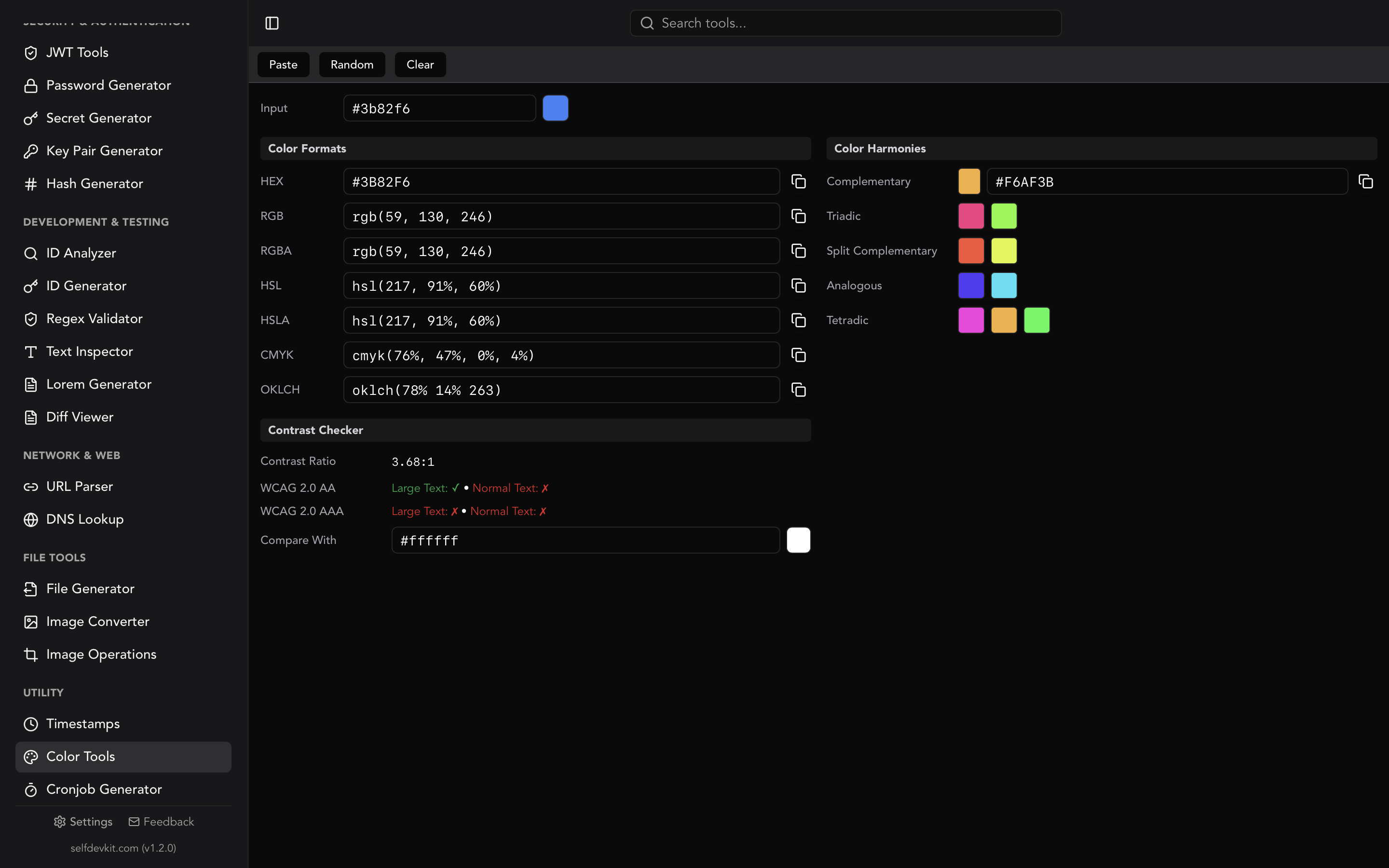
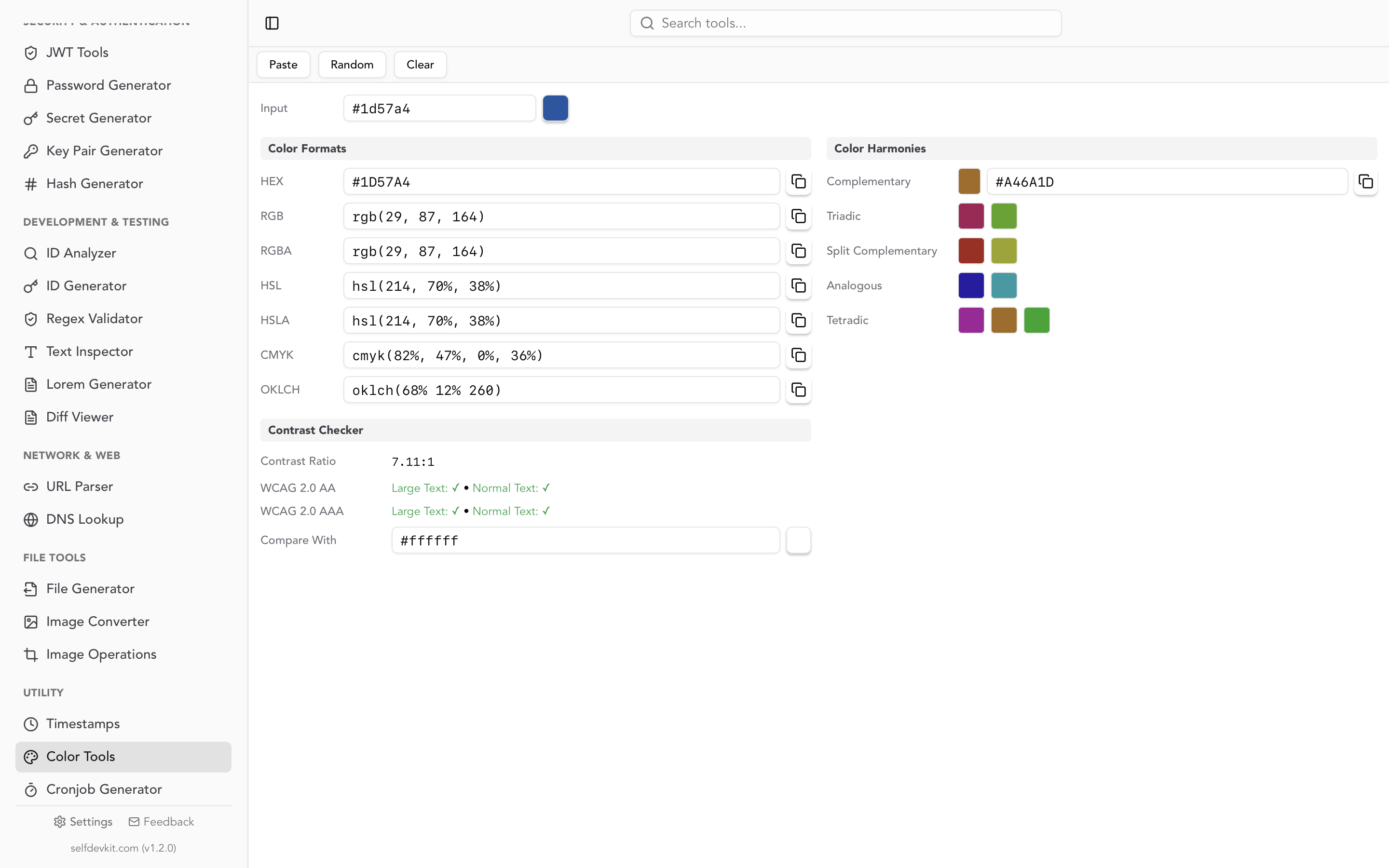
SelfDevKit's Color Tools convert between all of these formats instantly. Enter any color in any format, and every other format updates in real time with one-click copy for each value.
Using a hex color picker in your CSS workflow
Knowing the theory is useful. But how does a hex color picker fit into day-to-day development?
Design tokens and CSS custom properties
Modern CSS architectures use custom properties (variables) to define colors once and reference them everywhere. A hex color picker helps you nail down the exact values for your token system.
:root {
  --color-primary: #3b82f6;
  --color-primary-light: #60a5fa;
  --color-primary-dark: #2563eb;
  --color-surface: #ffffff;
  --color-text: #1e293b;
}

.button-primary {
  background-color: var(--color-primary);
  color: var(--color-surface);
}
When you define tokens this way, updating a brand color means changing one hex value instead of hunting through dozens of files.
Dark mode with HSL channel splitting
Here is a pattern that most hex color picker guides miss entirely. Instead of maintaining separate hex values for light and dark themes, define your colors using HSL channels and adjust the lightness.
:root {
  --primary-h: 217;
  --primary-s: 91%;
  --primary-l: 60%;
  --primary: hsl(var(--primary-h), var(--primary-s), var(--primary-l));
}

[data-theme="dark"] {
  --primary-l: 70%;
}
Start with a hex color picker to find your base color. Convert it to HSL. Then split the channels into separate variables. Now your dark mode only needs to adjust lightness values, keeping hue and saturation consistent across themes.
Tailwind CSS and hex values
If you use Tailwind CSS, you can extend the default palette with custom hex values in your configuration:
// tailwind.config.js
module.exports = {
  theme: {
    extend: {
      colors: {
        brand: {
          50: '#eff6ff',
          500: '#3b82f6',
          900: '#1e3a8a',
        },
      },
    },
  },
};
A hex color picker that also generates color harmonies makes it faster to build these shade scales. Pick your base 500 value, generate lighter and darker variants, and drop them into the config.
Color harmonies: building palettes from a single hex value
Color harmony refers to combinations of colors that look visually balanced based on their positions on the color wheel. Starting with one hex value, you can generate an entire palette using mathematical relationships between hues.
The five standard harmonies
Complementary: Two colors opposite each other on the color wheel (180 degrees apart). High contrast, good for call-to-action elements against a background. For #3b82f6 (blue), the complement is an orange in the #f6a83b range.
Analogous: Colors adjacent on the wheel (30 degrees apart). Low contrast, harmonious feel. Great for backgrounds and subtle UI gradients.
Triadic: Three colors equally spaced at 120-degree intervals. Vibrant but balanced. Useful for dashboards and data visualization where you need distinct but cohesive colors.
Split complementary: Your base color plus the two colors adjacent to its complement (150 and 210 degrees). Offers strong contrast like complementary, but with more variety and less tension.
Tetradic (double complementary): Four colors forming a rectangle on the wheel (90, 180, 270 degrees from base). Rich palettes, but harder to balance. Works well when one color dominates and the others accent.
Generating harmonies programmatically
The math behind color harmonies relies on rotating the hue value in HSL space:
function getComplementary(hex) {
  const { h, s, l } = hexToHsl(hex);
  return hslToHex((h + 180) % 360, s, l);
}

function getTriadic(hex) {
  const { h, s, l } = hexToHsl(hex);
  return [
    hslToHex((h + 120) % 360, s, l),
    hslToHex((h + 240) % 360, s, l),
  ];
}
This is precisely what SelfDevKit's Color Tools compute automatically. Enter a hex value, and complementary, triadic, split complementary, analogous, and tetradic harmonies appear instantly with preview swatches and copy buttons.
Checking contrast ratios for accessibility
A hex color picker that includes a contrast checker saves you from shipping inaccessible UIs. The Web Content Accessibility Guidelines (WCAG) define minimum contrast ratios between foreground and background colors.
WCAG 2.1 contrast requirements
| Level | Normal text | Large text |
|---|---|---|
| AA | 4.5:1 | 3:1 |
| AAA | 7:1 | 4.5:1 |
Large text is defined as 18px or larger (or 14px bold). Level AA is the minimum standard most organizations target. Level AAA is stricter but provides better readability for users with low vision.
How contrast ratios are calculated
The contrast ratio formula uses relative luminance, not just the visual "brightness" you perceive:
contrast = (L1 + 0.05) / (L2 + 0.05)
Where L1 is the luminance of the lighter color and L2 is the luminance of the darker one. Luminance itself is calculated from linearized RGB values, weighted to reflect how the human eye perceives different wavelengths (green contributes most, blue least).
This is why you cannot just eyeball contrast. A yellow text on white background might look "bright enough" to you, but the actual contrast ratio could be 1.07:1, which fails every WCAG level.
A practical contrast checking workflow
Here is how to integrate contrast checking into your development process:
- Pick your primary color using a hex color picker
- Check it against your background color (typically white
#ffffffor dark#1e293b) - Verify the ratio meets at least WCAG AA (4.5:1 for body text)
- If it fails, adjust the lightness in HSL until it passes
- Repeat for every text/background combination in your design system
SelfDevKit's contrast checker does this in real time. Enter your foreground and background colors, and it displays the ratio alongside pass/fail indicators for every WCAG level and text size combination. No need to switch between a color picker tab and a separate contrast checker.
Colors that commonly fail contrast checks
Watch out for these combinations that look fine on a high-end display but fail accessibility standards:
- Light gray text on white:
#9ca3afon#ffffff= 2.86:1 (fails AA) - Brand blue on dark blue:
#3b82f6on#1e3a8a= 2.83:1 (fails AA) - Yellow on white:
#facc15on#ffffff= 1.07:1 (fails everything) - Light green on white:
#4ade80on#ffffff= 1.85:1 (fails everything)
If your brand color fails contrast, you do not need to change it. Use it for large decorative elements, borders, or backgrounds, and pick a darker variant of the same hue for text.
Why offline color tools matter
Most online hex color pickers work fine for casual use. But there are real reasons to prefer a desktop tool, especially if you work on client projects or products that have not launched yet.
Brand colors are confidential
When you are developing a new product or working on a rebrand, the color palette is part of unreleased intellectual property. Pasting those hex values into a random website means that data hits an external server. Most online color pickers run ads and analytics scripts from multiple third parties. Your color data could end up in request logs, analytics pipelines, or browser extension telemetry.
For personal projects, this probably does not matter. For client work with NDAs, or for a company preparing a product launch, it is a real concern.
No internet, no problem
Offline tools work on flights, in low-connectivity environments, and on air-gapped machines. If you have ever tried to pick a color while tethering on a train, you know how frustrating it is to wait for a web app to load.
SelfDevKit runs as a native desktop app. The Color Tools work without any network connection. Your hex values never leave your machine, and the tool loads instantly because there is nothing to download.
Part of a larger toolkit
The real advantage of a desktop hex color picker is context switching. When you are building a feature, you might need to pick a color, then encode a string to Base64, then format some JSON, then decode a JWT from your auth service. With SelfDevKit, all of those tools are in the same app, a click away in the sidebar. No juggling browser tabs across different websites.
SelfDevKit includes 50+ developer tools in one native desktop app: color tools, JSON formatter, hash generator, regex validator, password generator, and many more. One-time purchase, no subscription.
Frequently asked questions
What is the difference between hex, RGB, and HSL color formats?
HEX (#3b82f6) is a compact string representation using base-16 numbers. RGB (rgb(59, 130, 246)) expresses the same color as decimal red, green, and blue values. HSL (hsl(217, 91%, 60%)) describes color using hue (degree on the color wheel), saturation (intensity), and lightness (brightness). All three can represent the same color. HEX and RGB are interchangeable with simple math; HSL requires a conversion formula but is more intuitive for creating color variations.
How do I find the hex code of a color on my screen?
Use a hex color picker tool. Browser DevTools include a built-in color picker (inspect any element, click the color swatch in the Styles panel). For a standalone tool, SelfDevKit's Color Tools let you enter any color value or use the visual picker, then copy the hex code with one click.
Does hex color support transparency?
Yes. The 8-digit hex format (#RRGGBBAA) adds an alpha channel for transparency. #3b82f680 gives you the same blue at 50% opacity. This is supported in all modern browsers per the CSS Color Module Level 4 specification. For older browser support, use rgba() instead.
What WCAG contrast ratio should I target?
Target at least WCAG 2.1 Level AA: a 4.5:1 contrast ratio for normal text and 3:1 for large text (18px+ or 14px bold). Level AAA (7:1 for normal text) is recommended for body copy and critical UI elements. Use a contrast checker like the one in SelfDevKit to verify your foreground and background color combinations before shipping.
Try it yourself
SelfDevKit's Color Tools give you a hex color picker, format converter, harmony generator, and WCAG contrast checker in one panel. No browser tabs, no ads, no data leaving your machine.
Download SelfDevKit, 50+ developer tools, offline and private.