What does it mean to test a regex?
To test a regex means to run a pattern against sample text and inspect exactly what it matches, which capture groups it fills, and where it fails. Good regex testing is not a single check. It is a small suite of positive cases (strings that should match) and negative cases (strings that should not), run in the same engine flavor your production code uses.
Most developers write a pattern, throw one happy-path string at it, see a green highlight, and ship. Then a weird input shows up in production and the pattern either misses it, over-matches it, or hangs the process entirely. The fix is not to write "better" regex on the first try. The fix is to test regex systematically, the same way you test any other code.
This guide is about the act of testing itself, not a syntax cheat sheet. If you want a reference for metacharacters, quantifiers, and anchors, read the companion regex tester guide. Here we focus on how to build test cases, why the engine flavor changes your results, how to test patterns programmatically in five languages, and how to catch the one bug that turns a regex into a denial-of-service vector.
Table of contents
- How to test a regex, step by step
- Why regex flavors change your test results
- Test regex programmatically in your language
- Test for catastrophic backtracking before production
- Test regex against real data without leaking it
- Testing regex with SelfDevKit's Regex Validator
- Frequently asked questions
How to test a regex, step by step
To test a regex properly, assemble a set of inputs that should match and a set that should not, then confirm the pattern accepts the first group and rejects the second. A single passing example proves almost nothing. The bugs live at the boundaries.
Here is a repeatable process that works for any pattern.
1. Write down the specification in plain English first. Before touching regex syntax, state the rule. "A US ZIP code is five digits, optionally followed by a hyphen and four more digits." That sentence becomes your test plan.
2. Collect positive cases. List the strings that must match:
90210
90210-1234
3. Collect negative cases. This is the step people skip. List the strings that must not match, especially ones that look close to valid:
9021          (too short)
902100        (too long)
90210-12      (partial extension)
abcde         (letters)
90210 1234    (space instead of hyphen)
4. Anchor for validation. If you are validating a whole field, anchor the pattern with ^ and $. Without anchors you are testing whether the pattern appears anywhere in the string, which is a completely different question:
Pattern without anchors:  \d{5}
"abc90210xyz"  matches  (the digits are in there somewhere)

Pattern with anchors:  ^\d{5}(-\d{4})?$
"abc90210xyz"  fails    (the whole string is not a ZIP)
This one distinction accounts for a huge share of "my regex validates garbage" bug reports. Validation needs anchors. Extraction usually does not.
5. Run both sets and inspect the groups. Do not just check pass or fail. Look at what each capture group actually captured. A pattern can return true while group 1 holds the wrong slice of text.
6. Add the input that broke it. When a bad string slips through in production, add it to your negative set before you fix the pattern. Your regex now has a regression test.
A visual regex tester makes steps five and six fast because you see every match highlighted inline and every group listed as you edit. That tight feedback loop is the entire point of testing regex interactively rather than in a REPL.
Why regex flavors change your test results
The same regex can pass in one language and fail or throw in another, because there is no single regex standard. Each engine implements its own flavor. Testing a pattern in a browser-based tool and then pasting it into Python is a common way to ship a bug.
The differences are not cosmetic. They change whether a pattern even compiles.
| Feature | JavaScript | Python re |
Java | .NET | Rust regex |
PCRE2 |
|---|---|---|---|---|---|---|
| Named group syntax | (?<name>) |
(?P<name>) |
(?<name>) |
(?<name>) |
(?P<name>) or (?<name>) |
both |
| Lookbehind | ES2018+ (variable) | fixed length only | fixed length | variable length | not supported | variable (PCRE2) |
| Lookahead | yes | yes | yes | yes | not supported | yes |
| Backreferences | yes | yes | yes | yes | not supported | yes |
Possessive quantifiers a++ |
no | no (built-in re) |
yes | no | no | yes |
| Linear-time guarantee | no | no | no | no | yes | no |
A few concrete traps this table hides:
- Named groups. A pattern using
(?P<year>\d{4})works in Python but is a syntax error in older JavaScript.(?<year>\d{4})works in JavaScript and .NET but not in Python's built-in module. Test in the target flavor, not just any tester. - Lookbehind. JavaScript only gained lookbehind in ES2018. Python's built-in
rerequires fixed-length lookbehind, so(?<=a+)fails there but works in .NET. If your CI runs an older Node or a different language than your local tester assumes, a "working" pattern can explode. - Backreferences and lookaround are entirely absent from the Rust
regexcrate and RE2-style engines. That is a deliberate tradeoff we will return to in the backtracking section.
Online testers like regex101 let you pick a flavor from a dropdown, which is essential. But the flavor selector only helps if you remember to set it to match your runtime. The safest test is one that runs in the exact engine your code uses. The flavor comparison is also documented across engines by the regular-expressions.info reference, which is worth bookmarking when you support multiple languages.
Test regex programmatically in your language
To test a regex programmatically, use your language's built-in match function and assert on both matching and non-matching inputs inside your normal test suite. Interactive testers are for exploration. Once a pattern matters, it belongs in code with assertions around it.
Here is the same email-ish pattern tested in five languages so you can see how each engine exposes matches and groups.
JavaScript uses RegExp.prototype.test() for a boolean and exec() or match() for groups. The MDN reference for test() is the canonical source:
const pattern = /^[^\s@]+@[^\s@]+\.[a-z]{2,}$/i;

// boolean test
console.assert(pattern.test("jane@example.com") === true);
console.assert(pattern.test("not-an-email") === false);

// extract groups
const m = "jane@example.com".match(/^([^@]+)@(.+)$/);
console.log(m[1], m[2]); // "jane" "example.com"
Note that a global (g) regex used with test() in a loop advances lastIndex between calls, which trips people up. Create a fresh regex or drop the g flag when you only want a yes/no answer.
Python uses the re module. re.fullmatch is the cleanest way to validate an entire string:
import re

pattern = re.compile(r"^[^\s@]+@[^\s@]+\.[a-z]{2,}$", re.IGNORECASE)

assert pattern.fullmatch("jane@example.com")
assert pattern.fullmatch("not-an-email") is None

m = re.match(r"^([^@]+)@(.+)$", "jane@example.com")
print(m.group(1), m.group(2))  # jane example.com
Java compiles a Pattern and asks the Matcher for a full match with matches():
Pattern p = Pattern.compile("^[^\\s@]+@[^\\s@]+\\.[a-z]{2,}$", Pattern.CASE_INSENSITIVE);
assert p.matcher("jane@example.com").matches();
assert !p.matcher("not-an-email").matches();
Go uses the regexp package, which, like Rust, is built on RE2 and is linear-time by design:
re := regexp.MustCompile(`^[^\s@]+@[^\s@]+\.[a-z]{2,}$`)
fmt.Println(re.MatchString("jane@example.com")) // true
fmt.Println(re.MatchString("not-an-email"))     // false
Rust uses the regex crate. is_match gives the boolean, captures gives the groups:
use regex::Regex;
let re = Regex::new(r"^([^@]+)@(.+)$").unwrap();
assert!(re.is_match("jane@example.com"));
if let Some(caps) = re.captures("jane@example.com") {
    println!("{} {}", &caps[1], &caps[2]); // jane example.com
}
The pattern in every example is nearly identical, but escaping rules differ (Java doubles every backslash, Go and Rust use raw string literals to avoid that). Testing the literal string as your code sees it, backslashes and all, catches escaping bugs that a clean web form hides.
Test for catastrophic backtracking before production
Catastrophic backtracking happens when a backtracking regex engine explores an exponential number of paths trying to match a crafted input, freezing the process for seconds or minutes. Testing for it means throwing adversarial input at your pattern, not just valid data. This is the single most dangerous regex bug and the one no happy-path test will ever surface.
The problem lives in patterns with nested or overlapping repetition. The OWASP ReDoS documentation calls these "evil regex" and lists the classic shapes:
(a+)+$
([a-zA-Z]+)*$
(a|aa)+$
(a|a?)+$
Feed any of them a long run of a followed by a single non-matching character and the engine detonates:
// Do NOT run this on a real server without a timeout
/(a+)+$/.test("aaaaaaaaaaaaaaaaaaaaaaaa!");
// hangs: the engine tries every way to split the a's before giving up
An attacker who controls a string you validate can turn this into a denial-of-service attack. A single 30-character request can pin a CPU core.
How to test for it:
- Build an adversarial input generator. For any pattern with a
+or*inside a group that is itself repeated, generate strings of increasing length that almost match, then append a character that breaks the match at the end. - Time the match. Wrap the test in a timer and watch how runtime grows as input length grows. Linear or near-linear growth is fine. If doubling the input length quadruples (or worse) the time, you have an exponential pattern.
- Refactor the pattern. Remove nested quantifiers, use possessive quantifiers or atomic groups where the engine supports them, or anchor more tightly so the engine cannot wander.
There is also a structural fix that removes the whole class of bug: use a regex engine that cannot backtrack. RE2-style engines, which back Go's regexp package and Rust's regex crate, compile patterns into finite automata and guarantee linear-time matching regardless of input. They cannot suffer catastrophic backtracking because they never backtrack. The tradeoff is that they drop backreferences and lookaround, features that require backtracking. For the overwhelming majority of validation and extraction work, that tradeoff is a bargain. This is exactly why SelfDevKit's regex tool is built on the Rust engine, a detail we cover next.
Test regex against real data without leaking it
The realistic way to test a regex is against real data, and that data is often sensitive: production log lines, database exports, customer records, config files with secrets. Pasting any of that into an online regex tester sends it to a third-party server you do not control.
This is the gap every browser-based tester ignores. Their business model or convenience depends on you pasting text into a web form. That text then:
- travels over the network to their infrastructure,
- may be logged for analytics or debugging,
- is exposed to whatever third-party scripts run on the page,
- and sits, however briefly, on a machine outside your compliance boundary.
The regex you are debugging is usually the reason the data is sensitive. You are writing a pattern to extract email addresses, redact credit card numbers, parse auth tokens out of logs, or validate personally identifiable fields. The sample text you test with is, almost by definition, the exact data you are least allowed to leak.
For teams under GDPR, HIPAA, SOC 2, or a client contract, running that data through an arbitrary website is not a gray area. It is the thing the policy exists to prevent. We wrote about the broader pattern in why offline-first developer tools matter, and regex testing is one of its sharpest examples, right alongside pasting API responses into a JSON formatter or tokens into a decoder.
An offline regex tester removes the question entirely. The pattern and the test data never leave your machine, so there is no server log to breach, no analytics to scrape, and nothing to disclose.
Testing regex with SelfDevKit's Regex Validator
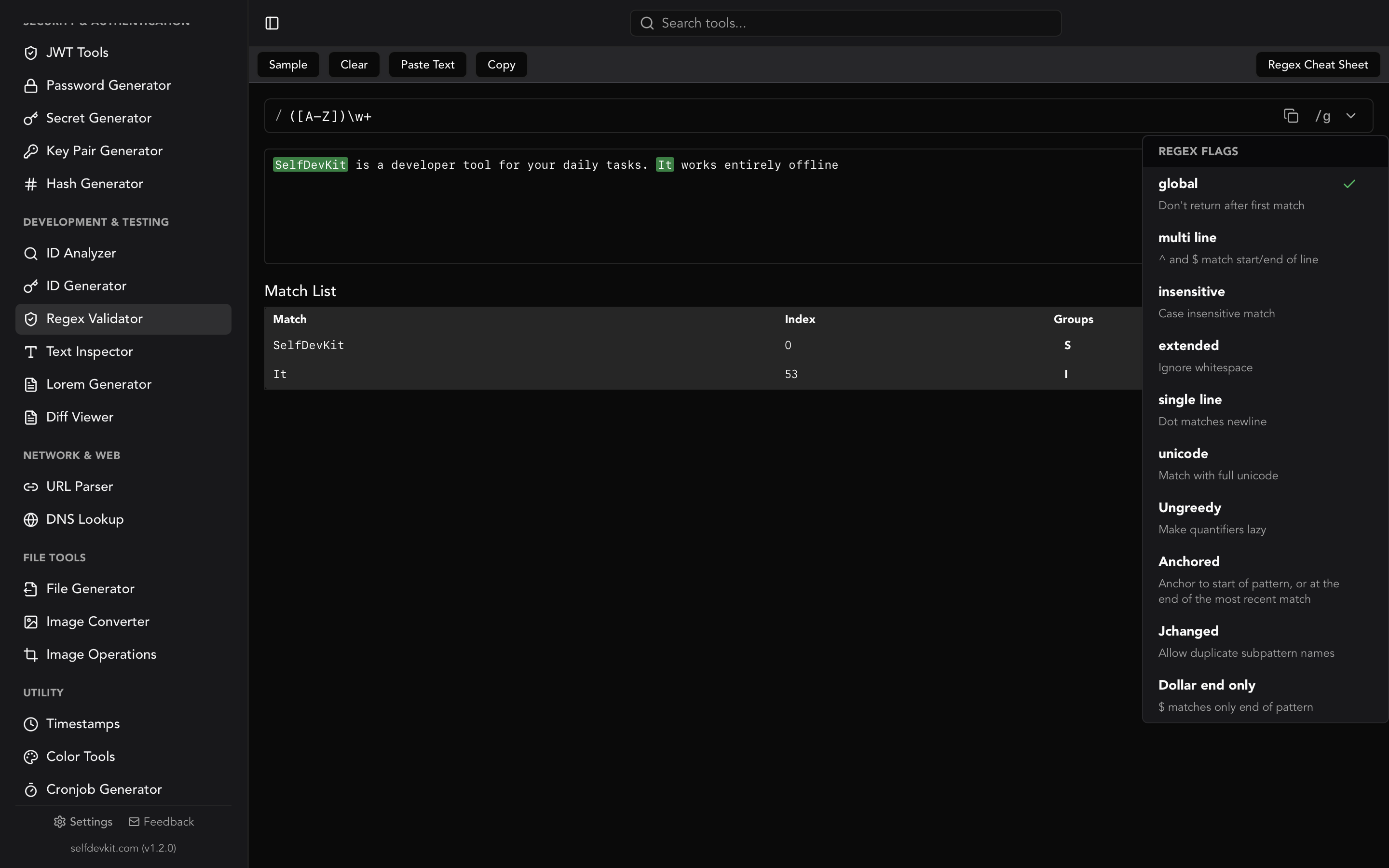
SelfDevKit's Regex Validator tests patterns entirely on your machine using the Rust regex engine, so matching is linear-time and your test data never touches a network. You type a pattern, toggle flags, and paste your test text; matches highlight inline and capture groups list in real time as you edit.
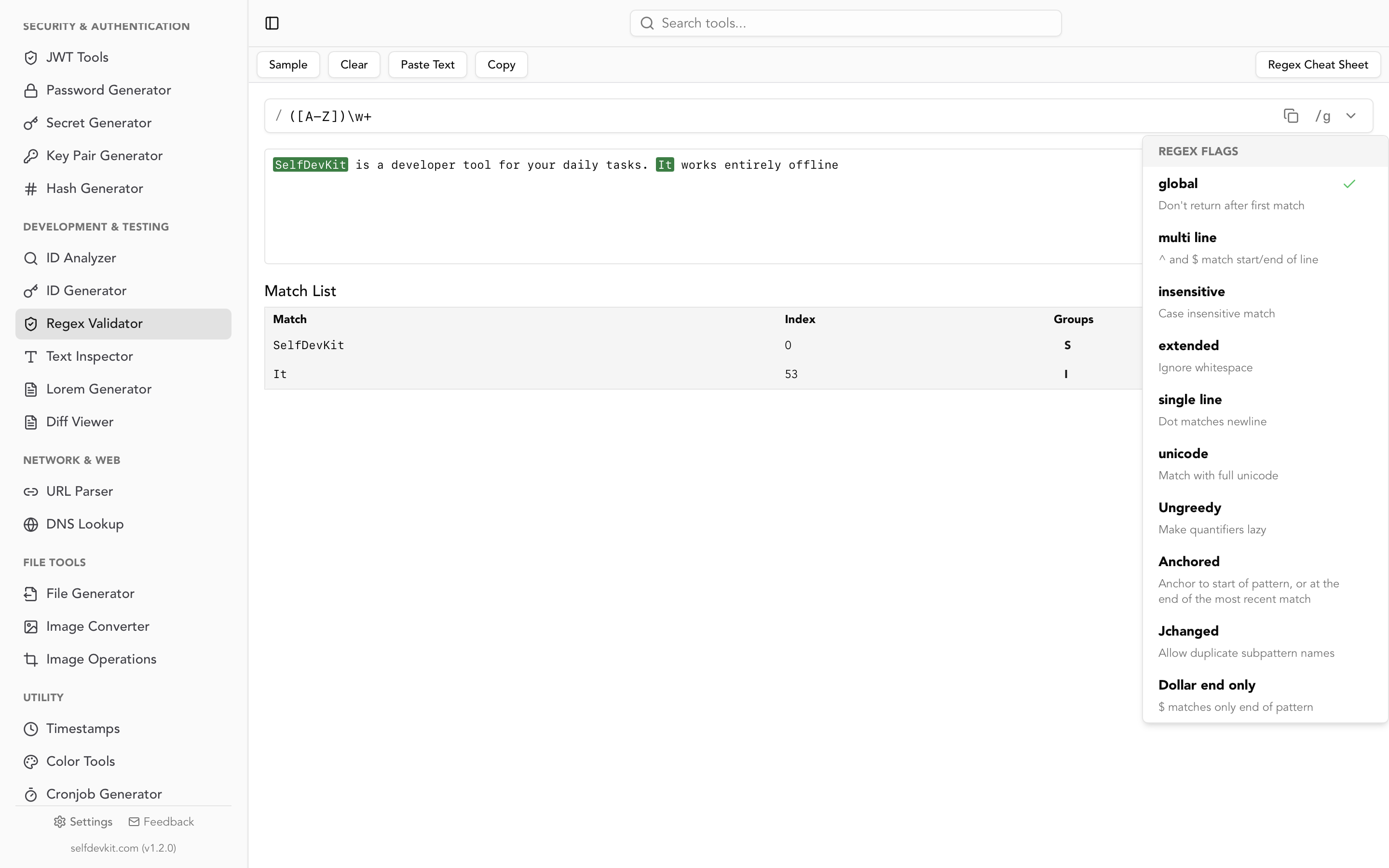
A few things make it well suited to the testing workflow described above:
- Linear-time engine. Because it runs on Rust's
regexcrate, an evil pattern like(a+)+$cannot hang the app. The engine compiles to a finite automaton and matches in time proportional to the input length. You get ReDoS immunity for free. - Real flags, accurately labeled. Toggle case-insensitive (
i), multi-line (m), dot-matches-newline / single-line (s), extended / ignore-whitespace (x), swap-greed (U), and global (g) match-all. Each flag shows what it does so you are not guessing. - Live match list with groups and indices. Every match shows the matched substring, its position, and each capture group, which is exactly what step five of the testing process needs.
- Built-in cheat sheet. A reference panel sits next to your pattern for quick lookups without leaving the window.
- Fully offline. Test patterns against production log samples, database dumps, or files full of PII with zero network exposure.
The honest tradeoff: the Rust engine does not support lookbehind, lookahead, or backreferences. If a pattern genuinely needs those, you will validate it in a PCRE or JavaScript flavor instead. In practice, most validation and extraction patterns do not, and the linear-time guarantee is worth more than the features you give up.
Regex is one of more than 50 tools in the app. If your workflow also involves inspecting text, the Text Inspector counts characters and reveals hidden escape sequences, the Diff Viewer compares two blocks of text line by line, and the JSON Tools format and validate the payloads you often run regex against.
Frequently asked questions
What is the difference between testing and validating a regex?
Testing a regex means running it against sample inputs to observe what it matches and how. Validating with a regex means using an anchored pattern (^...$) to confirm an entire string conforms to a format. You test the pattern during development, and the finished pattern then validates data at runtime.
Why does my regex work in one tester but not in my code?
Almost always because the tester uses a different engine flavor than your language. Named group syntax, lookbehind, backreferences, and possessive quantifiers all vary between JavaScript, Python, Java, .NET, Rust, and PCRE. Set your online tester to the correct flavor, or test directly in your language's regex library so the engine matches production.
How do I test a regex for catastrophic backtracking?
Feed it adversarial input: a long run of a repeated character that almost matches, followed by a character that breaks the match, and time how long matching takes as the input grows. If runtime grows exponentially, refactor the nested quantifiers. Alternatively, use a linear-time engine like Rust's regex or Go's regexp, which cannot backtrack and are immune to the problem. See the OWASP ReDoS guidance for details.
Is it safe to test regex against production data in an online tool?
No, if the data is sensitive. Online testers send your test text to their servers, where it may be logged or exposed to third-party scripts. Since regex work often involves PII, tokens, or secrets, an offline regex tester that runs locally is the safe choice for real data.
Test your next pattern the right way
Testing regex is not about writing the perfect expression on the first attempt. It is about building positive and negative cases, running them in the engine flavor you actually ship, probing for catastrophic backtracking, and doing it all without leaking the sensitive data your pattern was written to handle.
SelfDevKit's Regex Validator gives you a linear-time engine, live match highlighting, capture groups, and full offline privacy in one window.
Download SelfDevKit to test regex patterns locally, alongside 50+ other developer tools. For the syntax reference behind the patterns, keep the regex tester guide open in the next tab.