What is a Unix timestamp?
A Unix timestamp (also called epoch time or POSIX time) is the number of seconds that have elapsed since January 1, 1970, 00:00:00 UTC. It provides a timezone-independent way to represent any moment in time as a single integer, making it the standard for storing, comparing, and transmitting time data across programming languages, databases, and APIs.
Every developer runs into Unix timestamps. They show up in API responses, database columns, JWT tokens, server logs, and cron schedules. The value 1712563200 means nothing at a glance, but it represents April 8, 2024 at midnight UTC. A unix timestamp converter turns that opaque number into a human-readable date and vice versa.
This guide covers how epoch time works under the hood, how to convert timestamps in six programming languages, the seconds-vs-milliseconds trap that causes real bugs, and how to handle the edge cases that tutorials skip over.
Table of contents
- How Unix timestamps work
- Converting timestamps in code: 6 languages
- Unix timestamp converter: seconds vs milliseconds
- Negative timestamps and pre-1970 dates
- Timezone handling and DST pitfalls
- The Year 2038 problem
- Real-world debugging workflows
- Why timestamps deserve the same privacy as your code
- Frequently asked questions
- Try it yourself
How Unix timestamps work
Unix time is defined by the IEEE Std 1003.1 (POSIX) specification. The rules are deceptively simple: count the number of non-leap seconds since the epoch (January 1, 1970, 00:00:00 UTC), and represent that count as a signed integer.
Every day is treated as exactly 86,400 seconds. No exceptions.
This gives timestamps some useful properties:
- Timezone independence. The timestamp
1712563200refers to the same instant everywhere on Earth. The local representation differs, but the number does not. - Natural sorting. Higher numbers are later moments. Comparing two timestamps is just comparing two integers.
- Easy arithmetic. Add 3600 to move one hour forward. Subtract 86400 to go back one day.
- Compact storage. A single 32-bit or 64-bit integer replaces formatted date strings.
Here is a quick reference for common time intervals:
| Interval | Seconds |
|---|---|
| 1 minute | 60 |
| 1 hour | 3,600 |
| 1 day | 86,400 |
| 1 week | 604,800 |
| 30 days | 2,592,000 |
| 365 days | 31,536,000 |
These are useful when you need to calculate token expiration windows, cache TTLs, or log retention periods. If you work with JWT tokens, the exp and iat claims are Unix timestamps in seconds, so adding 3600 to iat gives you a one-hour expiration.
Converting timestamps in code: 6 languages
Every major language has built-in support for Unix timestamps, but the API surface varies. Some expect seconds. Others expect milliseconds. Getting this wrong is the single most common timestamp bug in production code.
JavaScript / TypeScript
JavaScript's Date object works in milliseconds, not seconds. You must multiply by 1000 when converting from a standard Unix timestamp.
// Timestamp to date
const ts = 1712563200;
const date = new Date(ts * 1000);
console.log(date.toISOString()); // "2024-04-08T00:00:00.000Z"

// Date to timestamp (seconds)
const now = Math.floor(Date.now() / 1000);
console.log(now); // e.g. 1712563200
Python
Python's datetime module expects seconds. Since Python 3.11, use datetime.UTC instead of timezone.utc for cleaner code.
from datetime import datetime, UTC

# Timestamp to date
ts = 1712563200
dt = datetime.fromtimestamp(ts, tz=UTC)
print(dt.isoformat())  # "2024-04-08T00:00:00+00:00"

# Date to timestamp
import time
now = int(time.time())
print(now)  # e.g. 1712563200
Go
Go uses seconds with time.Unix(). The second argument is nanoseconds for sub-second precision.
package main

import (
    "fmt"
    "time"
)

func main() {
    // Timestamp to date
    ts := int64(1712563200)
    t := time.Unix(ts, 0).UTC()
    fmt.Println(t.Format(time.RFC3339)) // "2024-04-08T00:00:00Z"

    // Date to timestamp
    now := time.Now().Unix()
    fmt.Println(now) // e.g. 1712563200
}
Rust
Rust's standard library uses SystemTime with seconds via the UNIX_EPOCH constant. For formatted output, the chrono crate is the standard choice.
use std::time::{SystemTime, UNIX_EPOCH};

fn main() {
    // Current timestamp
    let now = SystemTime::now()
        .duration_since(UNIX_EPOCH)
        .unwrap()
        .as_secs();
    println!("{}", now); // e.g. 1712563200

    // With chrono for formatting
    // use chrono::{DateTime, Utc};
    // let dt = DateTime::from_timestamp(1712563200, 0).unwrap();
    // println!("{}", dt.to_rfc3339());
}
PHP
PHP uses seconds natively. The date() function and DateTime class both work with second-precision timestamps.
// Timestamp to date
$ts = 1712563200;
echo date('c', $ts); // "2024-04-08T00:00:00+00:00"

// Date to timestamp
echo time(); // e.g. 1712563200
SQL (PostgreSQL / MySQL)
Databases store timestamps differently, but both major SQL engines support conversion:
-- PostgreSQL: timestamp to date
SELECT to_timestamp(1712563200) AT TIME ZONE 'UTC';
-- "2024-04-08 00:00:00+00"

-- PostgreSQL: date to timestamp
SELECT EXTRACT(EPOCH FROM TIMESTAMP '2024-04-08 00:00:00 UTC');
-- 1712563200

-- MySQL: timestamp to date
SELECT FROM_UNIXTIME(1712563200);
-- "2024-04-08 00:00:00"

-- MySQL: date to timestamp
SELECT UNIX_TIMESTAMP('2024-04-08 00:00:00');
-- 1712563200
If you write SQL regularly, SelfDevKit's SQL Tools can format complex queries that include timestamp conversions, making them easier to read during code review. You can also check out our SQL formatter guide for tips on keeping queries clean.
Unix timestamp converter: seconds vs milliseconds
This is the bug that burns every developer at least once. You parse a timestamp, get a date in 1970, and spend twenty minutes confused before realizing you forgot to multiply by 1000. Or the reverse: you pass milliseconds where seconds were expected and end up in the year 55,000.
The root cause is simple. Different platforms chose different base units.
| Platform / Language | Unit | Digits (current dates) | Example |
|---|---|---|---|
Unix/Linux (date +%s) |
Seconds | 10 | 1712563200 |
Python (time.time()) |
Seconds (float) | 10 + decimal | 1712563200.123 |
PHP (time()) |
Seconds | 10 | 1712563200 |
Go (time.Now().Unix()) |
Seconds | 10 | 1712563200 |
Rust (as_secs()) |
Seconds | 10 | 1712563200 |
JavaScript (Date.now()) |
Milliseconds | 13 | 1712563200000 |
Java (System.currentTimeMillis()) |
Milliseconds | 13 | 1712563200000 |
C# (DateTimeOffset.ToUnixTimeMilliseconds()) |
Milliseconds | 13 | 1712563200000 |
PostgreSQL (EXTRACT EPOCH) |
Seconds (float) | 10 + decimal | 1712563200.000 |
MongoDB (Date.getTime()) |
Milliseconds | 13 | 1712563200000 |
The quick rule: count the digits. Ten digits means seconds. Thirteen means milliseconds. If you see 16 digits, that is microseconds (used by some logging systems). Nineteen digits means nanoseconds.
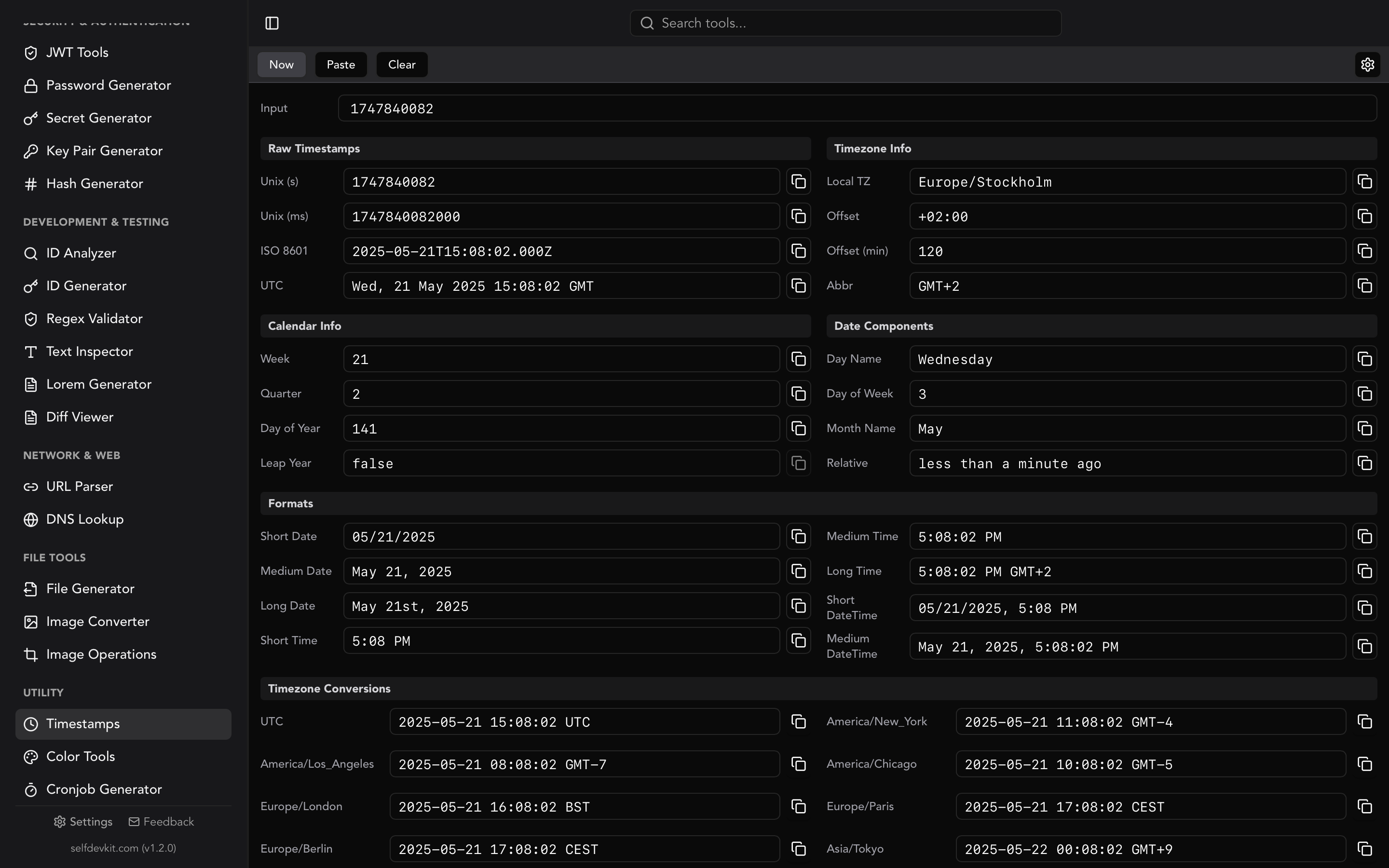
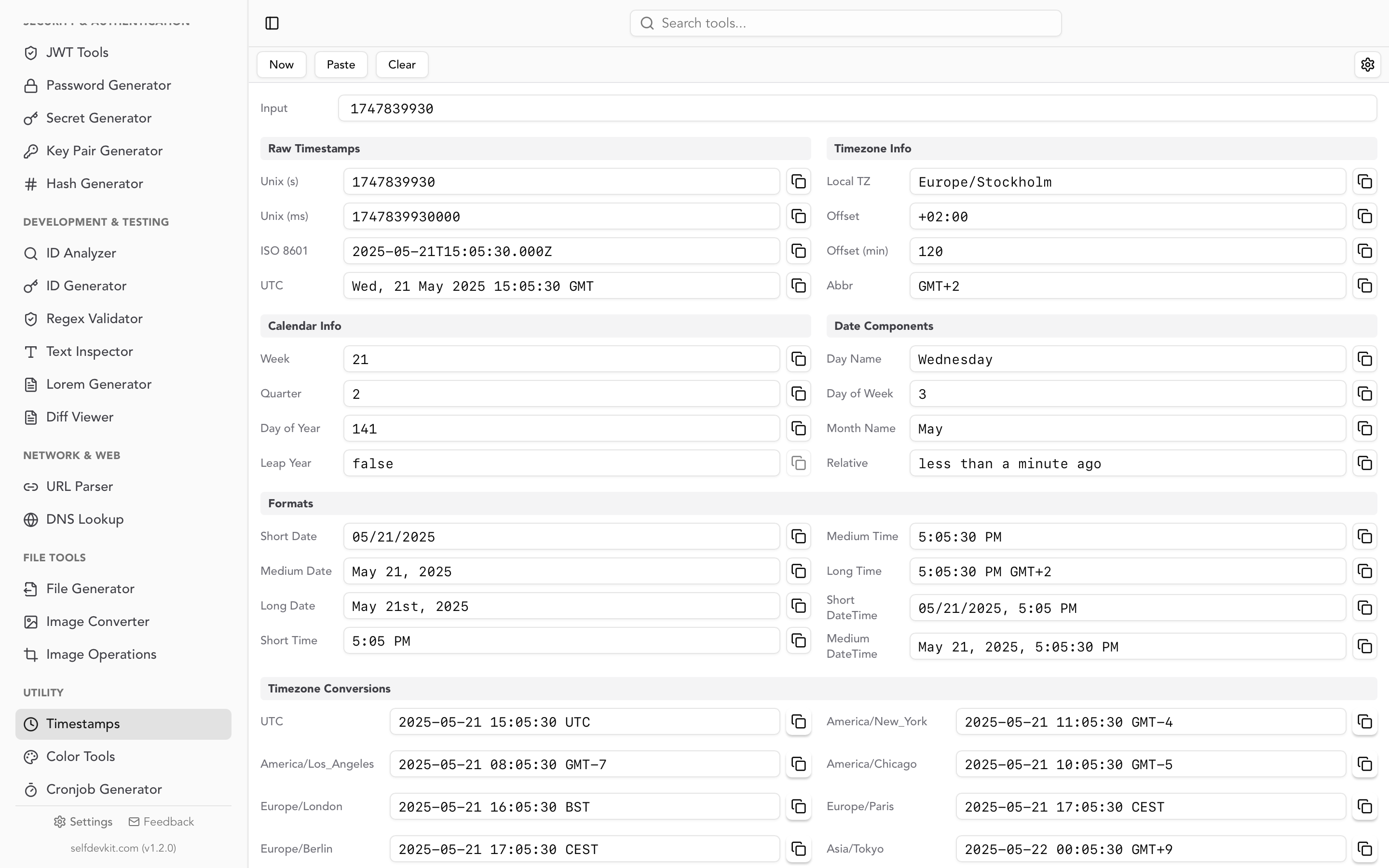
SelfDevKit's Timestamps tool automatically detects whether you have entered seconds or milliseconds and converts accordingly. No mental math required.
A real example of this bug
Consider a JWT token with these claims:
{
  "sub": "user_123",
  "iat": 1712563200,
  "exp": 1712566800
}
The exp claim is in seconds (per RFC 7519 Section 4.1.4). If your JavaScript code does new Date(token.exp) without multiplying by 1000, you get January 20, 1970 instead of April 8, 2024. The token appears expired by 54 years, and your auth middleware rejects every request.
If you are debugging JWT tokens, our JWT decoder guide walks through the full token structure including timestamp claims.
Negative timestamps and pre-1970 dates
Most tutorials stop at "seconds since January 1, 1970." But Unix timestamps are signed integers. Negative values represent dates before the epoch.
Timestamp: -86400
Date:      December 31, 1969, 00:00:00 UTC

Timestamp: -946684800
Date:      January 1, 1940, 00:00:00 UTC
This matters more than you might think. Historical data sets, birth dates, and legacy record systems all contain pre-1970 dates. If your code uses an unsigned integer type for timestamps, every date before 1970 silently becomes invalid.
Most languages handle negative timestamps correctly:
from datetime import datetime, UTC
dt = datetime.fromtimestamp(-946684800, tz=UTC)
print(dt.isoformat())  # "1940-01-01T00:00:00+00:00"
const date = new Date(-946684800 * 1000);
console.log(date.toISOString()); // "1940-01-01T00:00:00.000Z"
But some databases and serialization formats do not. MySQL's FROM_UNIXTIME() returns NULL for negative values. If you need pre-1970 dates in MySQL, store them as DATETIME columns rather than computing from timestamps.
Timezone handling and DST pitfalls
A Unix timestamp is always UTC. There is no timezone embedded in the number itself. The conversion to local time happens at display time, and that is where bugs creep in.
The DST trap
Daylight Saving Time creates hours that do not exist and hours that happen twice. On the second Sunday of March in the US, 2:00 AM jumps to 3:00 AM. On the first Sunday of November, 1:00 AM happens twice.
If you convert a timestamp to local time during a DST transition, the result depends entirely on which side of the transition your system clock falls on. This is why the golden rule exists: store timestamps in UTC, convert to local time only for display.
from datetime import datetime, timezone
from zoneinfo import ZoneInfo

ts = 1710050400  # March 10, 2024, 2:00 AM EST (DST transition)

# UTC is always unambiguous
utc = datetime.fromtimestamp(ts, tz=timezone.utc)
print(utc)  # 2024-03-10 07:00:00+00:00

# Local time reflects the transition
eastern = datetime.fromtimestamp(ts, tz=ZoneInfo("America/New_York"))
print(eastern)  # 2024-03-10 03:00:00-04:00 (EDT, not EST)
Leap seconds
The POSIX specification explicitly ignores leap seconds. Every day is 86,400 seconds, period. In reality, the International Earth Rotation and Reference Systems Service (IERS) occasionally inserts leap seconds to keep UTC aligned with solar time. As of 2024, 27 leap seconds have been added since 1972.
This means Unix time is technically not a perfect count of SI seconds since 1970. For most applications, the difference is irrelevant. For scientific computing, satellite systems, or financial trading platforms that need sub-second accuracy, you may need TAI (International Atomic Time) instead of UTC.
The Year 2038 problem
On January 19, 2038, at 03:14:07 UTC, a signed 32-bit integer holding a Unix timestamp will reach its maximum value of 2,147,483,647. One second later, it overflows to -2,147,483,648, which represents December 13, 1901.
This is not theoretical. Embedded systems, IoT devices, and legacy codebases still use 32-bit time_t values. Any system that calculates dates beyond 2038 (mortgage terms, insurance policies, long-running scheduled tasks) is already at risk today.
The fix is straightforward: use 64-bit integers for timestamps. A 64-bit signed integer can represent dates roughly 292 billion years into the future. Linux kernel versions 5.6 and later support 64-bit timestamps on 32-bit architectures. Most modern languages (Python, Go, Rust, Java) use 64-bit time representations by default.
Check your systems:
| Language/Platform | Default time_t size |
Y2038 safe? |
|---|---|---|
| Modern Linux (kernel 5.6+) | 64-bit | Yes |
| Python 3.x | Arbitrary precision | Yes |
| Go | 64-bit | Yes |
| Rust | 64-bit | Yes |
| Java | 64-bit | Yes |
| JavaScript | 64-bit float | Yes (until year 285,616) |
| C (32-bit systems) | 32-bit | No |
| Older embedded Linux | 32-bit | No |
MySQL TIMESTAMP type |
32-bit | No (max 2038-01-19) |
If you use MySQL, note that the TIMESTAMP column type is limited to 2038. The DATETIME type supports dates up to 9999-12-31 and is the safer choice for new schemas.
Real-world debugging workflows
Converting a single timestamp is easy. The real value of a unix timestamp converter shows up in debugging workflows where timestamps appear in context.
Debugging API responses
API responses frequently embed timestamps in JSON payloads. Here is a typical response from a payment API:
{
  "payment_id": "pay_abc123",
  "amount": 4999,
  "currency": "usd",
  "created_at": 1712563200,
  "captured_at": 1712563245,
  "metadata": {
    "retry_count": 2,
    "first_attempt": 1712562900
  }
}
Three questions jump out. When was the payment created? How long between creation and capture? How long between the first attempt and the successful one? With a timestamp converter, the answers come in seconds: created at midnight UTC on April 8, capture took 45 seconds, and there was a 5-minute gap between first attempt and success. That 5-minute gap with 2 retries tells you something about the payment processor's retry backoff.
SelfDevKit's JSON Tools let you format the response for readability, and the Timestamps tool converts each value. Both work offline, so you can debug production data without it leaving your machine.
Parsing server logs
Log timestamps vary wildly. Some systems use seconds, others use milliseconds, and some include ISO 8601 strings alongside epoch values:
[1712563200.123] ERROR payment_service: timeout after 30s
[1712563230.456] WARN  payment_service: retry attempt 1
[1712563260.789] INFO  payment_service: retry attempt 2 succeeded
The decimal portion here is fractional seconds (not milliseconds). The log shows 30 seconds between the error and first retry, then another 30 seconds before the second attempt. A timestamp converter turns these into 00:00:00.123, 00:00:30.456, and 00:01:00.789 UTC, which is far easier to reason about in an incident review.
Checking JWT expiration
When a user reports they are getting logged out unexpectedly, the first thing to check is the token's exp claim. Paste the timestamp into a converter and compare it against the current time. Is the token actually expired, or is there a clock skew between your auth server and your application server?
Clock skew of even a few seconds can cause intermittent auth failures. Most JWT libraries accept a "leeway" parameter (typically 30 to 60 seconds) to account for this. If you need to inspect the full token, the JWT Tools in SelfDevKit decode all three sections and display timestamp claims in human-readable format.
Database timestamp queries
When filtering records by date ranges in SQL, you need the epoch value for your boundaries:
-- Find all orders from April 2024
SELECT * FROM orders
WHERE created_at >= 1711929600   -- 2024-04-01 00:00:00 UTC
  AND created_at < 1714521600;   -- 2024-05-01 00:00:00 UTC
Getting those boundary values right matters. Off-by-one errors in timestamp ranges are a classic source of missing or duplicated records in reports.
Why timestamps deserve the same privacy as your code
When you paste a timestamp into an online converter, it seems harmless. It is just a number.
But timestamps rarely travel alone. You paste them from log files that contain IP addresses and user IDs. You copy them from JWT tokens that include authentication claims. You grab them from API responses that hold payment data and customer information. The timestamp itself is not sensitive, but the context you are working in is.
Online converter tools process your input on remote servers. That input gets logged, cached, and potentially exposed to third-party analytics scripts running on the page. For a single number, the risk is low. But developers work with timestamps in the middle of debugging sessions where they are also handling sensitive production data. One accidental paste of the full log line instead of just the timestamp, and that data is on someone else's server.
SelfDevKit's Timestamps tool runs entirely on your machine. No network requests, no server-side processing, no data leaving your controlled environment. For teams working under SOC 2, GDPR, or HIPAA requirements, offline tools eliminate an entire category of compliance questions.
Download SelfDevKit to convert timestamps offline alongside 50+ other developer tools.
Frequently asked questions
What is the maximum Unix timestamp value?
For 32-bit signed integers, the maximum is 2,147,483,647 (January 19, 2038 at 03:14:07 UTC). For 64-bit signed integers, the maximum represents a date approximately 292 billion years in the future. Most modern languages and operating systems use 64-bit timestamps by default, so the 2038 limit only affects legacy 32-bit systems and specific database column types like MySQL's TIMESTAMP.
How do I tell if a timestamp is in seconds or milliseconds?
Count the digits. Current-era timestamps in seconds have 10 digits (e.g., 1712563200). Milliseconds have 13 digits (e.g., 1712563200000). If you see 16 digits, that is microseconds. SelfDevKit's timestamp converter auto-detects the format so you do not need to check manually.
Can Unix timestamps represent dates before 1970?
Yes. Unix timestamps are signed integers, so negative values represent dates before the epoch. For example, -86400 is December 31, 1969. Most programming languages handle negative timestamps correctly, but some database functions (like MySQL's FROM_UNIXTIME) return NULL for negative values.
Why do some systems use milliseconds instead of seconds?
JavaScript adopted milliseconds when it was created in 1995 to provide sub-second precision without floating-point numbers. Java followed the same convention. Most Unix-native tools and languages (Python, PHP, Go, Rust) stuck with seconds for compatibility with the POSIX standard. The inconsistency is a historical artifact, but it is not going away.
Try it yourself
Timestamp conversion is one of those tasks that happens ten times a day during active debugging. Having a converter that auto-detects formats, shows multiple timezones, and keeps your data local removes just enough friction to keep you in flow.
Download SelfDevKit to get the Timestamps tool along with 50+ other developer utilities, all offline and private.