What is a URL parser?
A URL parser is a tool or function that breaks a URL into its individual components: protocol, username, password, hostname, port, path, query string, and fragment. Developers use URL parsers to inspect, debug, and manipulate web addresses without manually splitting strings.
A URL parser is one of those tools you don't think about until you need it. Then you really need it. Maybe you're staring at an OAuth redirect URL with six query parameters and a fragment, trying to figure out why the callback is failing. Or you're debugging a webhook that encodes JSON inside a query string. Or you just want to pull the port number out of a URL your teammate pasted in Slack.
Whatever the reason, parsing URLs by hand is tedious and error-prone. This guide covers how URLs are structured according to the spec, how to parse them in code, and when a dedicated URL parser tool saves you real time.
Table of contents
- The anatomy of a URL
- How a URL parser works
- Parsing URLs in code
- URL encoding: the part everyone gets wrong
- Real-world debugging with a URL parser
- Why you should parse URLs offline
- Frequently asked questions
The anatomy of a URL
Every URL follows a structure defined by RFC 3986, the specification for Uniform Resource Identifiers. The generic syntax looks like this:
scheme://[userinfo@]host[:port]/path[?query][#fragment]
Here is a concrete example with every component present:
https://admin:s3cret@api.example.com:8443/v2/users?role=admin&active=true#results
Broken down:
| Component | Value | Purpose |
|---|---|---|
| Scheme | https |
Protocol used for the connection |
| Username | admin |
Authentication credential (rare in modern URLs) |
| Password | s3cret |
Authentication credential (rare, discouraged) |
| Hostname | api.example.com |
Server to connect to |
| Port | 8443 |
Network port (defaults to 443 for HTTPS, 80 for HTTP) |
| Path | /v2/users |
Resource location on the server |
| Query string | role=admin&active=true |
Key-value parameters |
| Fragment | results |
Client-side anchor, never sent to the server |
Most URLs you encounter in daily development won't use every component. The username and password fields are largely deprecated for HTTP/HTTPS due to security concerns. Port numbers are usually omitted when the default port is used. But the query string and path? You'll parse those constantly.
Host vs hostname
One detail that trips people up: host and hostname are not the same thing.
The hostname is just the domain name: api.example.com. The host includes the port: api.example.com:8443. When the port is the default for the scheme, host and hostname are identical because the port is omitted.
This distinction matters when you're constructing URLs programmatically. Use the wrong one and you'll either duplicate the port or lose it entirely.
The origin
The origin combines scheme, hostname, and port: https://api.example.com:8443. It's read-only in most URL APIs and is the value browsers use for same-origin policy checks. If you work with CORS, understanding origin is essential.
How a URL parser works
A URL parser takes a raw URL string and splits it at well-defined delimiters. The algorithm, simplified, works like this:
- Find
://to extract the scheme - Look for
@to identify optional userinfo (username and password, separated by:) - Extract the host up to the next
/,?, or# - Split the host at
:to separate hostname and port - Everything from the first
/after the host up to?or#is the path - Everything after
?up to#is the query string - Everything after
#is the fragment
The query string gets further parsing: split on & to get key-value pairs, then split each pair on = to separate keys from values. Finally, all percent-encoded characters (like %20 for a space) get decoded.
This sounds straightforward. In practice, edge cases make hand-parsing unreliable. What about URLs with no scheme? Query values that contain = signs? Fragments that look like query strings? Every language's standard library handles these edge cases for you, which is why you should always use a proper parser instead of string splitting.
Parsing URLs in code
Every major language provides a built-in URL parser. Here's how to use them.
JavaScript / TypeScript
The URL Web API is available in all modern browsers and Node.js:
const url = new URL('https://api.example.com:8443/v2/users?role=admin&active=true#results');

console.log(url.protocol);   // "https:"
console.log(url.hostname);   // "api.example.com"
console.log(url.port);       // "8443"
console.log(url.pathname);   // "/v2/users"
console.log(url.hash);       // "#results"

// Parse individual query parameters
url.searchParams.get('role');    // "admin"
url.searchParams.get('active');  // "true"
url.searchParams.has('page');    // false

// Iterate all parameters
for (const [key, value] of url.searchParams) {
  console.log(`${key} = ${value}`);
}
The URL constructor throws a TypeError for invalid URLs, which makes it useful for validation too. In newer runtimes, URL.canParse() lets you check validity without a try/catch.
Python
Python's urllib.parse module has been in the standard library since Python 3:
from urllib.parse import urlparse, parse_qs

result = urlparse('https://api.example.com:8443/v2/users?role=admin&active=true#results')

print(result.scheme)    # "https"
print(result.hostname)  # "api.example.com"
print(result.port)      # 8443
print(result.path)      # "/v2/users"
print(result.fragment)  # "results"

# Parse query string into a dict
params = parse_qs(result.query)
print(params)  # {'role': ['admin'], 'active': ['true']}
Note that parse_qs returns lists for each key because query strings can have duplicate keys (e.g., tag=python&tag=rust). Use parse_qs instead of parse_qsl when you want a dictionary.
Go
Go's net/url package handles parsing and construction:
package main

import (
    "fmt"
    "net/url"
)

func main() {
    u, err := url.Parse("https://api.example.com:8443/v2/users?role=admin&active=true#results")
    if err != nil {
        panic(err)
    }

    fmt.Println(u.Scheme)       // "https"
    fmt.Println(u.Hostname())   // "api.example.com"
    fmt.Println(u.Port())       // "8443"
    fmt.Println(u.Path)         // "/v2/users"
    fmt.Println(u.Fragment)     // "results"

    // Query parameters
    fmt.Println(u.Query().Get("role"))  // "admin"
}
Command line
When you need a quick parse from the terminal, Python one-liners work well:
python3 -c "from urllib.parse import urlparse; r = urlparse('$URL'); print(f'host={r.hostname} path={r.path} query={r.query}')"
Or use curl with --url-query to build query strings without manual encoding.
These code examples are useful when URL parsing is part of a larger program. But when you're debugging, reading logs, or inspecting a URL someone sent you, opening an editor and writing code is overkill. That's where a dedicated URL parser tool saves time.
URL encoding: the part everyone gets wrong
Percent-encoding (often called URL encoding) replaces unsafe characters with a % followed by two hex digits. A space becomes %20. A forward slash becomes %2F. Curly braces become %7B and %7D.
This is where most URL-related bugs hide.
Spaces: %20 vs +
In the path portion of a URL, spaces must be encoded as %20. But in the query string, both %20 and + are valid representations of a space. The + convention comes from the application/x-www-form-urlencoded format used by HTML forms.
# These are equivalent in query strings:
?name=Jane+Doe
?name=Jane%20Doe

# But in the path, only %20 works:
/users/Jane%20Doe   ✓
/users/Jane+Doe     ✗ (the + is literal)
This distinction causes real bugs. If you're building a query string manually and use %20 where the server expects +, or vice versa, you'll get garbled data. Always use your language's built-in encoding functions rather than doing string replacement.
Reserved characters in values
The characters &, =, ?, and # have special meaning in URLs. When these appear as data inside a query value, they must be percent-encoded:
# Storing the value {"status":"active"} in a query parameter:
?filter=%7B%22status%22%3A%22active%22%7D
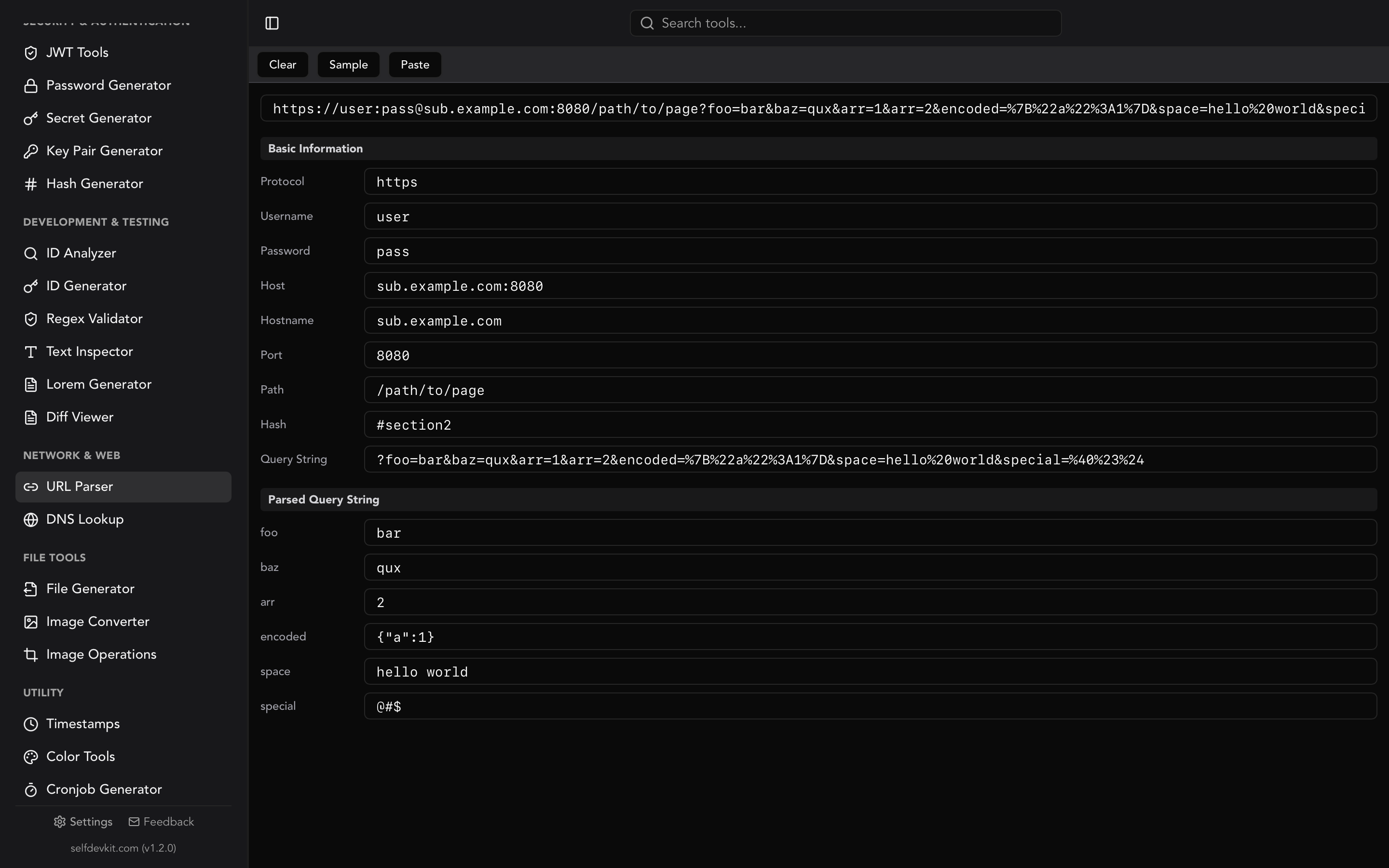
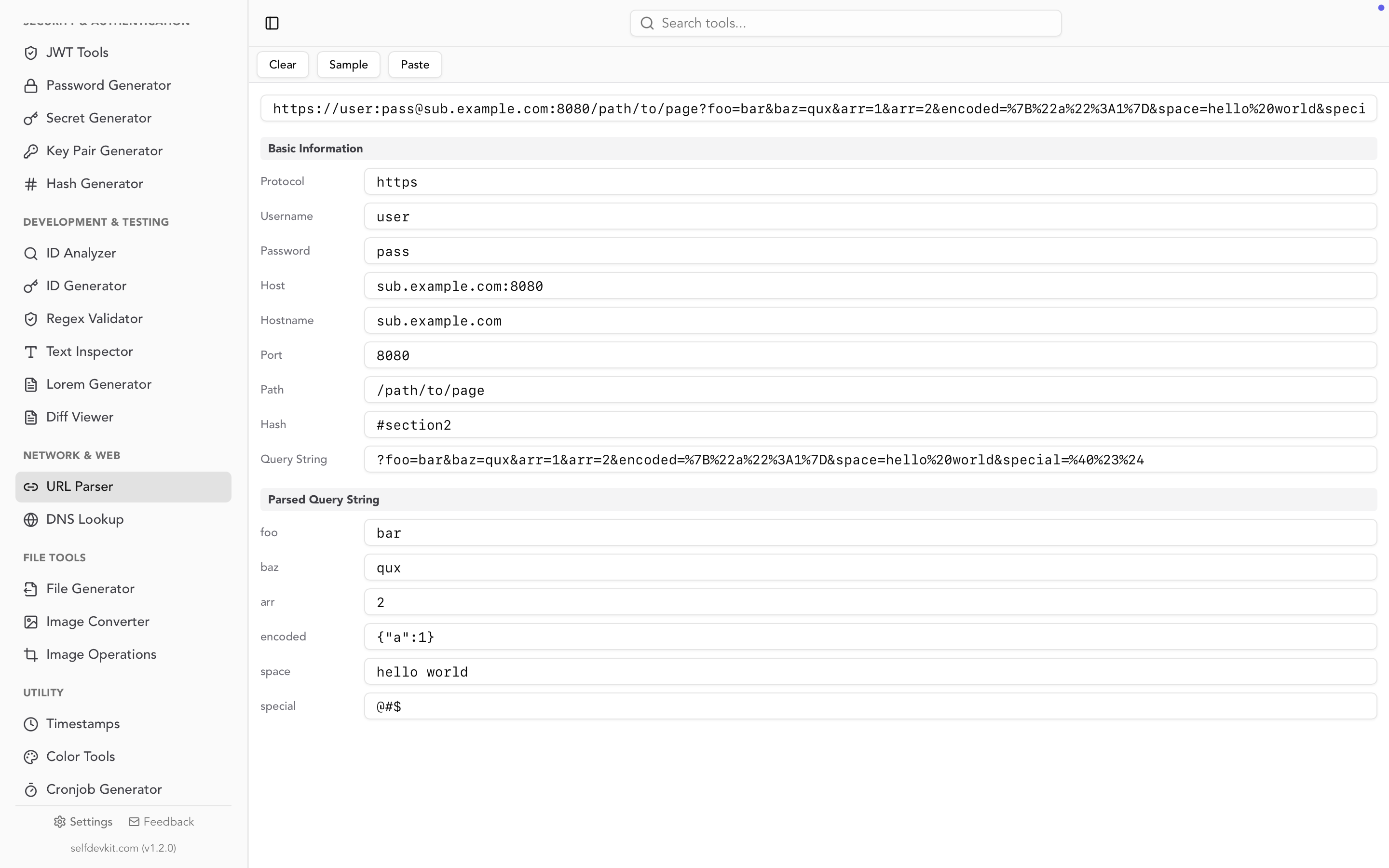
A URL parser automatically decodes these for you. SelfDevKit's URL parser shows both the raw encoded query string and the decoded key-value pairs side by side, so you can see exactly what the server receives versus what it means.
Double encoding
One of the most frustrating URL bugs is double encoding. It happens when an already-encoded string gets encoded again:
Original:    hello world
Encoded:     hello%20world
Double-encoded: hello%2520world
The % itself gets encoded to %25, turning %20 into %2520. When the server decodes once, it gets hello%20world instead of hello world. If you see %25 in a URL, something is being encoded twice. A URL parser makes this immediately visible by showing the decoded values.
Real-world debugging with a URL parser
Knowing URL anatomy is useful. But the real value of a URL parser shows up during debugging.
OAuth redirect debugging
OAuth flows pass a lot of state through URLs. A typical OAuth callback looks like this:
https://myapp.com/callback?code=4/0AX4XfWh...long_code...&state=abc123&scope=email%20profile%20openid
When the callback fails, you need to verify: Is the redirect URI correct? Does the state parameter match what you sent? What scopes were actually granted? Parsing this manually is slow. Pasting it into a URL parser gives you each parameter on its own line in under a second.
If you work with JWT tokens in OAuth flows, you might also want to decode the id_token parameter that some providers include in the callback URL. SelfDevKit puts both the URL parser and JWT decoder in the same app, so you can parse the URL, grab the token, and decode it without switching contexts.
Webhook URL inspection
Webhook configurations often pack parameters into the URL:
https://hooks.example.com/services/T00/B00/xxxx?channel=%23alerts&username=deploy-bot&icon_emoji=%3Arocket%3A
A quick parse reveals the channel is #alerts (the %23 decodes to #) and the emoji is :rocket:. Without decoding, you'd have to mentally translate percent-encoded characters.
API endpoint debugging
When building API clients, you often need to verify that query parameters are constructed correctly. Consider a search endpoint:
https://api.example.com/search?q=url+parser&lang=en&page=1&fields=title,description&sort=-relevance
A URL parser shows you each parameter cleanly separated. You can verify q is url parser (not url+parser literally), check that fields contains the right comma-separated list, and confirm sort has the leading minus sign for descending order.
Debugging encoded JSON in query strings
Some APIs accept JSON as a query parameter. The encoded version is nearly unreadable:
?filter=%7B%22status%22%3A%22active%22%2C%22tags%22%3A%5B%22production%22%5D%7D
A URL parser decodes this to {"status":"active","tags":["production"]}. From there, you can paste the decoded JSON into a JSON formatter to inspect it properly. These tools work well together, and having them in one app means you don't need to bounce between browser tabs.
Why you should parse URLs offline
Here is something most developers overlook: the URLs you paste into online parsers often contain sensitive data.
Think about what's in a typical URL you'd want to parse:
- OAuth tokens and authorization codes in callback URLs
- API keys passed as query parameters (yes, some APIs still do this)
- Session identifiers and CSRF tokens
- Internal hostnames that reveal your infrastructure
- User data like email addresses or account IDs
When you paste a URL containing ?api_key=sk_live_abc123 into an online parser, that key travels to someone else's server. Even if the tool processes it client-side, you're trusting that no analytics scripts, error logging, or network requests capture your input.
For base64-encoded data in URLs, the risk doubles. The encoded string might look harmless, but it could contain credentials or personal information.
SelfDevKit's URL parser runs entirely on your machine. No network requests. No server-side processing. No analytics capturing your input. You can parse URLs containing production secrets, internal endpoints, or customer data without any of it leaving your device.
This matters even more in regulated environments. If you're working under GDPR, HIPAA, or SOC 2 requirements, using external services to process URLs that contain personal data or credentials creates compliance risk that's easy to avoid with an offline tool.
Frequently asked questions
What is the difference between a URL and a URI?
Every URL is a URI, but not every URI is a URL. A URI (Uniform Resource Identifier) is the broader term defined by RFC 3986 for any string that identifies a resource. A URL (Uniform Resource Locator) is a specific type of URI that also tells you how to access the resource by including the scheme and authority. In practice, most developers use "URL" and "URI" interchangeably, and the parsing rules are the same for both.
Can a URL have multiple values for the same query parameter?
Yes. Query strings like ?tag=python&tag=rust are valid and common. The URL API in JavaScript handles this with searchParams.getAll('tag'), which returns ['python', 'rust']. Python's parse_qs also returns lists by default for this reason. SelfDevKit's URL parser displays each parameter separately, so duplicate keys are easy to spot.
Why does my URL show %20 instead of spaces?
Percent-encoding is how URLs represent characters that aren't allowed in their raw form. Spaces, brackets, quotes, and other special characters get replaced with a % followed by their hex code. %20 is a space, %23 is #, %3D is =. A URL parser decodes these automatically so you see the actual values. If you see %25 in a URL, that means the % character itself was encoded, which often indicates double-encoding, a common source of bugs.
Is the fragment (hash) sent to the server?
No. The fragment portion of a URL (everything after #) is handled entirely by the client. Browsers never include it in HTTP requests. This is why single-page applications can use hash-based routing without server configuration. It's also why you can't rely on fragments for server-side logic. If you need the server to receive that data, put it in the query string or path instead.
Try it yourself
Parsing URLs by hand is slow, error-prone, and unnecessary. Whether you're debugging OAuth callbacks, inspecting webhook configurations, or just trying to decode a messy query string, a proper URL parser gets you the answer in seconds.
Download SelfDevKit to get the URL parser along with 50+ other developer tools, all offline and private.