Building Native Apps with Privacy-First Tools
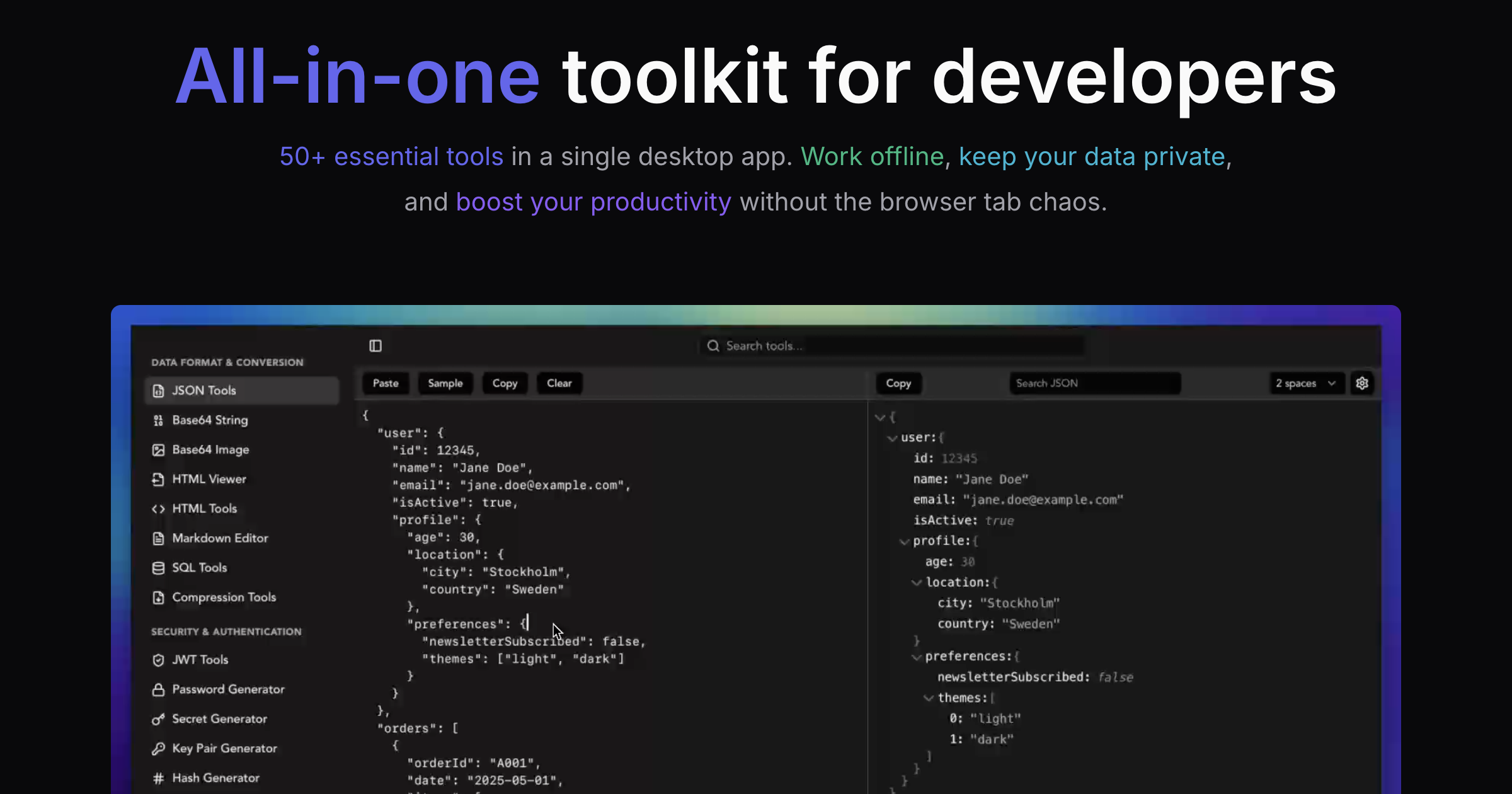
Moving from web development to native iOS presents unique challenges: different debugging workflows, new authentication patterns, and unfamiliar data handling. Throughout building FeelClose, a native iOS app for long-distance couples, I relied heavily on SelfDevKit to bridge these gaps. The same tools that power web development become even more valuable when working with Xcode, Swift, and mobile backends like Supabase.
Web developers transitioning to iOS development often underestimate how much their workflow depends on browser DevTools. The Network tab, console logging, and JavaScript debugging are suddenly unavailable. Instead, you're working with Xcode's debugger, print statements, and LLDB commands.
What doesn't change is the need for data transformation tools. You still need to format JSON responses, decode authentication tokens, generate UUIDs, and test regular expressions. These operations happen constantly during mobile development - the only difference is you can't just open a browser tab.
This post walks through how I use SelfDevKit while building FeelClose, a SwiftUI application that helps long-distance couples stay connected through daily rituals, nudges, and shared countdowns.
Table of contents
- About FeelClose
- The iOS development workflow
- JSON tools for Supabase debugging
- JWT decoding for authentication
- UUID generation for database records
- Base64 for image handling
- Unix timestamps for timezone logic
- Hash generation for caching
- URL encoding for deep links
- Regex testing for validation
- Color tools for UI design
- The offline advantage for mobile development
- Lessons from native development
- In summary
About FeelClose
FeelClose is a native iOS application designed specifically for long-distance relationships. The core philosophy is simple: feel close to your partner, no matter the distance.
The app provides:
- Countdown to Next Visit - A prominent timer showing days, hours, and minutes until you're together again
- Timezone Display - Side-by-side local times for both partners with day/night indicators
- Nudges - Five distinct touch gestures (thinking of you, kiss, hug, miss you, love you) with custom haptic feedback patterns
- Daily Questions - One relationship question per day at three intimacy levels (sweet, flirty, spicy)
- Streak Tracking - Consecutive days of answering questions together with milestone celebrations
- Good Morning/Night Greetings - Daily rituals with optional voice notes and photos
- Home Screen Widgets - Four widgets showing countdown, partner's time, days together, and couple photos
The technical stack includes Swift 5.9, SwiftUI, iOS 17+, Supabase for the backend (PostgreSQL with real-time subscriptions), and Firebase for presence tracking and push notifications.
Building this app required constant interaction with APIs, authentication tokens, and data transformation - exactly where developer tools prove essential.
The iOS development workflow
Native iOS development differs from web development in several key ways:
Debugging API responses: In web development, the browser Network tab shows every request and response. In iOS, you're reading console output or setting breakpoints. Getting readable JSON requires extra effort.
Authentication handling: Mobile apps use JWT tokens extensively. Understanding token contents, expiration times, and claims requires decoding - which means copying tokens from logs and pasting them somewhere.
Database operations: Supabase uses UUIDs for all primary keys. Generating test UUIDs, understanding relationships, and debugging Row Level Security policies requires working with UUID formats constantly.
Asset handling: Images move between Base64, file URLs, and binary data. Profile pictures, uploaded photos, and cached images all involve encoding and decoding.
Time calculations: Long-distance apps deal heavily with timezones. Converting between Unix timestamps, ISO dates, and local times happens in every feature.
Each of these workflows benefits from having reliable tools immediately accessible - without network latency or privacy concerns.
JSON tools for Supabase debugging
Supabase returns JSON for all database operations. When building FeelClose, I constantly debug API responses to understand data structures and identify issues.
Debugging query responses
A typical Supabase query in Swift looks like:
let response = try await supabase
    .from("couples")
    .select("""
        id,
        relationship_start_date,
        next_visit_date,
        current_streak,
        users!inner(
            id,
            name,
            avatar_url,
            timezone,
            city
        )
    """)
    .eq("id", value: coupleId)
    .single()
    .execute()

print(String(data: response.data, encoding: .utf8)!)
The console output is a single line of JSON:
{"id":"a1b2c3d4-e5f6-7890-abcd-ef1234567890","relationship_start_date":"2024-06-15","next_visit_date":"2026-02-14T10:00:00+00:00","current_streak":47,"users":[{"id":"user-uuid-1","name":"Alex","avatar_url":"https://...","timezone":"America/New_York","city":"New York"},{"id":"user-uuid-2","name":"Jordan","avatar_url":"https://...","timezone":"Europe/London","city":"London"}]}
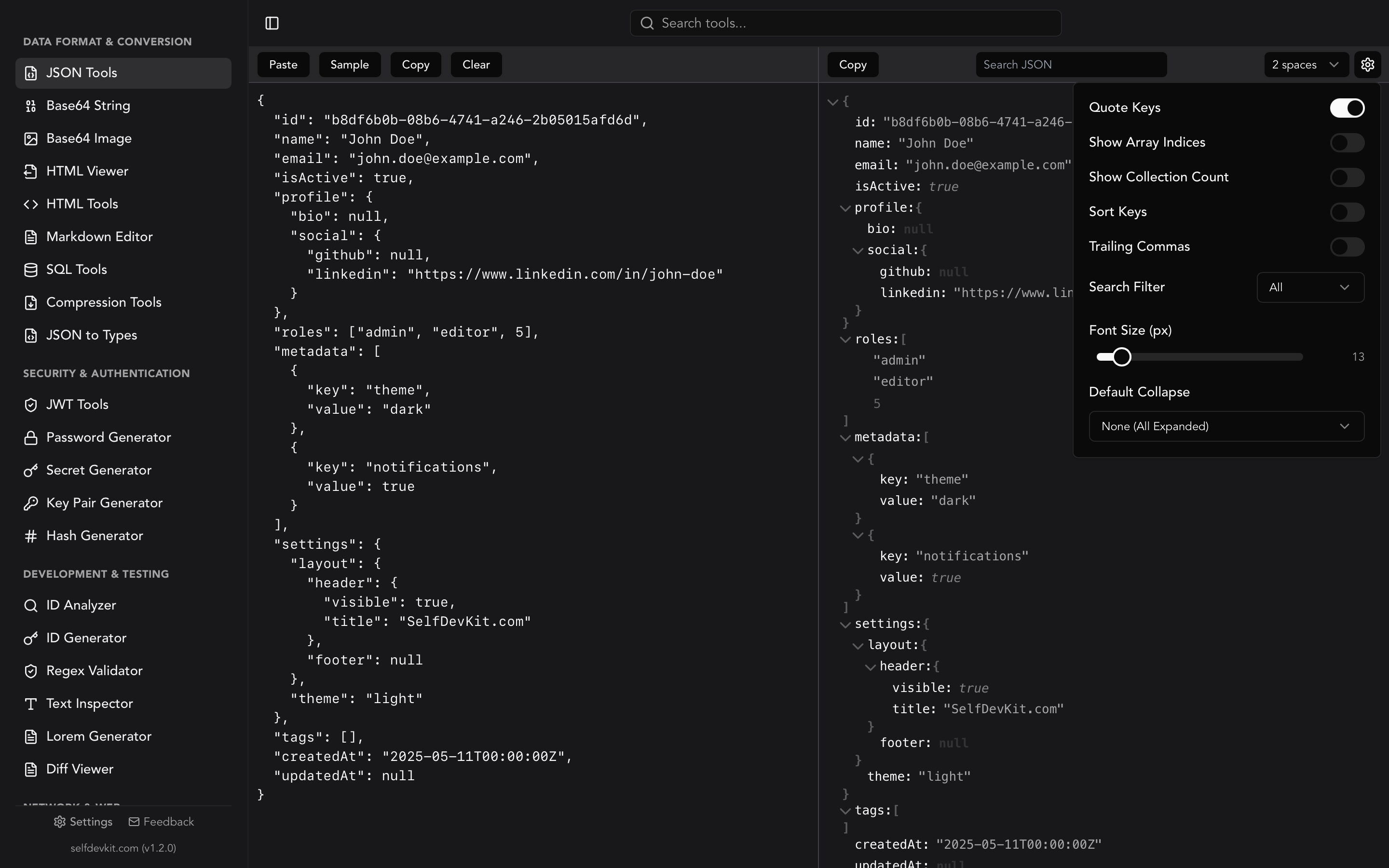
Using the JSON Formatter, I transform it instantly:
{
  "id": "a1b2c3d4-e5f6-7890-abcd-ef1234567890",
  "relationship_start_date": "2024-06-15",
  "next_visit_date": "2026-02-14T10:00:00+00:00",
  "current_streak": 47,
  "users": [
    {
      "id": "user-uuid-1",
      "name": "Alex",
      "avatar_url": "https://...",
      "timezone": "America/New_York",
      "city": "New York"
    },
    {
      "id": "user-uuid-2",
      "name": "Jordan",
      "avatar_url": "https://...",
      "timezone": "Europe/London",
      "city": "London"
    }
  ]
}
Now I can see the nested users array structure and understand how to decode it in Swift.
Debugging Row Level Security issues
Supabase enforces Row Level Security (RLS) policies. When a query returns empty results unexpectedly, I need to understand what the database actually contains versus what the policy allows.
The RLS policy for nudges in FeelClose:
CREATE POLICY "Users can view nudges for their couple"
ON nudges FOR SELECT
USING (
  couple_id IN (
    SELECT couple_id FROM users WHERE id = auth.uid()
  )
);
When debugging, I check the actual data structure:
{
  "id": "nudge-uuid",
  "couple_id": "couple-uuid",
  "sender_id": "user-uuid",
  "type": "kiss",
  "created_at": "2026-01-31T14:30:00Z",
  "read_at": null
}
The formatted JSON makes it clear that couple_id must match the authenticated user's couple. If couple_id is null or mismatched, the policy blocks access.
For a complete guide to JSON formatting, see our JSON Formatter, Viewer & Validator Guide.
JWT decoding for authentication
Supabase authentication uses JWTs extensively. Understanding token contents is essential for debugging auth issues in FeelClose.
Understanding Supabase tokens
When a user signs in, Supabase returns an access token:
let session = try await supabase.auth.signIn(
    email: email,
    password: password
)
print(session.accessToken)
The token looks like:
eyJhbGciOiJIUzI1NiIsInR5cCI6IkpXVCJ9.eyJhdWQiOiJhdXRoZW50aWNhdGVkIiwiZXhwIjoxNzA2NzE2ODAwLCJpYXQiOjE3MDY3MTMyMDAsImlzcyI6Imh0dHBzOi8veW91cnByb2plY3Quc3VwYWJhc2UuY28vYXV0aC92MSIsInN1YiI6ImE5YjhjN2Q2LWU1ZjQtMzIxMC1hYmNkLTk4NzY1NDMyMTBmZSIsImVtYWlsIjoiYWxleEBleGFtcGxlLmNvbSIsInBob25lIjoiIiwiYXBwX21ldGFkYXRhIjp7InByb3ZpZGVyIjoiZW1haWwiLCJwcm92aWRlcnMiOlsiZW1haWwiXX0sInVzZXJfbWV0YWRhdGEiOnsibmFtZSI6IkFsZXgifSwicm9sZSI6ImF1dGhlbnRpY2F0ZWQiLCJhYWwiOiJhYWwxIiwiYW1yIjpbeyJtZXRob2QiOiJwYXNzd29yZCIsInRpbWVzdGFtcCI6MTcwNjcxMzIwMH1dLCJzZXNzaW9uX2lkIjoic2Vzc2lvbi11dWlkIn0.signature
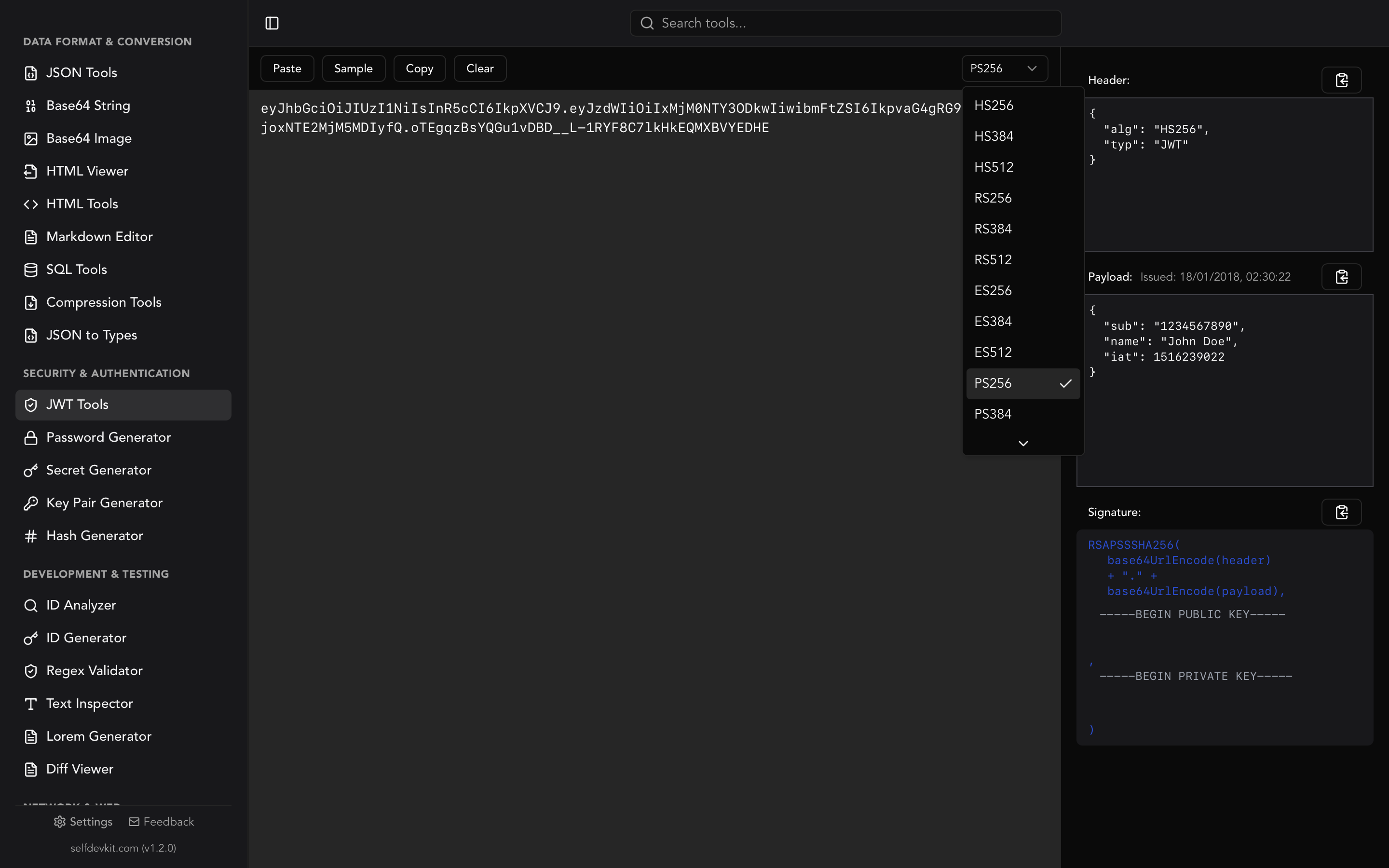
Using the JWT Decoder, I see the payload:
{
  "aud": "authenticated",
  "exp": 1706716800,
  "iat": 1706713200,
  "iss": "https://yourproject.supabase.co/auth/v1",
  "sub": "a9b8c7d6-e5f4-3210-abcd-9876543210fe",
  "email": "alex@example.com",
  "app_metadata": {
    "provider": "email",
    "providers": ["email"]
  },
  "user_metadata": {
    "name": "Alex"
  },
  "role": "authenticated",
  "aal": "aal1",
  "amr": [
    {
      "method": "password",
      "timestamp": 1706713200
    }
  ],
  "session_id": "session-uuid"
}
Key insights:
subis the user UUID used for RLS policiesexpshows token expiration (I can convert this with the timestamp tool)user_metadatacontains the user's name from sign-upaalindicates authentication assurance level
Debugging token expiration
When users report being logged out unexpectedly, I decode their tokens to check expiration:
// Token from user's device
let tokenExp = 1706716800  // From decoded JWT

// Current time
let now = Date().timeIntervalSince1970  // 1706720000

// Token expired 3200 seconds (53 minutes) ago
The Unix Timestamp Converter helps me convert these values to human-readable dates for debugging.
Apple Sign-In identity tokens
FeelClose supports Apple Sign-In, which returns its own JWT:
func authorizationController(
    controller: ASAuthorizationController,
    didCompleteWithAuthorization authorization: ASAuthorization
) {
    if let credential = authorization.credential as? ASAuthorizationAppleIDCredential,
       let identityToken = credential.identityToken,
       let tokenString = String(data: identityToken, encoding: .utf8) {
        // Decode this to understand what Apple provides
        print(tokenString)
    }
}
Decoding Apple's identity token reveals:
{
  "iss": "https://appleid.apple.com",
  "aud": "app.feelclose.ios",
  "exp": 1706800000,
  "iat": 1706713600,
  "sub": "001234.abcdef123456.7890",
  "email": "alex@icloud.com",
  "email_verified": "true",
  "auth_time": 1706713600,
  "nonce_supported": true
}
This helps me understand the mapping between Apple's sub claim and Supabase user IDs.
For more on JWT structure and validation, see our JWT Decoder & Validator Guide.
UUID generation for database records
Supabase uses UUIDs (Universally Unique Identifiers) for all primary keys. When building FeelClose, I work with UUIDs constantly.
Understanding UUID structure
Every record in the database has a UUID:
struct Nudge: Codable, Identifiable {
    let id: UUID           // Nudge ID
    let coupleId: UUID     // Foreign key to couples
    let senderId: UUID     // Foreign key to users
    let type: NudgeType
    let createdAt: Date
    let readAt: Date?
}
When debugging database relationships, I need to track which UUIDs connect to which records. The UUID Generator helps me:
- Generate test UUIDs for mock data
- Validate that a string is a proper UUID format
- Understand UUID versions (Supabase uses v4 random UUIDs)
Creating test data
During development, I create test couples and users with specific UUIDs:
// Test data setup
let testUser1 = UUID(uuidString: "11111111-1111-1111-1111-111111111111")!
let testUser2 = UUID(uuidString: "22222222-2222-2222-2222-222222222222")!
let testCouple = UUID(uuidString: "aaaaaaaa-bbbb-cccc-dddd-eeeeeeeeeeee")!
The UUID generator helps me create valid UUIDs quickly and verify that my test strings are properly formatted.
Debugging foreign key relationships
When a nudge isn't appearing for the partner, I check the UUID chain:
Nudge: 98765432-abcd-efgh-ijkl-123456789012
  └─ couple_id: aaaaaaaa-bbbb-cccc-dddd-eeeeeeeeeeee
       └─ User 1: 11111111-1111-1111-1111-111111111111 (couple_id matches ✓)
       └─ User 2: 22222222-2222-2222-2222-222222222222 (couple_id matches ✓)
If any UUID in the chain is incorrect, the RLS policy blocks access.
Base64 for image handling
FeelClose handles multiple image types: profile avatars, couple photos, and photos attached to greetings. Base64 encoding is essential for debugging image uploads and displays.
Avatar upload flow
When users set their profile picture:
func uploadAvatar(image: UIImage) async throws -> URL {
    guard let imageData = image.jpegData(compressionQuality: 0.8) else {
        throw ImageError.compressionFailed
    }

    let fileName = "\(userId.uuidString)/avatar.jpg"

    try await supabase.storage
        .from("avatars")
        .upload(
            path: fileName,
            file: imageData,
            options: FileOptions(contentType: "image/jpeg")
        )

    return try supabase.storage
        .from("avatars")
        .getPublicURL(path: fileName)
}
During development, I sometimes need to verify the image data. The Base64 Image Tools let me:
- Encode the raw JPEG data to verify it's valid
- Preview the encoded image before upload
- Debug display issues by decoding stored Base64
Debugging image display
When images don't appear correctly, I check the Base64:
// Log the first 100 characters to verify format
let base64 = imageData.base64EncodedString()
print("Image data: \(base64.prefix(100))...")
// "/9j/4AAQSkZJRgABAQEASABIAAD/4QBMRXhpZgAA..."
A valid JPEG starts with /9j/4AAQ. If I see different characters, the image encoding failed.
Widget image caching
Home screen widgets cache partner photos locally:
struct WidgetDataManager {
    func cachePartnerPhoto(imageData: Data) {
        let base64 = imageData.base64EncodedString()
        UserDefaults(suiteName: "group.app.feelclose")?.set(
            base64,
            forKey: "partnerPhotoBase64"
        )
    }

    func loadPartnerPhoto() -> UIImage? {
        guard let base64 = UserDefaults(suiteName: "group.app.feelclose")?
            .string(forKey: "partnerPhotoBase64"),
              let data = Data(base64Encoded: base64) else {
            return nil
        }
        return UIImage(data: data)
    }
}
When widgets show placeholder images instead of the cached photo, I extract the stored Base64 and decode it with SelfDevKit to verify the data integrity.
For more on Base64 encoding, see our Base64 Encode and Decode Guide.
Unix timestamps for timezone logic
Long-distance relationships mean different timezones. FeelClose displays both partners' local times and calculates optimal call windows - all requiring extensive timestamp handling.
Timezone display calculation
The home screen shows both partners' current times:
struct TimezoneDisplayView: View {
    let myTimezone: TimeZone       // America/New_York
    let partnerTimezone: TimeZone  // Europe/London

    var body: some View {
        HStack {
            TimeDisplay(
                timezone: myTimezone,
                label: "Your Time"
            )
            TimeDisplay(
                timezone: partnerTimezone,
                label: "Their Time"
            )
        }
    }
}
When debugging timezone issues, I use the Unix Timestamp Converter to verify conversions:
Unix: 1706713200
→ UTC: 2026-01-31T15:00:00Z
→ EST (New York): 2026-01-31T10:00:00-05:00
→ GMT (London): 2026-01-31T15:00:00+00:00
→ JST (Tokyo): 2026-02-01T00:00:00+09:00
Daily question scheduling
Questions are assigned at midnight in each user's timezone:
func shouldAssignNewQuestion(for user: User) -> Bool {
    let userTimezone = TimeZone(identifier: user.timezone)!
    var calendar = Calendar.current
    calendar.timeZone = userTimezone

    let now = Date()
    let todayMidnight = calendar.startOfDay(for: now)

    // Check if we already assigned a question today
    guard let lastAssignment = user.lastQuestionDate else {
        return true
    }

    return lastAssignment < todayMidnight
}
Debugging this requires converting timestamps across timezones. If a user in Tokyo reports getting yesterday's question, I check:
User's local midnight (JST): 2026-01-31T00:00:00+09:00
As Unix timestamp: 1706626800
Last assignment timestamp: 1706540400
→ Assignment was 2026-01-30T00:00:00+09:00 (yesterday)
→ Should assign new question: true ✓
Streak grace period
Streaks have a 1-day grace period to prevent accidental breaks:
func isStreakActive(lastActivityTimestamp: TimeInterval) -> Bool {
    let now = Date().timeIntervalSince1970
    let gracePeriod: TimeInterval = 48 * 60 * 60  // 48 hours

    return now - lastActivityTimestamp < gracePeriod
}
When users report lost streaks, I compare timestamps:
Last activity: 1706540400 (2026-01-30T00:00:00)
Current time:  1706713200 (2026-01-31T15:00:00)
Difference: 172800 seconds (48 hours exactly)
→ Streak should be broken (> 48 hours grace period)
The timestamp converter helps me verify these calculations quickly.
Hash generation for caching
FeelClose uses hashes for cache keys and deduplication. The Hash Generator helps me verify implementations.
Widget refresh caching
Widgets refresh periodically but shouldn't make redundant network requests:
struct WidgetDataCache {
    func generateCacheKey(userId: UUID, dataType: String) -> String {
        let input = "\(userId.uuidString):\(dataType):\(dayIdentifier())"
        return input.sha256()
    }

    private func dayIdentifier() -> String {
        let formatter = DateFormatter()
        formatter.dateFormat = "yyyy-MM-dd"
        return formatter.string(from: Date())
    }
}

// Example: "a1b2c3d4-...:countdown:2026-01-31" → "3f7a2b9c..."
I use the hash generator to verify that my Swift implementation produces the same output as expected:
Input: "a1b2c3d4-e5f6-7890-abcd-ef1234567890:countdown:2026-01-31"
SHA-256: 3f7a2b9c8d1e4f0a5b6c7d8e9f0a1b2c3d4e5f6a7b8c9d0e1f2a3b4c5d6e7f8a
Notification deduplication
Push notifications are deduplicated using message hashes:
func shouldShowNotification(payload: [String: Any]) -> Bool {
    let payloadData = try? JSONSerialization.data(withJSONObject: payload)
    let hash = payloadData?.sha256String() ?? UUID().uuidString

    let recentHashes = UserDefaults.standard.stringArray(
        forKey: "recentNotificationHashes"
    ) ?? []

    if recentHashes.contains(hash) {
        return false  // Duplicate
    }

    // Store hash and trim to last 50
    var updated = recentHashes
    updated.append(hash)
    updated = Array(updated.suffix(50))
    UserDefaults.standard.set(updated, forKey: "recentNotificationHashes")

    return true
}
When debugging duplicate notifications, I hash the payloads to understand why deduplication failed.
URL encoding for deep links
FeelClose uses deep links for sharing and notifications. URL encoding ensures special characters don't break links.
Invite link generation
Partners join using invite codes embedded in shareable links:
func generateInviteLink(code: String, referrer: String) -> URL? {
    var components = URLComponents()
    components.scheme = "https"
    components.host = "feelclose.app"
    components.path = "/join"
    components.queryItems = [
        URLQueryItem(name: "code", value: code),
        URLQueryItem(name: "ref", value: referrer)
    ]
    return components.url
}

// Result: https://feelclose.app/join?code=ABC123&ref=alex
The URL Encoder/Decoder helps me verify encoding when referrer names contain special characters:
Input: "Alex & Jordan 💕"
Encoded: "Alex%20%26%20Jordan%20%F0%9F%92%95"
Full URL: https://feelclose.app/join?code=ABC123&ref=Alex%20%26%20Jordan%20%F0%9F%92%95
Supabase storage URLs
Uploaded images have signed URLs with encoded parameters:
https://project.supabase.co/storage/v1/object/sign/avatars/user-uuid/avatar.jpg?token=eyJhbGciOiJIUzI1NiIsInR5cCI6IkpXVCJ9...
When images fail to load, I decode the URL to check the token validity and path encoding.
Push notification deep links
Notifications include deep links to specific screens:
// Notification payload
{
  "aps": { "alert": "Jordan sent you a kiss 💋" },
  "deep_link": "feelclose://nudge?type=kiss&from=jordan&time=1706713200"
}
The URL decoder helps me parse these links during debugging.
Regex testing for validation
FeelClose validates user input at multiple points. The Regex Tester helps me build and test patterns.
Invite code validation
Invite codes are 6 alphanumeric characters:
func isValidInviteCode(_ code: String) -> Bool {
    let pattern = "^[A-Z0-9]{6}$"
    return code.range(of: pattern, options: .regularExpression) != nil
}

// Valid: "ABC123", "X7Y8Z9", "AAAAAA"
// Invalid: "abc123", "ABC12", "ABC-123"
I test the pattern against edge cases:
Pattern: ^[A-Z0-9]{6}$
✓ ABC123
✓ X7Y8Z9
✗ abc123 (lowercase)
✗ ABC12 (too short)
✗ ABC1234 (too long)
✗ ABC 123 (contains space)
Question answer validation
Answers have length limits and content restrictions:
func validateAnswer(_ answer: String) -> ValidationResult {
    // Must be 1-500 characters
    let lengthPattern = "^.{1,500}$"

    // Optional: Check for suspicious patterns
    let urlPattern = "https?://[^\\s]+"

    if answer.range(of: lengthPattern, options: .regularExpression) == nil {
        return .invalid("Answer must be 1-500 characters")
    }

    if answer.range(of: urlPattern, options: .regularExpression) != nil {
        return .warning("Answer contains a URL")
    }

    return .valid
}
Parsing notification payloads
APNs payloads sometimes need parsing:
// Extract nudge type from notification body
let body = "Jordan sent you a kiss 💋"
let pattern = "sent you a (\\w+)"
if let match = body.range(of: pattern, options: .regularExpression) {
    // Extract "kiss"
}
The regex tester lets me refine patterns against real notification text.
For more on regular expressions, see our Regex Tester Guide.
Color tools for UI design
FeelClose uses a coral color scheme throughout the interface. The Color Picker helped design accessible color combinations.
Brand color implementation
The primary color in SwiftUI:
extension Color {
    static let coral = Color(red: 255/255, green: 111/255, blue: 97/255)
    static let coralLight = Color(red: 255/255, green: 160/255, blue: 150/255)
    static let coralDark = Color(red: 200/255, green: 80/255, blue: 70/255)
}

// Hex equivalents
// coral: #FF6F61
// coralLight: #FFA096
// coralDark: #C85046
The color picker helps me:
- Convert between RGB and hex formats
- Check contrast ratios for accessibility
- Generate complementary colors for dark mode
Streak milestone colors
Different streak lengths get different celebration colors:
func streakColor(for days: Int) -> Color {
    switch days {
    case 0..<7: return .gray
    case 7..<30: return .orange      // #FFA500
    case 30..<100: return .yellow    // #FFD700
    case 100..<365: return .purple   // #9B59B6
    default: return .coral           // #FF6F61
    }
}
Accessibility verification
Text must be readable against colored backgrounds. I verify contrast ratios:
Coral background (#FF6F61) + White text (#FFFFFF)
Contrast ratio: 3.2:1
→ Fails WCAG AA (4.5:1 required)

Coral background (#FF6F61) + Dark text (#1A1A1A)
Contrast ratio: 5.8:1
→ Passes WCAG AA ✓
The offline advantage for mobile development
Building FeelClose reinforced why offline tools matter, especially for mobile development:
Xcode workflow integration
Xcode doesn't have browser DevTools. When I need to format JSON or decode a JWT, switching to Safari adds friction. SelfDevKit runs as a native app alongside Xcode - no browser context switching required.
Sensitive token handling
Development involves real authentication tokens, API keys, and user data. I'm not comfortable pasting Supabase JWTs into online decoders - those tokens grant database access. Offline tools eliminate this security concern entirely.
No network dependency
Mobile development often happens on unreliable connections - coffee shops, flights, or just spotty office WiFi. Having tools that work instantly without network requests means consistent productivity regardless of connectivity.
Speed during debugging
When tracking down a bug, I might decode dozens of tokens, format hundreds of JSON responses, and test multiple regex patterns. Each operation taking 300ms of network latency would add up to significant wasted time. Offline tools complete in milliseconds.
For more on the privacy and performance benefits of offline tools, see Why Offline-First Developer Tools Matter More Than Ever.
Lessons from native development
Building FeelClose as a native iOS app taught me several lessons about tooling:
1. Data format tools are universal
Whether building for web or mobile, you need the same core utilities: JSON formatting, URL encoding, Base64 conversion, timestamp handling. The platform changes, but the data transformation requirements don't.
2. Authentication debugging is constant
Mobile apps use tokens extensively. Understanding JWT structure, verifying claims, and checking expiration is a daily activity. Having a reliable JWT decoder accessible at all times is essential.
3. UUID literacy matters
Working with Supabase (and most modern databases) means working with UUIDs. Generating test UUIDs, validating format, and tracking relationships becomes second nature.
4. Timezone complexity is underestimated
Any app dealing with users in different timezones needs extensive timestamp debugging. Converting between Unix timestamps, ISO dates, and localized displays is surprisingly complex.
5. Color tools save iteration
Designing accessible color schemes requires checking contrast ratios and testing combinations. Having color conversion tools available speeds up UI iteration.
In summary
Native iOS development presents unique challenges, but the core need for data transformation tools remains constant. Building FeelClose required daily use of:
- JSON Tools - Format and validate Supabase API responses
- JWT Decoder - Debug authentication tokens from Supabase and Apple Sign-In
- UUID Generator - Create test data and verify database relationships
- Base64 Tools - Handle image encoding for avatars and photos
- Unix Timestamp Converter - Debug timezone calculations and streak logic
- Hash Generator - Verify cache keys and deduplication
- URL Encoder/Decoder - Build and debug deep links
- Regex Tester - Validate invite codes and parse payloads
- Color Picker - Design accessible UI color schemes
The key benefits for native development:
- No browser required - Tools run alongside Xcode without context switching
- Privacy for tokens - Authentication credentials stay on your machine
- Instant results - No network latency during intensive debugging
- Consistent availability - Works regardless of connectivity
Whether you're building web services or native mobile apps, the same developer tools power your workflow. Having them available offline, instantly, and privately makes the difference between friction and flow.
Ready to streamline your iOS development workflow?
SelfDevKit includes 50+ developer tools that work entirely offline. Everything runs locally on your machine - no network requests, no data logging, no privacy concerns.
Download SelfDevKit — available for macOS, Windows, and Linux.
Or explore the full toolkit at selfdevkit.com/features to see all available tools including the JSON formatter, JWT decoder, and UUID generator.
Start building with confidence, knowing your authentication tokens and API data never leave your machine.