
How do you convert hex to RGB?
Split the six hex digits into three pairs and read each pair as a base-16 number. Multiply the first digit by 16, add the second, and you have a channel value between 0 and 255.
#4682B4is46→ 70,82→ 130,B4→ 180, which isrgb(70 130 180).
That is the entire hex to RGB operation. Three multiplications and three additions, and you can do it in your head once you have memorized sixteen numbers.
Most people never bother, because there is always a converter one tab away. Fair enough. But a chart is faster than a tab, mental math is faster than a chart, and there is a newer problem that no converter warns you about: a growing share of design systems no longer store colors as hex at all. Tailwind CSS v4 ships its default palette in OKLCH. When you convert one of those to hex, the answer is not exact, and two different tools will hand you two different values.
This post is the reference chart plus the parts of the story that charts leave out.
Table of contents
- The hex to RGB math you can do in your head
- Hex to RGB chart: CSS named colors
- The grey ramp, and why #808080 is not half as bright as white
- RGB as percentages
- Your palette might not be hex anymore
- Two different colors, one hex code
- When a chart is not enough
- Converting hex to RGB without a browser tab
- Frequently asked questions
The hex to RGB math you can do in your head
Convert each hex pair by looking up the first digit's base value, then adding the second digit. The first digit is worth sixteen times its face value, the second digit is worth its face value, and A through F count as 10 through 15.
Here is the only table you have to memorize. Every hex pair starts at one of these sixteen numbers:
| Pair starts | Base | Pair starts | Base |
|---|---|---|---|
0_ |
0 | 8_ |
128 |
1_ |
16 | 9_ |
144 |
2_ |
32 | A_ |
160 |
3_ |
48 | B_ |
176 |
4_ |
64 | C_ |
192 |
5_ |
80 | D_ |
208 |
6_ |
96 | E_ |
224 |
7_ |
112 | F_ |
240 |
Then add the second digit. B4 is 176 + 4 = 180. 4D is 64 + 13 = 77. FE is 240 + 14 = 254. That is it.
Two anchors make the table easier to hold on to. 8_ is 128, exactly half the range, which is why #808080 is the arithmetic middle grey. And F_ is 240, so anything starting with F is already at least 94% of full brightness. If a hex code has an F in the first position of a pair, that channel is effectively maxed.
The repeated-digit shortcut
Hex codes written by humans lean heavily on repeated digits, because those are the pairs that shorthand can express. Each step is exactly 17:
| Pair | Decimal | Pair | Decimal |
|---|---|---|---|
00 |
0 | 88 |
136 |
11 |
17 | 99 |
153 |
22 |
34 | AA |
170 |
33 |
51 | BB |
187 |
44 |
68 | CC |
204 |
55 |
85 | DD |
221 |
66 |
102 | EE |
238 |
77 |
119 | FF |
255 |
This table doubles as the shorthand expansion chart. Three-digit hex expands by duplicating each digit, not by padding it with a zero, so #39F is #3399FF, which is rgb(51 153 255). The MDN hex color reference puts it bluntly: "If there is only one number, it is duplicated: 1 means 11."
Because every shorthand color must have both digits equal in each pair, shorthand can only reach 4,096 of the 16,777,216 colors a six-digit code can express. If a hex code does not have three matching pairs, it has no exact shorthand form.
Worked example
#DC143C, the color CSS calls crimson:
| Pair | Base from first digit | Plus second digit | Decimal |
|---|---|---|---|
DC |
D_ = 208 |
+ 12 | 220 |
14 |
1_ = 16 |
+ 4 | 20 |
3C |
3_ = 48 |
+ 12 | 60 |
rgb(220 20 60). Ten seconds, no tab.
Hex to RGB chart: CSS named colors
The 148 CSS named colors are the one place where specific hex values are fixed by a standard rather than chosen by a designer, which makes them the most useful entries in any hex to RGB chart. Here are the ones that actually show up in stylesheets and code review comments.
| Name | Hex | RGB |
|---|---|---|
black |
#000000 |
rgb(0 0 0) |
white |
#FFFFFF |
rgb(255 255 255) |
red |
#FF0000 |
rgb(255 0 0) |
lime |
#00FF00 |
rgb(0 255 0) |
blue |
#0000FF |
rgb(0 0 255) |
yellow |
#FFFF00 |
rgb(255 255 0) |
cyan |
#00FFFF |
rgb(0 255 255) |
magenta |
#FF00FF |
rgb(255 0 255) |
gray |
#808080 |
rgb(128 128 128) |
silver |
#C0C0C0 |
rgb(192 192 192) |
maroon |
#800000 |
rgb(128 0 0) |
olive |
#808000 |
rgb(128 128 0) |
green |
#008000 |
rgb(0 128 0) |
purple |
#800080 |
rgb(128 0 128) |
teal |
#008080 |
rgb(0 128 128) |
navy |
#000080 |
rgb(0 0 128) |
orange |
#FFA500 |
rgb(255 165 0) |
gold |
#FFD700 |
rgb(255 215 0) |
pink |
#FFC0CB |
rgb(255 192 203) |
hotpink |
#FF69B4 |
rgb(255 105 180) |
crimson |
#DC143C |
rgb(220 20 60) |
tomato |
#FF6347 |
rgb(255 99 71) |
coral |
#FF7F50 |
rgb(255 127 80) |
orangered |
#FF4500 |
rgb(255 69 0) |
firebrick |
#B22222 |
rgb(178 34 34) |
brown |
#A52A2A |
rgb(165 42 42) |
chocolate |
#D2691E |
rgb(210 105 30) |
goldenrod |
#DAA520 |
rgb(218 165 32) |
tan |
#D2B48C |
rgb(210 180 140) |
wheat |
#F5DEB3 |
rgb(245 222 179) |
khaki |
#F0E68C |
rgb(240 230 140) |
beige |
#F5F5DC |
rgb(245 245 220) |
ivory |
#FFFFF0 |
rgb(255 255 240) |
whitesmoke |
#F5F5F5 |
rgb(245 245 245) |
lavender |
#E6E6FA |
rgb(230 230 250) |
plum |
#DDA0DD |
rgb(221 160 221) |
violet |
#EE82EE |
rgb(238 130 238) |
indigo |
#4B0082 |
rgb(75 0 130) |
rebeccapurple |
#663399 |
rgb(102 51 153) |
midnightblue |
#191970 |
rgb(25 25 112) |
steelblue |
#4682B4 |
rgb(70 130 180) |
dodgerblue |
#1E90FF |
rgb(30 144 255) |
skyblue |
#87CEEB |
rgb(135 206 235) |
turquoise |
#40E0D0 |
rgb(64 224 208) |
seagreen |
#2E8B57 |
rgb(46 139 87) |
forestgreen |
#228B22 |
rgb(34 139 34) |
limegreen |
#32CD32 |
rgb(50 205 50) |
salmon |
#FA8072 |
rgb(250 128 114) |
slategray |
#708090 |
rgb(112 128 144) |
darkslategray |
#2F4F4F |
rgb(47 79 79) |
Two things worth noticing. green is #008000, not #00FF00; the bright one is called lime, which trips up more people than it should. And rebeccapurple is #663399, added to the spec in memory of Eric Meyer's daughter, which is why it is the one named color with a story attached.
Named colors are also the fastest sanity check on a converter. If a tool tells you steelblue is anything other than rgb(70 130 180), stop using it. For choosing values rather than looking them up, the hex color picker guide walks through picking and adjusting codes directly.
The grey ramp, and why #808080 is not half as bright as white
Greys are the hex codes developers convert most often, because border, divider, and text colors are almost always neutral. The chart is short because every channel is identical:
| Hex | RGB | Typical use |
|---|---|---|
#000000 |
rgb(0 0 0) |
Pure black, rarely correct for text |
#111111 |
rgb(17 17 17) |
Dark mode background |
#222222 |
rgb(34 34 34) |
Dark mode surface |
#333333 |
rgb(51 51 51) |
Body text on white |
#444444 |
rgb(68 68 68) |
Secondary text |
#666666 |
rgb(102 102 102) |
Muted text |
#808080 |
rgb(128 128 128) |
Midpoint grey |
#999999 |
rgb(153 153 153) |
Placeholder text |
#CCCCCC |
rgb(204 204 204) |
Borders |
#DDDDDD |
rgb(221 221 221) |
Dividers |
#EEEEEE |
rgb(238 238 238) |
Subtle fills |
#F5F5F5 |
rgb(245 245 245) |
Page background |
#FFFFFF |
rgb(255 255 255) |
White |
Now the part that surprises people. #808080 is the numeric midpoint of the 0-255 range, but it does not emit half as much light as white. sRGB channel values are gamma-encoded, so converting to actual light output means linearizing them first. Channel 128 has a relative luminance of about 21.6% of white. The grey that genuinely sits halfway between black and white in light output is closer to #BBBBBB, at 49.7%.
This matters the moment you touch contrast. WCAG ratios are computed from linearized luminance, not from the raw RGB integers, and the cliff is steeper than the hex codes suggest. Against white, #666666 scores 5.74:1 and passes AA. One step lighter, #777777 scores 4.48:1 and fails, by two hundredths. If you are picking greys off a chart and assuming the numbers track perceived brightness, you will guess wrong in exactly the direction that fails an audit. The rgb color picker guide covers the luminance formula in more detail.
RGB as percentages
CSS rgb() accepts percentages as well as 0-255 integers, and the two are interchangeable: 0% is 0, 100% is 255, and everything scales linearly in between. rgb(100% 50% 0%) is rgb(255 128 0).
Percentages come up when you paste a value out of a design tool, a graphics library, or a print workflow, since many of them normalize channels rather than using bytes. The conversion is simply byte / 255, but the round numbers rarely survive it:
| Percentage | Byte | Hex | Exact value back |
|---|---|---|---|
| 0% | 0 | 00 |
0% |
| 10% | 26 | 1A |
10.196% |
| 20% | 51 | 33 |
20% |
| 30% | 77 | 4D |
30.196% |
| 40% | 102 | 66 |
40% |
| 50% | 128 | 80 |
50.196% |
| 60% | 153 | 99 |
60% |
| 70% | 179 | B3 |
70.196% |
| 80% | 204 | CC |
80% |
| 90% | 230 | E6 |
90.196% |
| 100% | 255 | FF |
100% |
The multiples of 20 land exactly, because 51, 102, 153, and 204 are all clean multiples of 51. The rest drift by about two tenths of a percent. That drift is invisible on screen and extremely visible in a snapshot test diff.
Your palette might not be hex anymore
The biggest change to hex to RGB workflows in the last two years is that a lot of design systems stopped shipping hex. Tailwind CSS v4 rebuilt its default palette in OKLCH, so blue-500 is no longer a hex code:
--color-blue-500: oklch(62.3% 0.214 259.815);
--color-emerald-500: oklch(69.6% 0.17 162.48);
--color-amber-400: oklch(82.8% 0.189 84.429);
Hex to RGB is lossless. Both notations describe the same three bytes in sRGB, so the round trip is exact in either direction. OKLCH to hex is not lossless, because OKLCH can describe colors that sRGB cannot reach. Several of Tailwind's own defaults fall outside the sRGB gamut, and converting them produces channel values that are not valid bytes:
| Token | Raw sRGB conversion | Naive clamp | Chroma-mapped |
|---|---|---|---|
blue-500 |
rgb(43 127 261) |
#2B7FFF |
#3280FF |
emerald-500 |
rgb(-55 188 125) |
#00BC7D |
#00B981 |
amber-400 |
rgb(255 185 -59) |
#FFB900 |
#FABC00 |
indigo-500 |
rgb(97 95 257) |
#615FFF |
#6260FF |
red-500 |
rgb(251 44 54) |
#FB2C36 |
#FB2C36 |
Look at the blue channel on blue-500: 261. There is no such byte. Something has to give, and the two common strategies give different answers.
Naive clamping pins every out-of-range channel to 0 or 255. It is fast and it is what most quick converters do, but it shifts the hue, because clamping one channel while leaving the others alone changes the ratio between them.
Gamut mapping reduces the color's chroma in OKLCH until it fits, which preserves the hue and produces a slightly less saturated but visually closer result. The CSS Color Module Level 4 spec describes the intended outcome: a color outside the display gamut "would need to be CSS gamut mapped for display, producing a similar-looking but lower chroma (less saturated) color."
Here is the practical kicker. The spec asks for chroma reduction, but browsers do not do that yet. As Evil Martians documents in its OKLCH writeup, "The CSS Colors 4 spec requires browsers to use the OKLCH method for gamut mapping. But still, right now, Chrome and Safari use the fast, but inaccurate, clipping method."
So #2B7FFF is closer to what your users currently see, and #3280FF is closer to what the color is supposed to be. Neither is wrong. They are answers to different questions.
What to do about it:
- Never treat an OKLCH-to-hex conversion as a source of truth. Keep the OKLCH token as canonical and generate hex as a fallback, not the other way around.
- Pick one converter and use it everywhere. Mixing a clamping tool and a gamut-mapping tool across a codebase is how one brand blue becomes two.
- Check whether the color is in gamut at all before converting. If it is, like Tailwind's
red-500, both methods agree exactly and you can stop worrying.
Two different colors, one hex code
Hex notation can only describe sRGB. The spec is explicit on this: "The CSS hex color notation allows an sRGB color to be specified by giving the components as hexadecimal numbers." That is a hard ceiling, and it means hex is a lossy destination for anything wider. Note that the ceiling applies to rgb() too, since MDN's rgb() reference defines it in the sRGB color space as well. Converting hex to RGB does not buy you any extra range.
A concrete example. color(display-p3 0 1 0) is the greenest green a P3 display can produce. Converted to sRGB it comes out as rgb(-131 260 -79), which clips to #00FF00. But #00FF00 on its own is sRGB pure green, a visibly duller color on the same screen. Two genuinely different greens, one hex code.
This is the real answer to "why does my color look different from the design file." The hex to RGB math is exact and is almost never the culprit. The mismatch comes from somewhere upstream: a designer picking in a P3 space, an image with an embedded ICC profile, or a screenshot color-picked from a wide-gamut display and pasted into a stylesheet as if it were sRGB.
The workflow fix is boring but effective. Decide at the top of the project whether your tokens are sRGB or wide gamut, write it down, and stop color-picking values off screenshots.
When a chart is not enough
Charts cover lookup. They do not cover the cases where hex to RGB conversion actually breaks in code, and those are worth knowing before you write your own parser:
- Alpha. Eight-digit hex encodes opacity as a byte, so
#80is 50.196% rather than a clean half. - Byte ordering. CSS reads eight-digit hex as
#RRGGBBAA. Android reads it as#AARRGGBB. Paste a CSS value into an Android color resource and you get a plausible-looking wrong color that compiles fine and ships. - Input hygiene.
parseInt('#394DFE', 16)returnsNaNbecause#is not a hex digit, andparseInt('39zz', 16)returns 57 rather than failing, so you have to validate before you parse.
All three, with working JavaScript, Python, Go, and shell implementations, are covered in the companion post on hex to RGB color conversion rules and edge cases. If you are validating hex codes across a whole config file rather than one at a time, a regex validator is the faster route, and when a code that looks correct still refuses to parse, a text inspector will show you the stray non-breaking space you copied out of the brand guidelines.
Converting hex to RGB without a browser tab
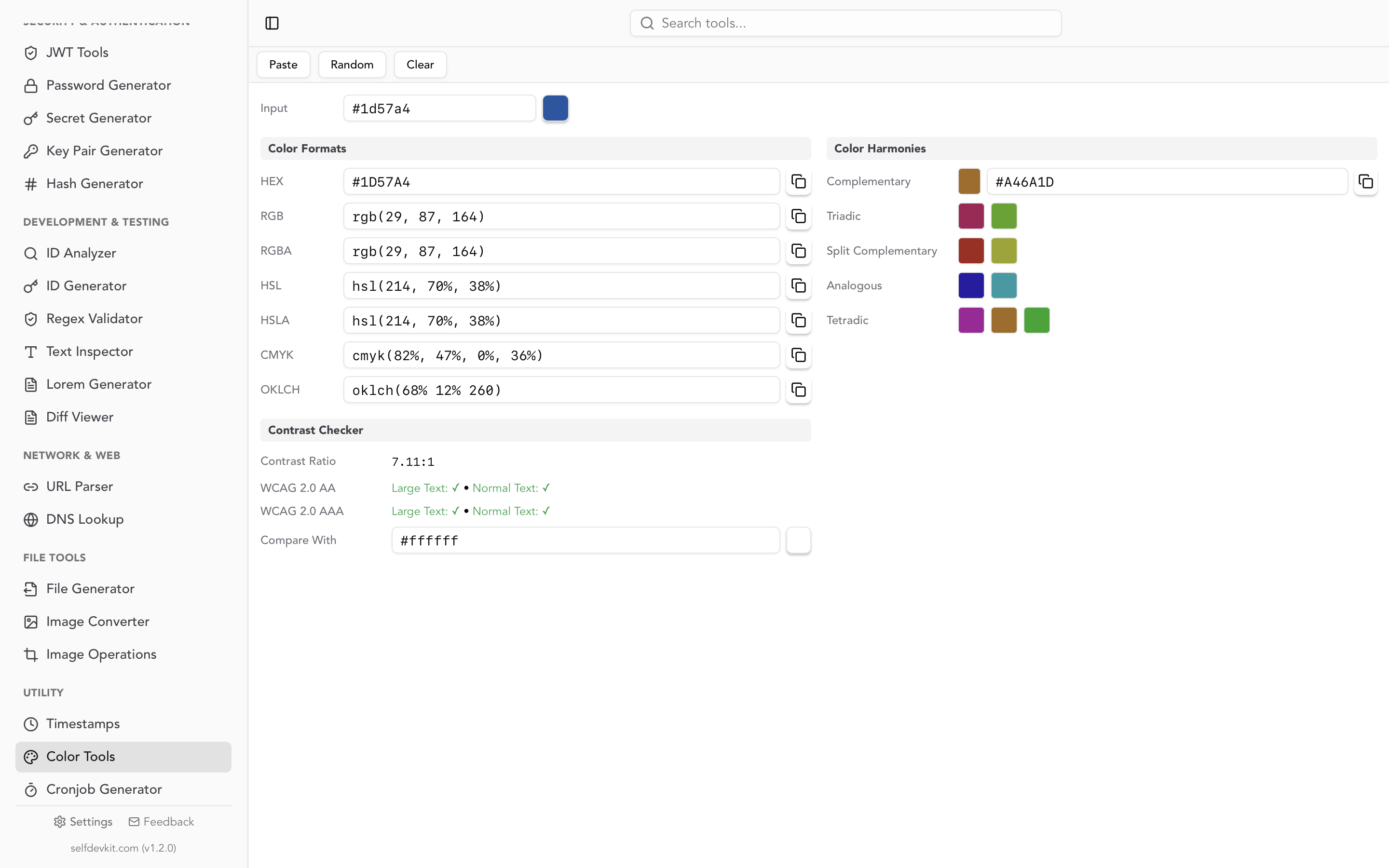
Most hex to RGB conversions are not one-offs. You are walking a palette, checking contrast on each pair, generating a couple of tints, and pasting results into three different files. Doing that through a web converter means a round trip per color, and the color itself is frequently the most confidential thing on your screen: an unreleased brand palette, a client identity system under NDA, an accent color for a product that has not been announced.
SelfDevKit's color tools convert between HEX, RGB, HSL, CMYK, and OKLCH entirely on your machine. Nothing leaves the app, because the app has no reason to open a socket. The same panel generates complementary, triadic, analogous, split complementary, and tetradic harmonies, and checks contrast against WCAG 2.0 AA and AAA thresholds, so the palette walk happens in one place instead of four tabs.
The offline part is also just faster. No page load, no cookie banner, no ad script racing your keystrokes. We wrote about that tradeoff at length in why offline matters, and the download page has builds for macOS, Windows, and Linux.
Frequently asked questions
What is the RGB value of #FFFFFF?
#FFFFFF is rgb(255 255 255), pure white, because FF is the maximum byte value of 255. Its inverse #000000 is rgb(0 0 0). Any hex code with three identical pairs is a neutral grey somewhere between them.
Is hex to RGB conversion lossless?
Yes. Hex and rgb() describe the same three 8-bit sRGB integers in different notations, so converting either direction and back returns the original value exactly. Conversions involving HSL, OKLCH, or wide-gamut spaces are not lossless, because those can express values that do not land on clean bytes or fall outside sRGB entirely.
How do I convert an OKLCH color to hex?
Convert to sRGB, then check whether all three channels land inside 0-255. If they do, round and format as hex. If any channel falls outside, the color is out of gamut and you must choose between clamping the channels, which shifts the hue, or reducing chroma until it fits, which preserves it. Document which one you used.
Why does my hex code look different in the design file?
Almost always a color space difference rather than a conversion error. Hex is sRGB by definition, while design tools may be working in Display P3 or a CMYK print profile. The hex to RGB math is exact; the pipeline around it is what shifts the color.
Try it yourself
Keep this page bookmarked for the chart. When you need more than a lookup, whether that is contrast ratios across a palette, harmonies from a base color, or converting a stubborn OKLCH token, SelfDevKit does it offline alongside 50+ other developer tools. New here? The getting started guide is a five-minute tour.
Download SelfDevKit and stop pasting your brand colors into other people's servers.