Most regex cheat sheets hand you a table of symbols and wish you luck. That works right up until the pattern you copied fails in Go, silently changes meaning in grep, or gets mangled by your language's string escaping. This regex cheat sheet includes the syntax tables you expect, plus the portability notes that decide whether the pattern actually works where you paste it.
The short version
A regex cheat sheet is a compact reference for regular expression syntax: character classes (
\d,\w,\s), quantifiers (*,+,?,{n,m}), anchors (^,$,\b), groups ((...)), and flags (i,m,s). The syntax is roughly 90% identical across engines. The remaining 10%, mostly lookbehind, backreferences, named groups, and Unicode behavior, is where patterns break when moved between languages.
Table of contents
- Regex cheat sheet: characters and character classes
- Quantifiers
- Anchors and boundaries
- Groups, alternation, and lookarounds
- Flags and inline modifiers
- The same pattern, different answers per engine
- Regex on the command line: grep, sed, and ripgrep
- Escaping your pattern for the host language
- Search and replace syntax
- Reading a regex you did not write
- Keeping the cheat sheet next to the tester
Regex cheat sheet: characters and character classes
Character classes define which single characters a position can match. These are the tokens you use in almost every pattern.
| Token | Matches | Portability note |
|---|---|---|
. |
Any character except newline | Universal. Add the s / DOTALL flag to include newlines |
\d \D |
Digit / non-digit | Unicode-aware in Python, Rust, and .NET. ASCII-only in JavaScript, Go, and Java |
\w \W |
Word char / non-word char | Same split as \d. JavaScript \w is always [A-Za-z0-9_] |
\s \S |
Whitespace / non-whitespace | Universal in practice |
[abc] |
Any one of a, b, c | Universal |
[^abc] |
Any character except a, b, c | Universal |
[a-z0-9] |
Range union inside a class | Put - first or last to match a literal hyphen |
[\d\-.] |
Classes nest inside classes | Escape - or place it at the edge |
\. \/ \\ |
Literal metacharacter | Inside [...] most metacharacters lose their meaning and need no escape |
\p{L} \p{Nd} |
Unicode property (letter, decimal number) | Requires the u flag in JavaScript. Not available in POSIX grep |
[[:alpha:]] [[:digit:]] |
POSIX class | The only portable named class in BRE/ERE grep. Rare in application code |
\t \n \r \f \v |
Tab, newline, carriage return, form feed, vertical tab | Universal |
\xhh \uFFFF |
Character by hex code point | Syntax varies: Rust and Python also accept \x{1F600} style |
If you write mostly JavaScript, MDN's regular expressions cheatsheet is the authoritative list of what the ECMAScript engine accepts. The tables here stay engine-neutral on purpose.
Two class rules cause more bugs than the rest combined. Inside a bracket class, . is a literal dot, so [.] needs no backslash. And outside a class, - is always literal, so \- is harmless but unnecessary noise.
Quantifiers
Quantifiers control repetition. Greedy by default, lazy when you add ?, possessive when you add + on the engines that support it.
| Token | Meaning | Greedy | Lazy | Possessive |
|---|---|---|---|---|
* |
0 or more | * |
*? |
*+ |
+ |
1 or more | + |
+? |
++ |
? |
0 or 1 | ? |
?? |
?+ |
{n} |
Exactly n | {n} |
{n}? |
{n}+ |
{n,} |
n or more | {n,} |
{n,}? |
{n,}+ |
{n,m} |
Between n and m | {n,m} |
{n,m}? |
{n,m}+ |
Possessive quantifiers exist in Java, PCRE2, and Ruby (Oniguruma). They are documented in the Java Pattern javadoc as X?+, X*+, X++. They do not exist in JavaScript, Python's standard re, Go, or Rust.
The greedy versus lazy difference is the classic HTML-scraping trap:
Input:  <b>bold</b> and <i>italic</i>
<.+>    matches the entire line
<.+?>   matches <b>, then </b>, then <i>, then </i>
[^>]+   matches the same as the lazy version, faster
[^>]+ is usually the right answer. A negated character class does the same job as a lazy quantifier without the backtracking cost. If you want to understand why that cost matters, our guide on how to test regex covers catastrophic backtracking and how to measure it.
Anchors and boundaries
Anchors match a position, not a character. They consume nothing, which is why ^$ matches an empty string and why \b\b is legal but pointless.
| Token | Matches | Notes |
|---|---|---|
^ |
Start of string | With the m flag, start of every line |
$ |
End of string | With m, end of every line. See the trailing-newline warning below |
\A |
Absolute start of string | Not in JavaScript. Ignores the m flag |
\z |
Absolute end of string | Not in JavaScript |
\Z |
End of string, before a final newline | Java and Python. Do not confuse with \z |
\b |
Word boundary | Defined by \w on each side, so its Unicode behavior follows \w |
\B |
Not a word boundary | Useful for "inside a word" searches |
\G |
End of the previous match | PCRE, Java, .NET. Not in JavaScript, Python, Go, or Rust |
The $ behavior is worth memorizing because it silently changes what your validator accepts. Running the same pattern against "abc\n":
# Python 3
re.search(r'c$',  'abc\n')   # matches: $ allows a trailing newline
re.search(r'c\Z', 'abc\n')   # None: \Z is the true end of input
// Node.js
/c$/.test('abc\n')   // false: JavaScript $ means the actual end
Both results were verified locally on Python 3 and Node 24. If you validate user input with ^...$ in Python, a trailing \n sneaks past, which the re module documentation spells out. Use \Z in Python when you mean the end of the input, and note that Java reverses the meaning: Java's \Z is "the end of the input but for the final terminator" while \z is the hard end.
Groups, alternation, and lookarounds
| Token | Meaning | Portability note |
|---|---|---|
(...) |
Capture group, numbered left to right | Universal |
(?:...) |
Non-capturing group | Universal |
(?<name>...) |
Named capture group | JavaScript, .NET, Java, Rust, PCRE2 |
(?P<name>...) |
Named capture group, Python style | Python and Rust. A syntax error in JavaScript |
a|b |
Alternation, leftmost match wins | Universal. Order matters: put the longer alternative first |
\1 \2 |
Backreference to a captured group | Not supported in Go or Rust |
\k<name> |
Named backreference | Not supported in Go or Rust |
(?=...) |
Positive lookahead | Not supported in Go or Rust |
(?!...) |
Negative lookahead | Not supported in Go or Rust |
(?<=...) |
Positive lookbehind | Fixed width only in Python. Variable width in JavaScript and .NET |
(?<!...) |
Negative lookbehind | Same constraints as lookbehind |
(?#...) |
Inline comment | PCRE, Python, .NET. Not JavaScript |
Alternation ordering is a real bug source. (cat|category) matching against category captures cat, because most engines take the first alternative that allows the overall match to succeed rather than the longest one. Write (category|cat).
Lookbehind width limits are engine-specific and verified easily:
re.compile(r'(?<=ab{1,3})c')
# error: look-behind requires fixed-width pattern
/(?<=ab{1,3})c/.test('abbc') // true
Flags and inline modifiers
Flags change how the whole pattern is interpreted. Every flag below also has an inline form you can embed in the pattern itself, which is the portable way to carry a flag along with the pattern string.
| Flag | Inline | Effect |
|---|---|---|
i |
(?i) |
Case-insensitive matching |
m |
(?m) |
Multiline: ^ and $ match at line boundaries |
s |
(?s) |
Dot matches newline (DOTALL / single-line) |
x |
(?x) |
Extended: ignore whitespace and allow # comments in the pattern |
u |
n/a | Unicode mode. Required in JavaScript for \p{...} |
U |
(?U) |
Swap greedy and lazy quantifiers (PCRE, Rust, Go) |
g |
n/a | Global: return every match, not just the first. A JavaScript and tool-level concept, not a pattern feature |
Inline modifiers can be scoped to part of the pattern with (?i:...), and switched off with a leading minus: (?-i:...). That scoping is the cleanest way to make one section case-insensitive without touching the rest.
The extended flag is underused. It turns an unreadable pattern into something a reviewer can approve:
(?x)
  ^(\d{4})      # year
  -(\d{2})      # month
  -(\d{2})$     # day
The same pattern, different answers per engine
The most important thing a regex cheat sheet can tell you is where the same pattern produces a different result. These are the five differences that actually bite, with sources.
| Behavior | JavaScript | Python 3 | Go (RE2) | Rust regex |
Java | .NET |
|---|---|---|---|---|---|---|
\d matches non-ASCII digits |
No | Yes | No | Yes | No | Yes |
Lookahead (?=...) |
Yes | Yes | No | No | Yes | Yes |
| Lookbehind width | Variable | Fixed only | Not supported | Not supported | Bounded | Variable |
Backreference \1 |
Yes | Yes | No | No | Yes | Yes |
| Named group syntax | (?<n>) |
(?P<n>) |
both (Go 1.22+) | both | (?<n>) |
(?<n>) |
The Unicode digit row surprises people, so here it is running against the Arabic-Indic digits ٣٤:
re.fullmatch(r'\d+', '٣٤')                  # matches
re.fullmatch(r'\d+', '٣٤', re.ASCII)        # None
/^\d+$/.test('٣٤') // false
That means a "digits only" validator ported from JavaScript to Python quietly starts accepting numerals your downstream int() parse may still handle, but your database column or downstream service may not. The Rust regex crate documents the same Unicode-aware default: \d is \p{Nd}, and you opt out per-token with (?-u:\d).
The missing lookahead in Go and Rust is not an oversight. Both use finite-automata engines derived from RE2. The Go regexp package states that it "is guaranteed to run in time linear in the size of the input," and the Rust regex crate docs say the syntax "lacks several features that are not known how to implement efficiently. This includes, but is not limited to, look-around and backreferences." You trade two features for immunity to catastrophic backtracking. For anything that runs against untrusted input, that is a good trade, and OWASP's ReDoS page explains what happens when you do not have it.
Regex on the command line: grep, sed, and ripgrep
Command-line tools use a different, older regex dialect than your application code, and this is where copied cheat-sheet patterns fail most often. GNU grep supports three dialects: basic (BRE, the default), extended (-E), and Perl-compatible (-P).
Every result below was run against GNU grep 3.11 on the input abc123:
| Pattern | grep (BRE) |
grep -E (ERE) |
grep -P (PCRE) |
|---|---|---|---|
\d\+ / \d+ |
No match | No match | Matches |
[[:digit:]]\+ |
Matches | Matches | Matches |
\w\+ / \w+ |
Matches (GNU extension) | Matches | Matches |
foo(?=1) |
No match (warns) | No match (warns) | Matches |
+ ? { ( ) | |
Literal characters, escape to activate | Metacharacters | Metacharacters |
Three rules follow from that table:
\ddoes not exist in POSIX regex. Use[0-9]or[[:digit:]]unless you pass-P. This single fact explains most "but it worked in the tester" bug reports.- In BRE, the operators are backslashed.
a\+,\(group\),a\{2,3\},cat\|dog. In ERE, they are bare. Reach forgrep -Eandsed -Eby default so the syntax matches what everyone else writes. grep -Pis not always available. It is an optional feature in GNU grep and absent from BSD/macOS grep.ripgrepsidesteps this by using the Rust engine everywhere, with the same no-lookaround tradeoff described above.
The GNU grep manual documents the full BRE and ERE dialects if you need the edge cases.
Shell quoting adds a second layer. Single quotes are the safe default because the shell will not touch $, \, or ! inside them:
grep -E '^[0-9]{3}-[0-9]{4}$' file.txt     # correct
grep -E "^[0-9]{3}-[0-9]{4}$" file.txt     # $ inside double quotes invites expansion
Escaping your pattern for the host language
A regex is a string before it is a pattern, and every language escapes strings differently. This table shows the exact source you need to express the pattern \d{4}-\d{2} in each host.
| Host | How you write it | Why |
|---|---|---|
| JavaScript literal | /\d{4}-\d{2}/ |
Literal syntax, no string escaping |
| JavaScript string | new RegExp("\\d{4}-\\d{2}") |
\d is not a valid string escape, so double it |
| Python | r'\d{4}-\d{2}' |
Raw strings exist for exactly this |
| Java | "\\d{4}-\\d{2}" |
The javadoc requires doubling backslashes in string literals |
| Go | `\d{4}-\d{2}` |
Backtick raw string literals |
| C# | @"\d{4}-\d{2}" |
Verbatim string literal |
| JSON config | "\\d{4}-\\d{2}" |
JSON has no raw strings. Every backslash doubles |
| YAML (single-quoted) | '\d{4}-\d{2}' |
Single-quoted YAML scalars do not process backslash escapes |
| Shell | '\d{4}-\d{2}' |
Single quotes, always |
The JSON row causes the worst debugging sessions, because the doubling happens at a layer you are not looking at. A pattern in an ESLint config, a Prometheus relabel rule, or a Logstash filter is a JSON or YAML string first. If you are staring at a config value and cannot tell how many backslashes survived, run it through a JSON viewer and unescaper to see the decoded string, or read our walkthrough on unescaping JSON strings.
One more escaping rule: when you build a pattern from user input, escape it programmatically. re.escape() in Python, regexp.QuoteMeta() in Go, and RegExp.escape() in modern JavaScript all exist so that a search term containing . or ( does not become a syntax error or an accidental wildcard.
Search and replace syntax
Replacement strings have their own syntax, and it does not match the pattern syntax. This is the table almost no regex cheat sheet includes.
| Environment | Group by number | Group by name | Whole match |
|---|---|---|---|
| JavaScript | $1 |
$<name> |
$& |
| Python | \1 |
\g<name> |
\g<0> |
| Java / .NET | $1 |
${name} |
$0 |
| sed / Perl | \1 (sed), $1 (Perl) |
n/a in sed | & (sed), $& (Perl) |
| Go | $1 or ${1} |
${name} |
$0 |
All of these were verified by running them:
echo 'user@host' | sed -E 's/(\w+)@(\w+)/\2:\1/'     # host:user
echo 'user@host' | perl -pe 's/(\w+)\@(\w+)/$2:$1/'  # host:user
re.sub(r'(\w+)@(\w+)', r'\2:\1', 'user@host')        # host:user
re.sub(r'(\w+)@(\w+)', r'$2:$1', 'user@host')        # '$2:$1' literally
Use ${1} or \g<1> whenever a digit follows the reference. $12 is group 12, not group 1 followed by 2.
Reading a regex you did not write
Cheat sheets are usually organized the wrong way for the most common task: you have a pattern in front of you from a config file or an old PR and you need to know what it does. Read it left to right, splitting at the top-level alternation and group boundaries first.
^(?:[a-z0-9._%+-]+)@(?:[a-z0-9-]+\.)+[a-z]{2,}$
| Fragment | Meaning |
|---|---|
^ |
Anchor at the start of the string |
(?: |
Non-capturing group, so no capture number is assigned |
[a-z0-9._%+-]+ |
One or more of these characters. The - is last, so it is literal |
)@ |
Close group, then a literal at sign |
(?:[a-z0-9-]+\.)+ |
One or more repetitions of "label followed by a dot" |
[a-z]{2,} |
A TLD of two or more letters |
$ |
Anchor at the end |
Three habits make this faster. Count the unescaped ( to know how many capture groups exist. Check whether every . is escaped, because an unescaped one is a wildcard. And scan for nested quantifiers like (a+)+, which is the shape of a catastrophic backtracking bug.
Also worth saying plainly: some things should not be regex at all. Parsing a URL into scheme, host, path, and query with a pattern is a losing game against percent-encoding and internationalized domains. Use a real URL parser instead. The same applies to HTML and to JSON, where a structural validator beats any pattern you can write.
Keeping the cheat sheet next to the tester
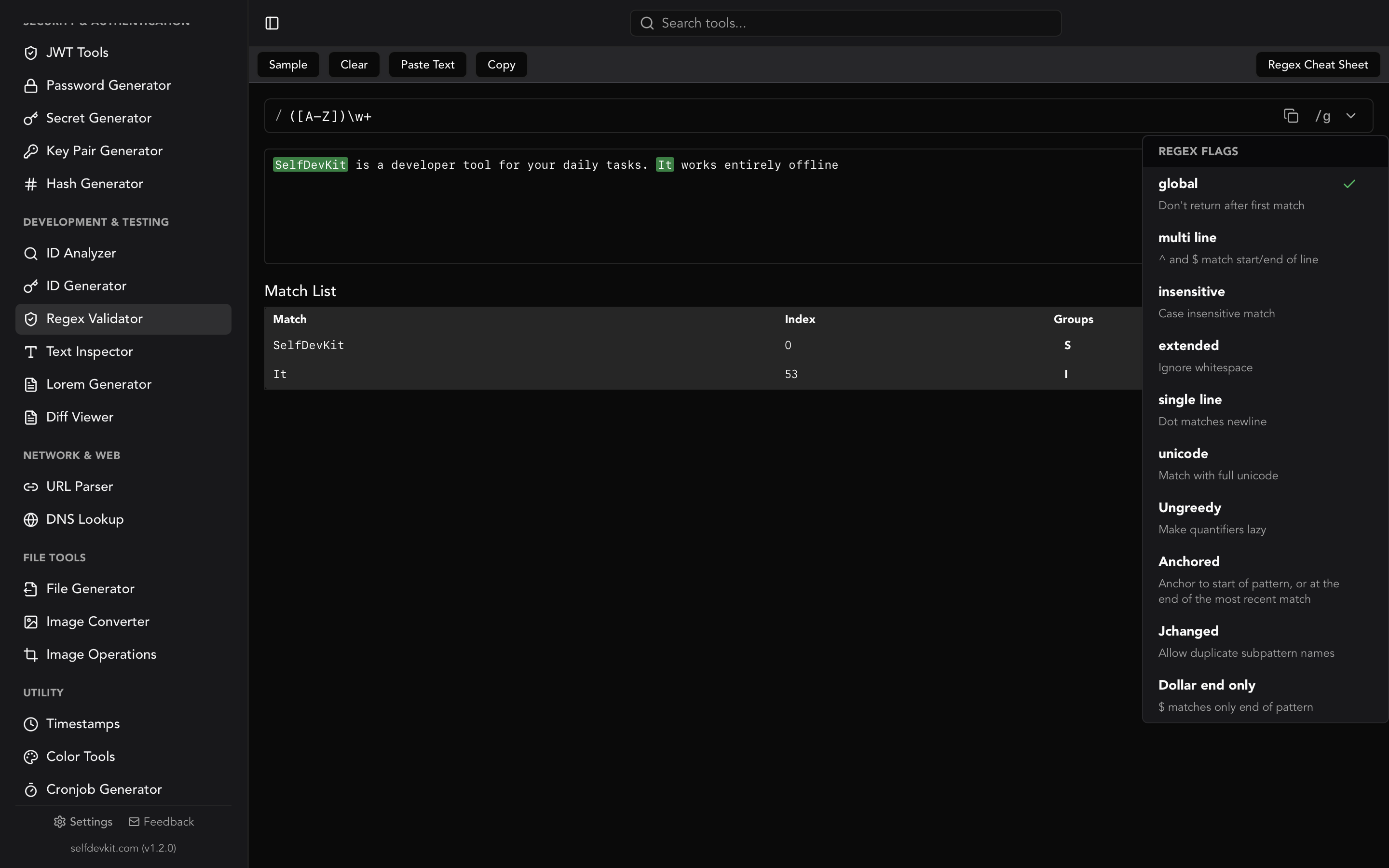
A cheat sheet is most useful in the two seconds between "I need a word boundary" and "does this engine call it \b?" That is why SelfDevKit ships the reference inside the tool: the Regex Validator has a built-in cheat sheet panel, flag toggles with plain-English labels, and live match highlighting with capture groups and match indices.
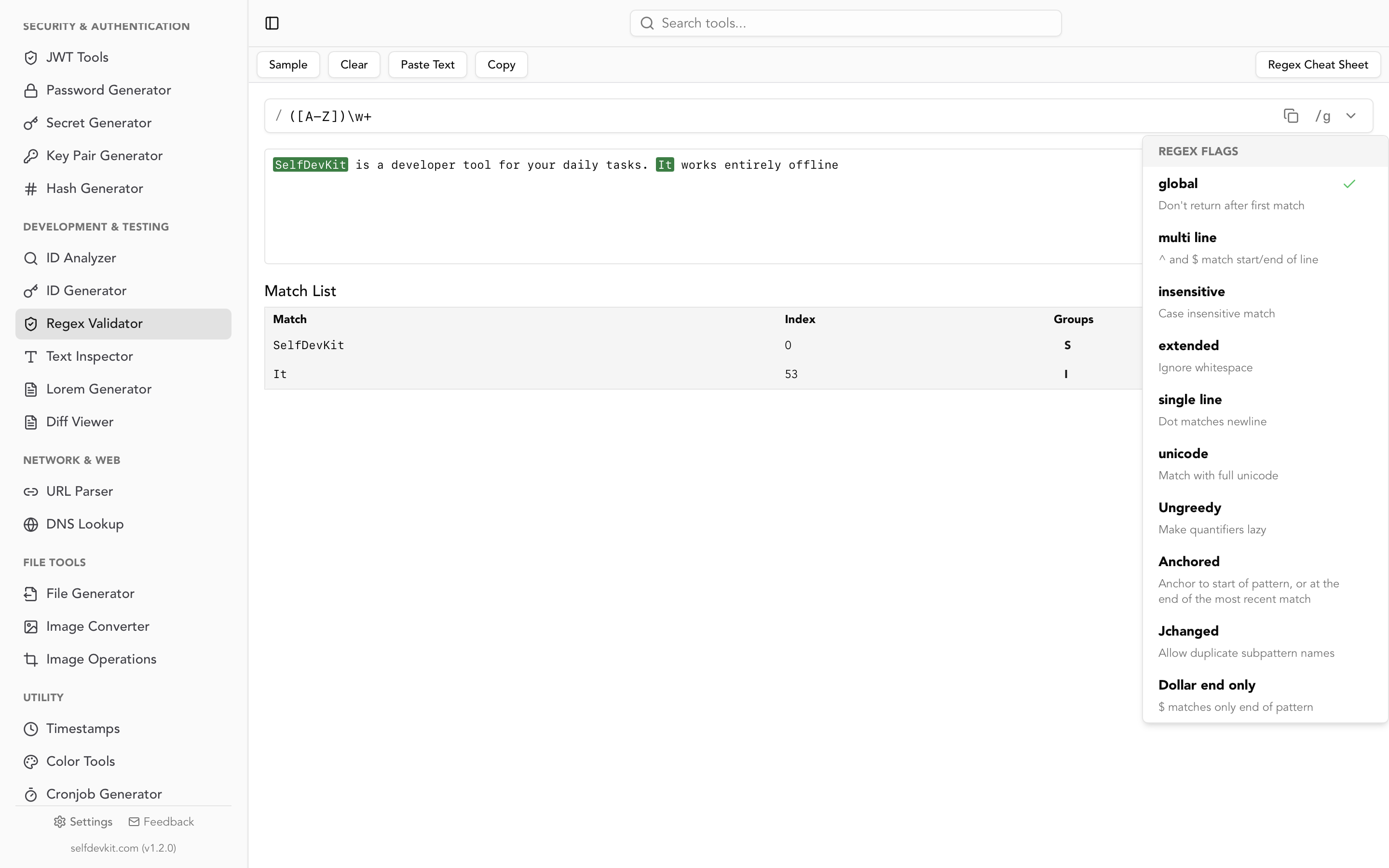
Two details matter for how you use it. First, the matching engine is the Rust regex crate, so patterns behave exactly like Go, ripgrep, and RE2: linear-time matching, no lookaround, no backreferences. If your pattern is destined for a Go service or a ripgrep invocation, testing it here catches the incompatibility immediately rather than in CI. If it is destined for JavaScript, use the flavor table above and verify the lookaround parts in your runtime.
Second, nothing leaves the machine. Regex work usually means pasting a sample of the data you are matching against, and that sample is often production log lines, customer emails, or an access token you are trying to extract. Online testers receive that payload on a server you do not control. A desktop app does not, which is the whole argument in why offline matters for developer tooling. For heavier text work on the same data, the text inspector gives you character counts, encoding checks, and line stats without a network round trip either.
Frequently asked questions
Why does my regex work in an online tester but not in my code?
Usually one of two reasons. The tester used a different engine, so a lookahead or backreference that worked there is unsupported in Go or Rust. Or the pattern survived the tester fine but got mangled by string escaping in your source file or config. Check the escaping table above first, then the engine table.
Which regex flavor should I learn from a cheat sheet?
Learn the PCRE-style syntax that JavaScript, Python, Java, and .NET share, since that covers most application code. Then memorize two exceptions: POSIX tools like grep and sed have no \d, and RE2-based engines like Go and Rust have no lookaround or backreferences.
Is \d the same as [0-9]?
Not always. In Python, .NET, and Rust, \d matches any Unicode decimal digit, including Arabic-Indic and Devanagari numerals. In JavaScript, Go, and Java it is ASCII [0-9] by default. If you mean exactly the ASCII digits, write [0-9] and remove the ambiguity.
How do I make a regex faster?
Replace lazy quantifiers with negated character classes ([^>]+ instead of .+?), anchor the pattern so it fails early, and avoid nesting quantifiers inside groups. If you need a hard guarantee against pathological input, use an engine with linear-time matching. The regex tester guide has the full pattern library if you want worked examples.
Try the cheat sheet where you actually work
Copying a pattern from a web page into a tester into your editor is three chances to lose a backslash. Keeping the reference, the tester, and the flag toggles in one offline window removes all three.
Download SelfDevKit to get the Regex Validator plus 50+ other developer tools, offline and private.