What does a SQL query formatter do?
A SQL query formatter re-prints a query with consistent line breaks, indentation, and keyword casing without changing what the query does. It rearranges whitespace only, so the formatted query and the original produce identical results and identical execution plans.
Most articles about a SQL query formatter assume you wrote the query. You did not. The queries that actually need formatting are the ones that arrive as a single 4,000-character line: pulled out of a JSON log entry, printed by an ORM at 2 AM, copied from pg_stat_statements, or inherited from an engineer who left two years ago. Those queries need more than a beautify button. They need unescaping, placeholder handling, and a reading strategy.
This post covers that workflow end to end.
Table of contents
- Where unreadable SQL actually comes from
- What a SQL query formatter changes, and what it must not
- Step 1: get the query out of the log line
- Step 2: decide what to do with the placeholders
- Step 3: read the formatted query in execution order
- Formatting queries for EXPLAIN work
- When the formatter chokes on generated SQL
- Get readable SQL from your ORM instead of the log
- The privacy problem with logged queries
- Frequently asked questions
- Format your SQL where the data already lives
Where unreadable SQL actually comes from
Unreadable SQL almost always has a machine as its author. Something serialized a query into a single line for transport or storage, and formatting is the act of reversing that. Knowing the source tells you what cleanup the query needs before a formatter can help.
| Source | What the SQL looks like | Cleanup needed first |
|---|---|---|
| ORM debug log (Hibernate, ActiveRecord, SQLAlchemy) | One line, lowercase, machine aliases like o1_0 |
Usually none, sometimes unescaping |
| Structured JSON app log | SQL embedded in a JSON string with \" and \n |
JSON unescaping |
| MySQL slow query log | Multi-line, prefixed with # comment headers |
Strip the header lines |
pg_stat_statements |
Constants replaced with $1, $2 |
Decide how to handle placeholders |
| BI tool or dbt compiled output | Deeply nested CTEs, thousands of lines | Nothing, but expect volume |
| SQL string concatenated in app code | Missing spaces at concatenation seams | Fix the seams before parsing |
| Legacy stored procedure | Tabs, mixed casing, dialect-specific syntax | Pick the right dialect |
The pattern worth noticing: five of those seven need a step that has nothing to do with formatting. Paste them straight into a formatter and you get an error, or worse, silently wrong output. That is why "just use a beautifier" is incomplete advice.
What a SQL query formatter changes, and what it must not
A SQL query formatter changes whitespace, line breaks, and keyword casing. It must not change the tokens themselves, the order of clauses, or anything that affects semantics. A formatter that rewrites SELECT * into an explicit column list is not a formatter; it is a refactoring tool, and it will eventually break something.
Here is a real Hibernate-style log line:
select o1_0.id,o1_0.created_at,o1_0.customer_id,c1_0.email,c1_0.name,o1_0.status,o1_0.total_cents from orders o1_0 join customers c1_0 on c1_0.id=o1_0.customer_id where o1_0.status=? and o1_0.created_at>=? order by o1_0.created_at desc limit ?
After formatting:
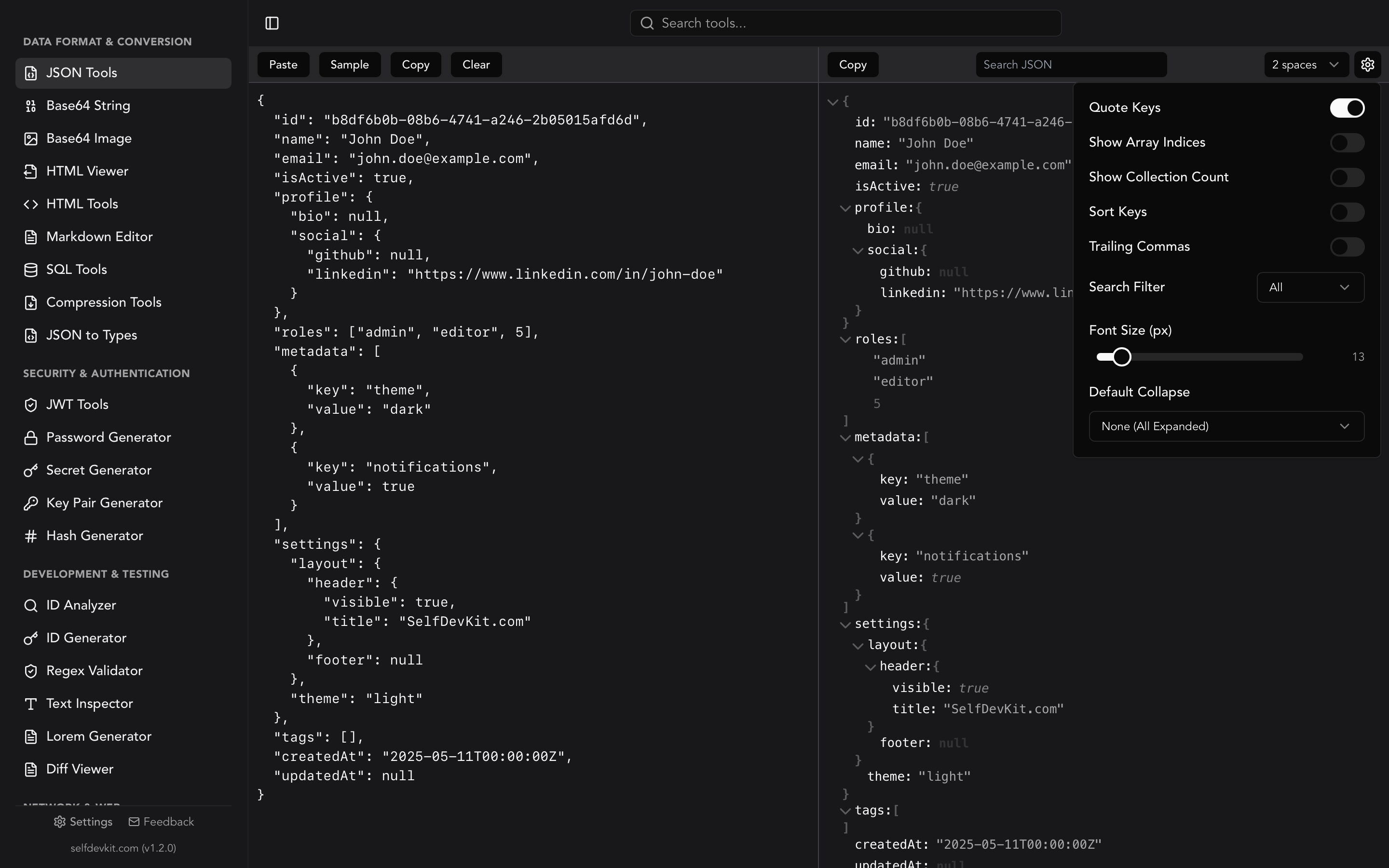
SELECT
    o1_0.id,
    o1_0.created_at,
    o1_0.customer_id,
    c1_0.email,
    c1_0.name,
    o1_0.status,
    o1_0.total_cents
FROM
    orders o1_0
    JOIN customers c1_0 ON c1_0.id = o1_0.customer_id
WHERE
    o1_0.status = ?
    AND o1_0.created_at >= ?
ORDER BY
    o1_0.created_at DESC
LIMIT
    ?
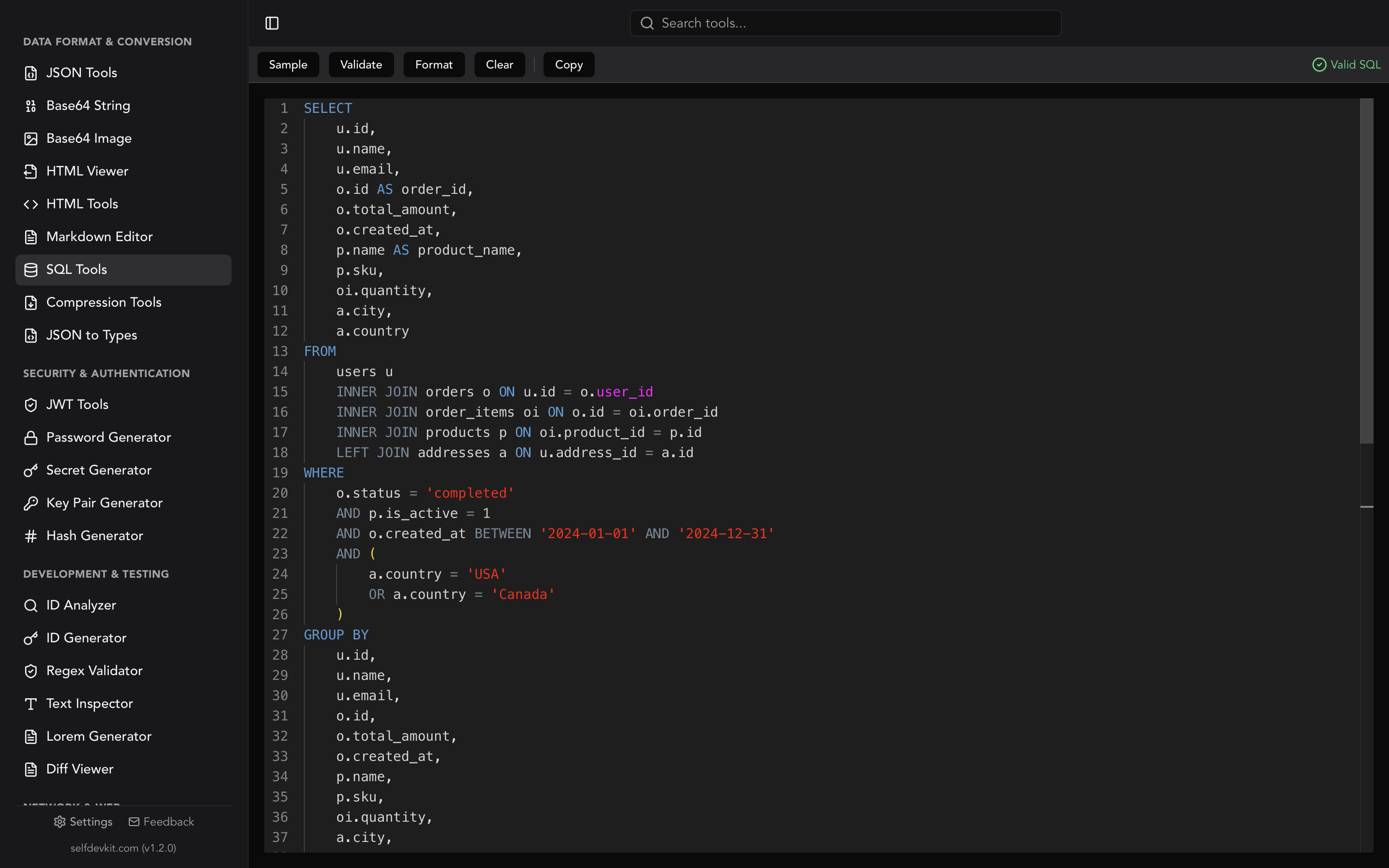
Same query. Same plan. But now you can see in one glance that the join is on customer_id, that two of the seven selected columns come from customers, and that the filter is a status plus a date range. That is the entire value proposition: the formatter converts a parsing problem into a scanning problem.
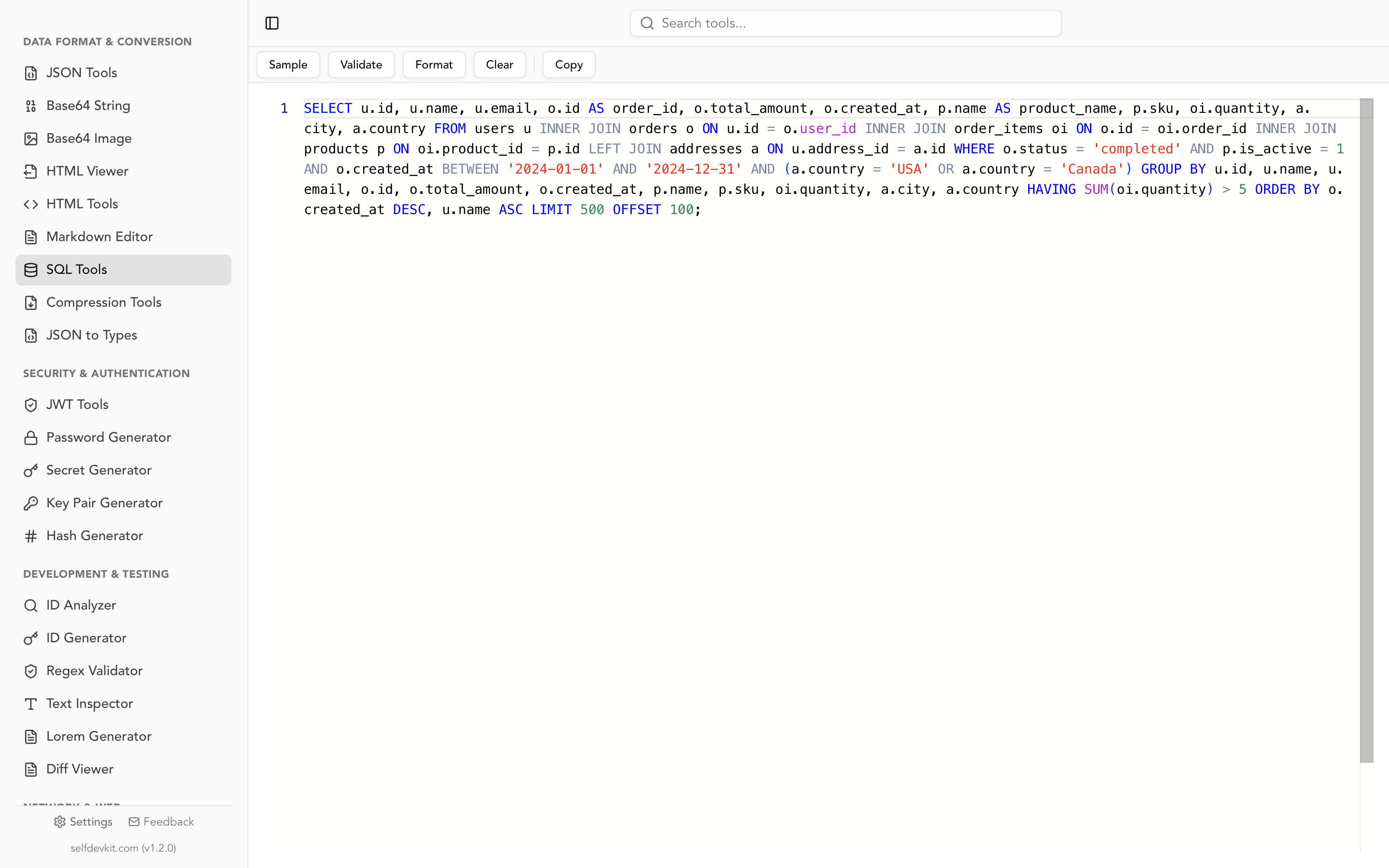
SelfDevKit's SQL formatter and validator does this locally with 4-space indentation and uppercase keywords, and it validates the query first so you find out immediately if what you pasted is not parseable SQL. For a deeper look at the mechanics of tokenizers versus parsers and why dialect selection matters, see how SQL formatters work and where they break.
Step 1: get the query out of the log line
Extract the SQL string from its container before formatting, because JSON escaping will break most SQL parsers. A query stored inside a JSON log field arrives with " rendered as \" and newlines rendered as the two characters \ and n. A formatter sees \ as an unexpected token and gives up.
A typical structured log line looks like this:
{"level":"debug","ts":"2026-07-29T09:14:02Z","msg":"query","duration_ms":812,"sql":"SELECT o.id, o.total_cents FROM orders o WHERE o.status = 'shipped' AND o.created_at >= '2026-07-01'"}
Pull out the slow ones with jq:
jq -r 'select(.duration_ms > 500) | .sql' app.log | head -20
Or do the extraction and the formatting in one pass with Python:
import json
import sqlparse

with open("app.log") as fh:
    for line in fh:
        entry = json.loads(line)
        if entry.get("msg") != "query":
            continue
        print(sqlparse.format(entry["sql"], reindent=True, keyword_case="upper"))
        print("-" * 60)
json.loads handles the unescaping for you. If you only have the escaped string and not the surrounding object, the fastest fix is to wrap it in quotes and parse it as a JSON string, which is the same trick described in the guide to unescaping JSON strings. SelfDevKit's JSON tools will do the unescape step in the same app you are about to format the SQL in, which saves a browser round trip.
Two other extraction gotchas worth knowing:
MySQL slow query log entries carry a comment header before the statement. Lines starting with # contain query time, lock time, and rows examined. Most formatters preserve comments fine, but the SET timestamp=...; line that MySQL injects will be formatted as a separate statement. Strip it before you paste. The MySQL slow query log documentation explains the full header format.
Terminal copies wrap lines. Copying a long query out of a psql pager or a Docker log viewer can insert hard line breaks in the middle of string literals. If your formatter reports an unterminated string and the query looks fine, that is usually why.
Step 2: decide what to do with the placeholders
Formatters treat parameter placeholders as opaque tokens, so ?, $1, and :name all survive formatting intact. The question is whether you want them to. You have three options, and they have very different risk profiles.
Leave the placeholders. Best when you are reading the query to understand its shape. The structure is what matters, not the values. This is the default and it is the right choice most of the time.
Substitute values manually for a one-off EXPLAIN. You need concrete values to get a real plan. Type them yourself into a scratch copy rather than automating the substitution, and never feed the result back into application code.
Ask the ORM to inline the values. Every ORM offers this, and every ORM warns you about it. SQLAlchemy's literal_binds documentation is blunt: the method of escaping is "insecure, incomplete and for debugging purposes only," and executing statements with inline-rendered user values is described as extremely insecure. That warning applies to the equivalent feature in every other ORM too. Treat inlined SQL as a read-only debugging artifact. Details are in the SQLAlchemy SQL expressions FAQ.
One placeholder style deserves special mention. PostgreSQL's pg_stat_statements extension normalizes queries by replacing literal constants with $1, $2, and so on, so that queries differing only in their constants share a single statistics row. Long IN lists get collapsed into a distinctive marker:
SELECT * FROM test WHERE a IN ($1 /*, ... */)
That /*, ... */ is a comment, not valid parameter syntax, and it is telling you the original query had a variable-length list. Keep it. It is the most useful part of the line when you are hunting for a query that occasionally passes 10,000 IDs. The pg_stat_statements documentation covers the normalization rules and the stability caveats around queryid.
Pull the worst offenders and format them in a batch:
SELECT queryid, calls, round(mean_exec_time::numeric, 1) AS mean_ms, query
FROM pg_stat_statements
ORDER BY total_exec_time DESC
LIMIT 10;
Step 3: read the formatted query in execution order
Read a formatted query in the order the database evaluates it, not the order it is written. SQL is written SELECT ... FROM ... WHERE, but it is evaluated roughly FROM, then WHERE, then GROUP BY, then HAVING, then SELECT, then ORDER BY, then LIMIT. Reading top to bottom is why long queries feel impenetrable: the first thing you read is the last thing that happens.
A repeatable pass for a query you have never seen:
- Start at
FROMand the joins. Build a mental picture of the row shape. How many tables, what is the grain, are any of the joinsLEFT? ALEFT JOINfollowed by aWHEREclause on the right-hand table is the single most common silent bug in inherited SQL, because it turns the outer join back into an inner join. - Read
WHEREnext. This tells you the selectivity story. Which predicates are constant, which are parameters, which are functions applied to columns?WHERE date(created_at) = $1is a formatted-and-obvious index killer that is invisible on one line. - Check
GROUP BYandHAVING. These define the output grain. If the grain here differs from what you inferred at step one, there is a fan-out somewhere and your aggregates are probably inflated. - Now read
SELECT. By this point the column list is just labeling. Aggregate functions and window functions are the only parts that still need thought. - Finish with
ORDER BYandLIMIT. AnORDER BYon a non-indexed expression with a smallLIMITis a classic cause of a fast-looking query that scans everything.
This ordering only works on formatted SQL. One clause per line is what makes step two a two-second scan instead of a character hunt. If you also need to compare two versions of the same query, format both with identical settings first, then run them through a diff viewer. Unformatted diffs of SQL are noise; the technique is covered in more detail in the diff checker guide.
Formatting queries for EXPLAIN work
Format the query before you run EXPLAIN, because a consistent layout is what lets you map plan nodes back to source clauses. PostgreSQL's plan output is a tree read from the innermost node outward, and matching a Nested Loop or Hash Join node to the join that produced it is guesswork on a single-line query.
A workflow that holds up on large queries:
EXPLAIN (ANALYZE, BUFFERS)
SELECT ...
Then, working from the most expensive node upward, find the corresponding line in the formatted SQL and annotate it with a comment:
FROM
    orders o
    -- Seq Scan, 2.1M rows, 840ms  <-- the problem
    JOIN order_items oi ON oi.order_id = o.id
    JOIN customers c ON c.id = o.customer_id
Comments survive formatting, so you can re-format after annotating without losing your notes. This turns a plan-reading session into a document you can paste into a pull request. PostgreSQL's Using EXPLAIN chapter is the reference for interpreting the node types.
One caution: EXPLAIN needs real parameter values to produce a representative plan. A plan generated with a placeholder replaced by an unusually common value will look nothing like the plan for a rare value. If you inline values for this purpose, do it in a scratch buffer and throw it away afterward.
When the formatter chokes on generated SQL
Machine-generated SQL breaks formatters in three specific ways, and each has a fix.
Truncated log lines. Logging frameworks cap message length. A query cut off at 2,048 or 4,096 characters is not valid SQL, and the formatter will report a parse error somewhere near the end. Check the tail of what you pasted: if it ends mid-identifier or with unbalanced parentheses, you have a truncation, not a syntax problem. Raise the logger's max message size or read the query from the database's own statement view instead.
Enormous IN lists. An ORM that batches 12,000 IDs into a single IN clause will produce a formatted output of 12,000 lines, because most formatters put one list element per line past a certain width. That is technically correct and completely useless. Collapse the list first:
import re

def collapse_in_lists(sql, threshold=200):
    def replace(match):
        body = match.group(1)
        count = body.count(",") + 1
        return f"IN (/* {count} values */)"
    return re.sub(r"IN \(([^()]{%d,})\)" % threshold, replace, sql, flags=re.IGNORECASE)
You lose the values, which you did not want anyway, and keep the structure, which is what you were reading the query for.
Concatenation seams. SQL assembled from string fragments in application code frequently ends up as ...FROM ordersWHERE status = 'x' because a fragment was missing a trailing space. The formatter will parse ordersWHERE as a single identifier and produce output that looks fine but is wrong. This is the case where validation matters more than formatting. Running a real parser over the query catches the missing space; a pure whitespace formatter will not. The sql-formatter project is explicit that it is "a whitespace formatter," which is exactly why you should validate separately.
SelfDevKit validates before it formats, so a query with a concatenation seam surfaces as an error rather than as plausible-looking output.
Get readable SQL from your ORM instead of the log
The fastest fix for unreadable ORM SQL is to ask the ORM for it directly instead of scraping the log. Every major ORM exposes both the statement and, with an extra setting, the bound values.
| ORM | Get the SQL | Notes |
|---|---|---|
| Django | str(Model.objects.filter(...).query) |
Values are inlined but not properly quoted; connection.queries needs DEBUG=True |
| Rails ActiveRecord | Model.where(...).to_sql |
Values inlined; safe to read, not to execute |
| SQLAlchemy | stmt.compile(engine, compile_kwargs={"literal_binds": True}) |
Basic types only; LIMIT/OFFSET stay as parameters |
| Prisma | new PrismaClient({ log: ['query'] }) |
Query and params logged as separate fields |
| Hibernate 6 | hibernate.format_sql=true plus logging.level.org.hibernate.orm.jdbc.bind=trace |
The bind category changed name in Hibernate 6 |
Two practical notes. Django's answer to this is documented in the Django models FAQ, and it warns that the inlined values are not quoted correctly for execution. And Hibernate's own format_sql produces a layout that differs from the one most standalone formatters use, so if you are diffing Hibernate output against a hand-written query, run both through the same formatter rather than trusting the ORM's built-in pretty printer.
Once you have a clean query, the conventions for laying it out consistently across a team (keyword casing, leading versus trailing commas, indentation depth) are covered in the SQL formatter guide.
The privacy problem with logged queries
Queries pulled from production logs contain production data, which makes them categorically riskier to paste into a web tool than SQL you wrote yourself. This is the part that the tool pages ranking for this keyword never mention.
Consider what is in a single logged query with inlined values:
SELECT id, email, stripe_customer_id, plan_tier
FROM users
WHERE email = 'alice.mercer@acme-health.example'
  AND deleted_at IS NULL
That one line carries a real customer email address, the name of a real customer organization, the fact that you use Stripe, a plan_tier column that maps to your pricing model, and a soft-delete convention. A handwritten query leaks schema. A logged query leaks schema plus actual records.
Now multiply that by the fifty slow queries you dumped out of the log to triage an incident. Pasting that batch into an online formatter means transmitting personal data to a third party you have no agreement with, and many of those tools process server-side, which means the query text hits their logs too. If your organization has any kind of data processing agreement policy, that paste is a reportable event, not a convenience.
The mitigation is straightforward: format locally. A desktop tool that never opens a socket cannot leak the query, regardless of what is in it. That is the reasoning laid out in why offline matters for developer tools, and it applies with unusual force to SQL. If you want a comparison of what the browser-based options do with your input, see the breakdown of online SQL formatters.
For the middle ground, redact before you format. Replace literal values with placeholders using the same normalization pg_stat_statements performs, and you get a query that is safe to share in a ticket and still readable enough to debug. SelfDevKit's text inspector is useful for spotting the literals you missed before the query leaves your machine.
Frequently asked questions
Does a SQL query formatter change how my query executes?
No. A formatter changes whitespace, line breaks, and keyword casing only. The parsed statement is identical, so the execution plan and results are identical. The one exception is a tool that advertises rewriting or optimization features, which is a different category of product and should be treated as one.
Can I format a query that still contains ? or $1 placeholders?
Yes. Formatters treat placeholders as ordinary tokens and preserve them. Some formatters let you declare which placeholder styles to expect so they are not mistaken for other syntax; sql-formatter exposes this through its paramTypes option for positional, numbered, and named parameters.
Why does my formatter fail on a query I copied from the logs?
Almost always one of three causes: the log line was truncated at a size limit, the SQL is still JSON-escaped with \" sequences, or a terminal or log viewer inserted a hard line break inside a string literal. Check the end of the query first, since truncation is the most common and the easiest to confirm.
How do I handle a generated query that is 10,000 lines after formatting?
Collapse the long IN lists into a count comment before formatting, and format the query with the outer structure only. If the query came from an ORM, it is usually faster to look at the ORM call that produced it than to read the generated SQL, since the generated form deliberately trades readability for correctness.
Format your SQL where the data already lives
The queries that most need a SQL query formatter are the ones carrying real customer data out of a production log. Those are exactly the queries that should never be pasted into a browser tab.
SelfDevKit's SQL tools validate and format queries entirely on your machine, alongside JSON tools for unescaping log lines and a diff viewer for comparing query versions. No upload, no request, no third-party log entry with your customers' email addresses in it.
Download SelfDevKit and get 50+ developer tools in one offline desktop app, with a one-time license rather than a subscription.