What is a diff checker?
A diff checker is a tool that compares two versions of text, code, or data and highlights exactly what changed between them. It marks added lines, removed lines, and modified content so you can see differences at a glance instead of reading every line by hand.
A diff checker is one of those tools every developer uses constantly, often without naming it. You use one every time you review a pull request, resolve a merge conflict, or figure out why a config that worked yesterday broke today. Yet most people only know the diff checker built into GitHub, or the first web tool that pops up in search.
There is a lot more to it. Diff checkers come in different flavors, use different algorithms, and carry very different privacy tradeoffs depending on where they run. This guide covers what a diff checker actually does, the main types you will encounter, how to read their output, and how to compare sensitive text and code without shipping it to a stranger's server.
Table of contents
- What a diff checker does
- The main types of diff checkers
- How a diff checker works under the hood
- How to read diff checker output
- When developers reach for a diff checker
- Online diff checkers and the privacy problem
- How to choose the right diff checker
- Frequently asked questions
What a diff checker does
A diff checker takes two inputs, usually labeled "original" and "modified," and computes the smallest set of changes that turns one into the other. Instead of forcing you to scan two blocks of text line by line, it surfaces every difference visually: additions in green, deletions in red, and unchanged content left as context.
The value is speed. A single changed character buried in a 400-line file can cost you ten minutes of squinting. A diff checker finds it in a fraction of a second. That is why the operation sits at the center of version control, code review, deployment debugging, and document editing.
The core idea is old. The Unix diff command shipped in 1974, and the word "diff" itself comes from that utility. Everything since, from GitHub's file view to modern web comparison tools, is a refinement of the same concept: compute the difference, then present it clearly.
The main types of diff checkers
Diff checkers are not all the same. The right one depends on what you are comparing, because "difference" means something different for prose than it does for JSON or an image. Here are the main categories developers run into.
Text diff checker
A text diff checker compares two blocks of plain text line by line. This is the most common and general-purpose type. It handles documentation, log files, notes, and anything without a rigid structure. Word-level highlighting makes it especially useful for prose, where line breaks are arbitrary and you care about which words changed. For a deeper walkthrough, see our full guide on how to text compare two documents.
Code diff checker
A code diff checker is a text diff tuned for source code. It respects line structure, often adds syntax highlighting, and understands that a moved block of code is a common and meaningful event. This is the type behind git diff and every pull request view. If you want to master reading raw diff output, our code diff checker guide breaks down the unified diff format line by line.
Semantic (structured data) diff checker
A semantic diff checker understands the structure of the data instead of treating it as plain text. This matters enormously for formats like JSON, YAML, and XML, where key order is often meaningless but a plain text diff will flag it as a change. A semantic diff for JSON knows that {"a":1,"b":2} and {"b":2,"a":1} are equivalent. Our JSON compare guide covers this distinction in detail.
Image and binary diff checker
Image diff tools compare two images pixel by pixel and highlight regions that changed, which is invaluable for visual regression testing. Standard text diff checkers cannot do this. When Git encounters a binary file, it simply reports "Binary files differ" rather than attempting a line comparison. Binary comparison needs specialized tooling.
File and folder diff checker
Beyond comparing two snippets, folder diff tools compare entire directory trees, showing which files were added, removed, or modified across two versions of a project. These are common in backup verification, deployment audits, and migration checks.
| Diff checker type | Best for | Key trait |
|---|---|---|
| Text | Docs, logs, notes | Line and word level highlighting |
| Code | Source files, PRs | Syntax aware, unified diff output |
| Semantic | JSON, YAML, XML | Ignores irrelevant key ordering |
| Image | Visual regression | Pixel level comparison |
| Folder | Directory trees | Shows per-file add/remove/change |
Most day-to-day work happens with text and code diff checkers, but knowing the other categories exist saves you from forcing the wrong tool onto the wrong job. A plain text diff of two reordered JSON objects will drown you in false positives.
How a diff checker works under the hood
A diff checker works by computing the shortest edit script: the fewest insertions and deletions needed to transform the first input into the second. The dominant approach is the Myers diff algorithm, published by Eugene W. Myers in 1986 and still the default in Git today.
Myers models the comparison as a graph traversal. Matching lines become "free" diagonal moves, while insertions and deletions are horizontal and vertical steps that carry a cost. The algorithm searches for the path with the fewest costly steps. Its time complexity is O(ND), where N is the combined size of both inputs and D is the number of differences, so when two versions are similar it runs in near-linear time.
Other algorithms exist for cases where Myers produces confusing results:
| Algorithm | Best for |
|---|---|
| Myers | General purpose, Git default |
| Patience | Code with large moved blocks |
| Histogram | Files with many duplicate lines |
You can switch between them in Git with git diff --diff-algorithm=patience or git diff --histogram. For most comparisons the default is fine, but if a diff looks tangled and hard to follow, trying Patience often produces cleaner output.
How to read diff checker output
Diff checker output uses a small, consistent vocabulary. Once you learn it, you can read any diff regardless of which tool produced it. The standard is unified diff format, which you see in git diff, pull requests, and patch files.
Here is a short example comparing two versions of a config file:
--- a/config.yaml
+++ b/config.yaml
@@ -2,6 +2,6 @@
 server:
   host: localhost
-  port: 8080
+  port: 3000
-  debug: true
+  debug: false
   timeout: 30
Three things to read:
File headers. The --- line is the original, the +++ line is the modified version.
Chunk header. The @@ -2,6 +2,6 @@ marks where the change lives. It reads as "starting at line 2, six lines shown" for both versions.
Change markers. Lines starting with - were removed. Lines starting with + were added. Lines with no prefix are unchanged context, included so you can orient yourself.
That is the entire format. A graphical diff checker shows the same information with colors and side-by-side panes instead of prefixes, but the underlying meaning is identical. For multi-hunk diffs and more complex examples, our guide to reading diff output goes deeper.
When developers reach for a diff checker
A diff checker is not a once-a-week tool. It shows up across the entire development cycle. Here are the situations where it earns its keep.
Debugging a broken deploy
Something worked yesterday and is broken today. You suspect a config change. Pull the previous version and the current version into a diff checker, and the culprit jumps out. A single flipped boolean or a changed port number is invisible in raw text but obvious in a diff. This is especially common with JSON configuration files, where a misplaced value inside a deeply nested object hides easily.
Reviewing code before merge
Every pull request is a diff. Reading it well is a core review skill. Being fluent in diff output means you catch unintended changes, spot logic that slipped in alongside a refactor, and comment precisely on the lines that matter.
Verifying a refactor
After reorganizing a function, you want proof that you changed only structure and not behavior. Diff the old and new versions to confirm no logic drifted while you were moving things around.
Comparing API responses
When an API changes its response shape, a diff tells you exactly what was renamed, added, or removed. Format both responses with consistent indentation first, then compare. Without formatting both sides, whitespace noise buries the real changes. SelfDevKit's JSON tools can normalize both responses before you diff them.
Checking database migrations
Migrations are high-stakes. Comparing the before and after state of a SQL schema catches destructive changes, such as a dropped column or an altered type, before they reach production.
The recurring pattern across all of these: format first, then diff. Comparing minified or inconsistently formatted text produces noisy diffs full of whitespace changes that hide the actual modifications.
Online diff checkers and the privacy problem
Most online diff checkers send or expose your text in a browser environment you do not control, which is a real concern when the content is sensitive. Some tools genuinely process everything client-side, and their marketing says so. But "runs in your browser" is not the same as "private." Third-party analytics scripts, ad networks, and browser extensions on the same page can read the contents of a text area.
Think about what you routinely paste into a diff checker:
- Configuration files with database credentials and API keys
- JWT tokens carrying user claims and secrets
- SQL migrations that expose your database schema
- API responses containing customer names, emails, and IDs
- Source code under an NDA
- URL strings with embedded session tokens
Even when the diff tool itself is trustworthy, the page it lives on may not be. And for teams under SOC 2, HIPAA, or GDPR obligations, pasting customer data or credentials into a third-party website is often a direct policy violation, not just a bad habit.
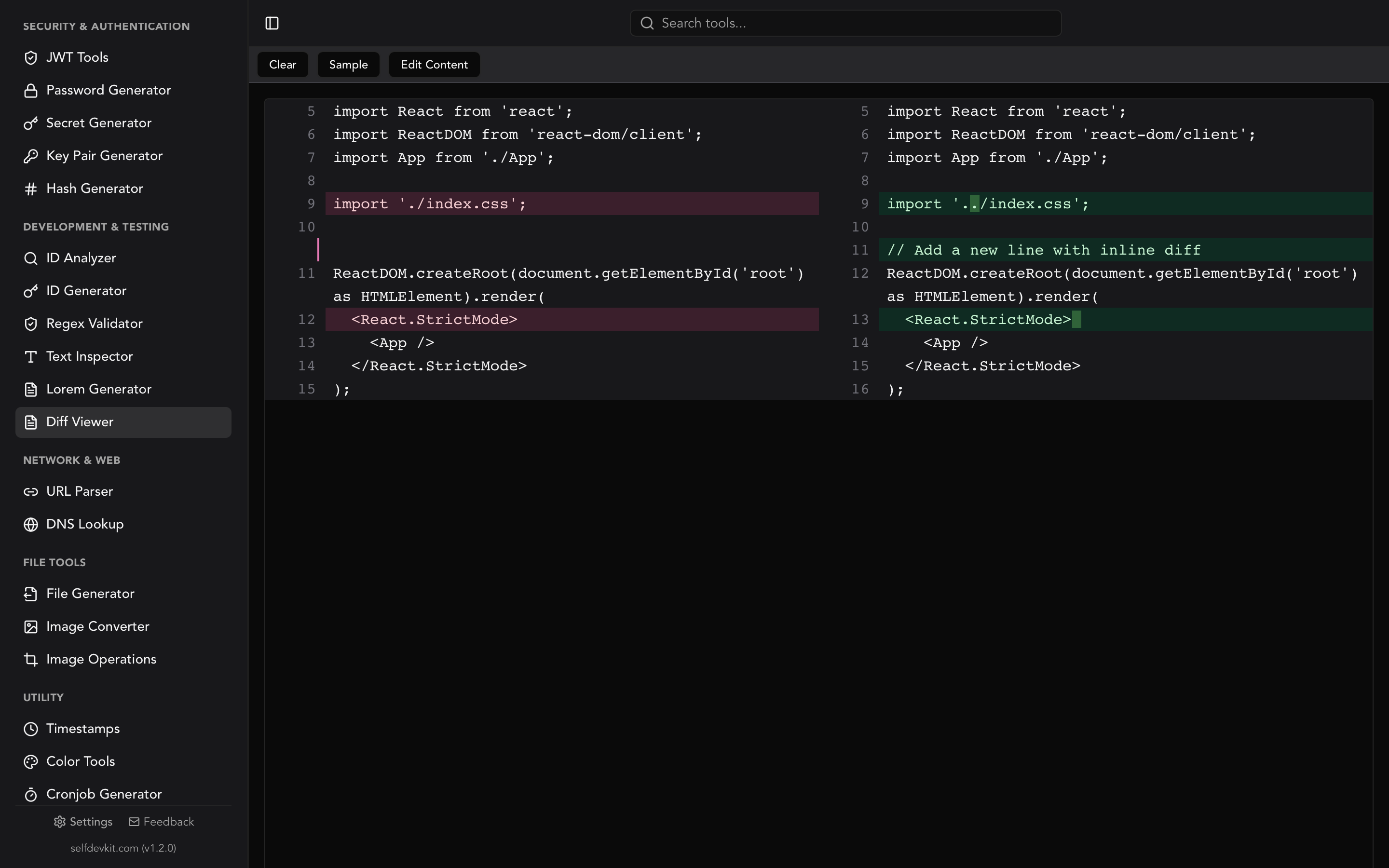
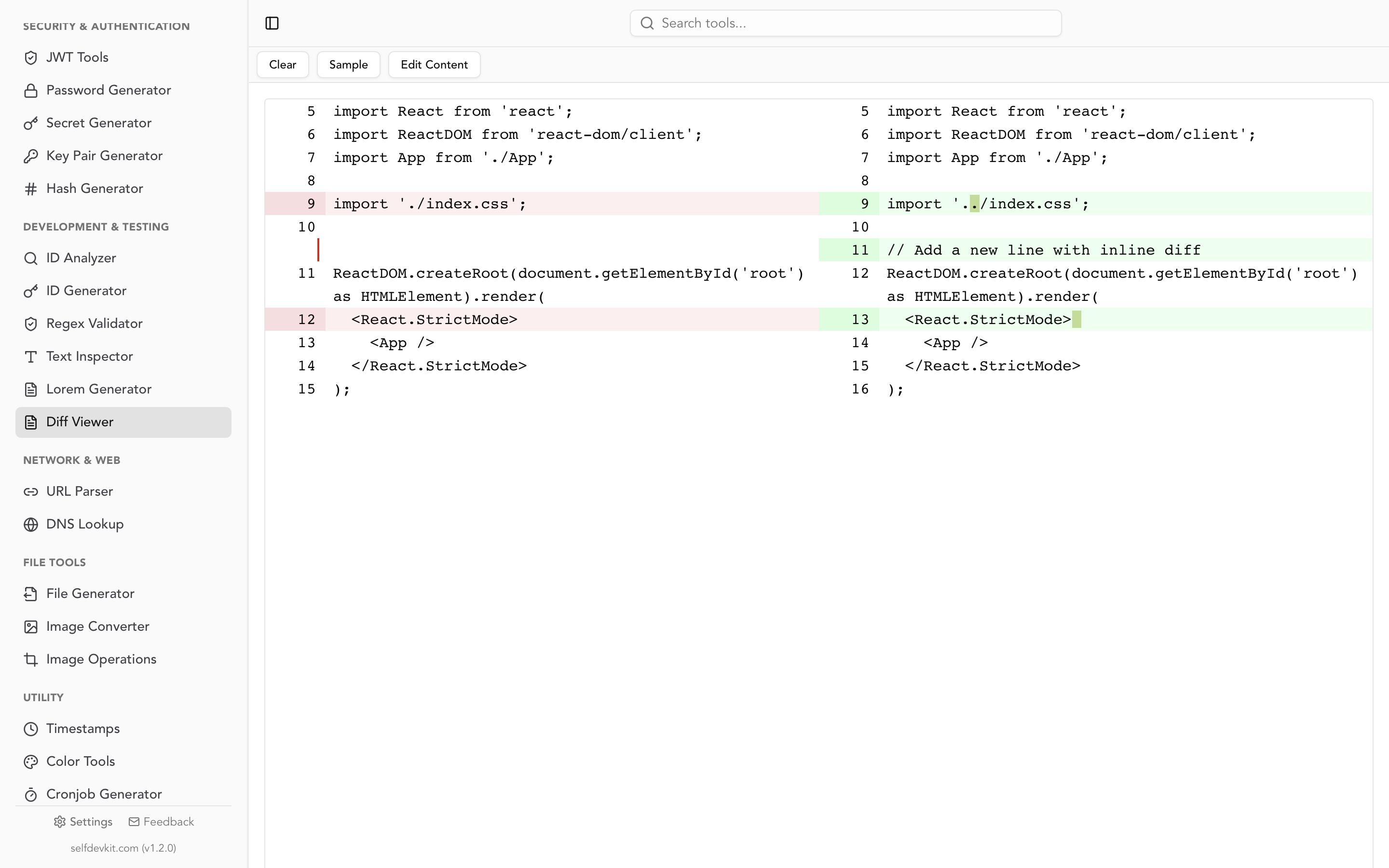
An offline diff checker removes the entire category of risk. There are no network requests, no third-party scripts, and no ambiguity about where your data goes. SelfDevKit's Diff Viewer runs as a native desktop application that compares everything locally, with editing on both sides and real-time highlighting. Your text never leaves your machine. For more on why local-first tooling matters, see our take on why offline developer tools are worth it.
How to choose the right diff checker
The best diff checker depends on the content, the sensitivity of the data, and how often you run the comparison. Here is a practical decision matrix.
| Scenario | Best choice | Why |
|---|---|---|
| Quick paste-and-compare of two snippets | Desktop app (SelfDevKit) | No file creation, instant, private |
| Files already in a repo | git diff |
Built into version control |
| Comparing across servers | diff over SSH |
Scriptable and remote-friendly |
| Automated tests | Language library (difflib, jsdiff) | Integrates with assertions |
| JSON or YAML structures | Semantic diff | Ignores irrelevant key ordering |
| Sensitive or proprietary content | Offline tool only | Data never leaves your machine |
For the everyday "compare these two things right now" case, the friction of creating temporary files just to run diff pushes most developers toward a web tool. A desktop diff checker removes that friction while keeping everything local. You paste two versions, see the differences instantly, edit either side, and nothing touches the network.
If your comparison work spans formats, having the diff checker sit alongside a JSON formatter, a SQL formatter, and a text inspector in one app means you can normalize before you compare without switching tools.
Frequently asked questions
What is the difference between a diff checker and a diff tool?
They are the same thing. "Diff checker," "diff tool," and "text compare" are all names for a utility that finds differences between two inputs. "Diff" originates from the Unix diff command released in 1974. The various names are just different search terms for identical functionality.
Can a diff checker compare more than two files at once?
Standard diff checkers compare exactly two inputs. For three-way comparison, common during merge conflicts, Git provides git diff3 and merge tools. For comparing whole directory trees, use diff -r (recursive) or a dedicated folder comparison tool that reports per-file additions, removals, and changes.
Why does my diff show every line as changed?
This almost always means line endings differ. Windows uses CRLF while macOS and Linux use LF, and a file edited across both can appear entirely changed. Use diff -w to ignore whitespace, or normalize line endings before comparing. Encoding mismatches, such as UTF-8 with and without a byte order mark, cause the same symptom.
Is it safe to paste confidential code into an online diff checker?
The safest answer is to avoid it. Even client-side tools run in a browser that may expose text areas to analytics scripts and extensions. For proprietary code, credentials, or customer data, use an offline diff checker like SelfDevKit that processes everything on your own machine with no network requests.
Try it yourself
Stop pasting configs, credentials, and proprietary code into browser tabs to find out what changed. SelfDevKit's Diff Viewer gives you side-by-side comparison, real-time highlighting, and editing on both sides, all running locally on your machine.
Download SelfDevKit to get a private diff checker alongside 50+ other developer tools, offline and free of subscriptions.