What is a word counter?
A word counter is a tool that analyzes text and reports the number of words, characters, sentences, paragraphs, and other statistics. Developers use word counters to check content against length limits, estimate reading time, calculate byte sizes for different encodings, and inspect text properties before processing.
Every developer hits a character limit eventually. Maybe it is a git commit message that should stay under 72 characters. Maybe it is an API field that truncates at 255 bytes. Maybe you are writing documentation and want to keep your README concise. A reliable word counter saves you from the guesswork.
But most online word counters are built for students and bloggers. They count words and call it a day. Developers need more: byte sizes, encoding detection, reading time estimates, and the confidence that their text is not being sent to someone else's server.
This guide covers how word counting works under the hood, practical code examples for counting words programmatically, the edge cases that trip up naive implementations, and where a desktop tool like SelfDevKit's Text Inspector fits into a developer workflow.
Table of contents
- How a word counter works
- What counts as a word? Edge cases that matter
- Code examples: counting words in 4 languages
- Beyond word count: metrics developers actually need
- Character limits every developer should know
- Why online word counters are a privacy risk
- Frequently asked questions
- Try it yourself
How a word counter works
A word counter splits text on whitespace boundaries and counts the resulting tokens. The simplest implementation in any language is a single line: split the string on spaces, tabs, and newlines, then count the array length.
Here is how the basic algorithm works:
- Take the input string
- Split on whitespace (spaces, tabs,
\n,\r) - Filter out empty tokens (handles consecutive spaces)
- The remaining array length is the word count
Character counting is simpler. Each element in the string is a character. But "character" gets complicated fast when Unicode enters the picture. The string "café" is 4 characters in most languages, but 5 bytes in UTF-8 because é is encoded as two bytes. The emoji "👨👩👧👦" looks like one character but is actually 7 Unicode code points joined by zero-width joiners.
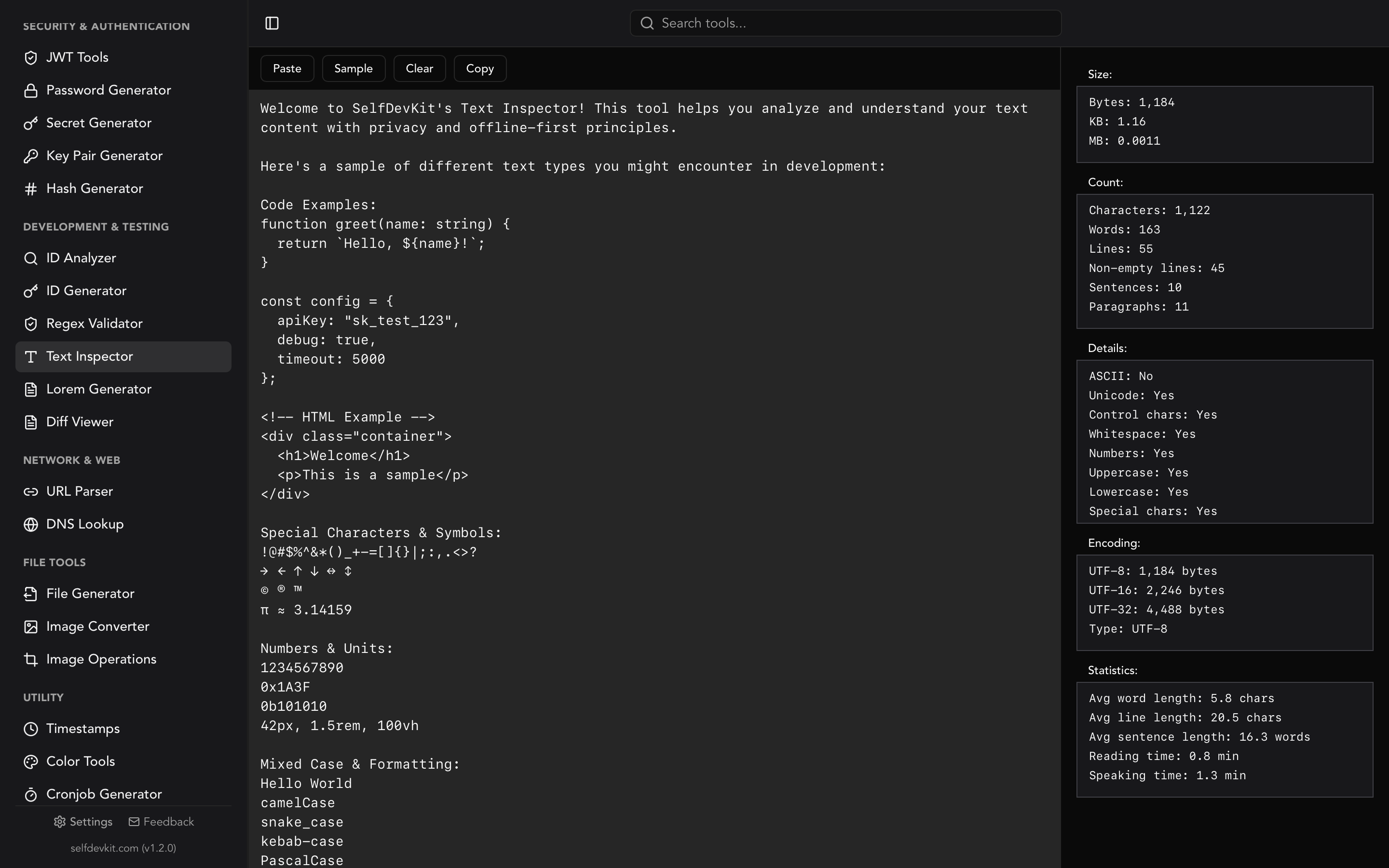
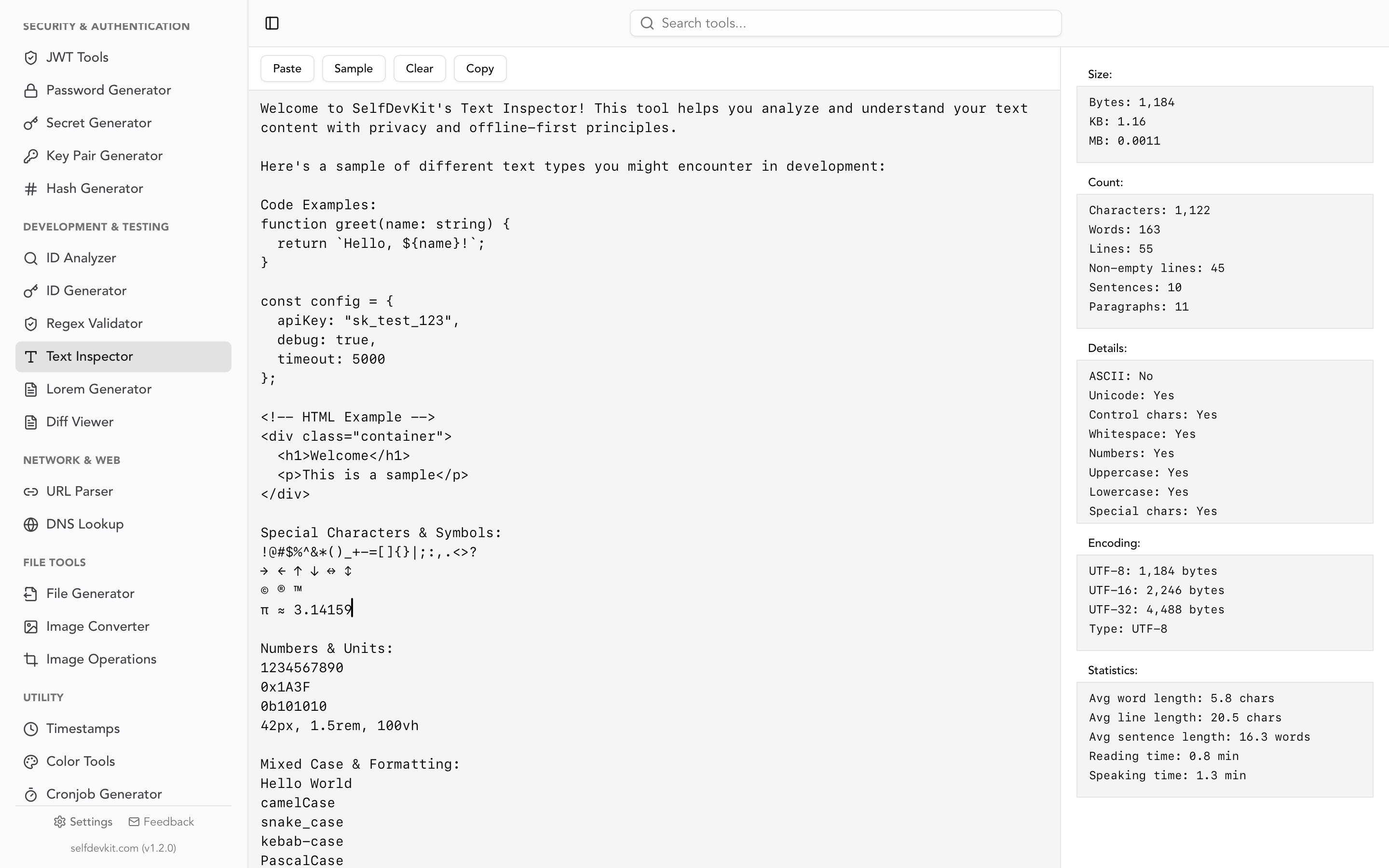
This is why a good word counter reports both character count and byte size. SelfDevKit's Text Inspector shows UTF-8, UTF-16, and UTF-32 byte sizes side by side, so you know exactly how much space your text occupies regardless of encoding.
What counts as a word? Edge cases that matter
Most word counters agree on the basics: "hello world" is two words. But real-world text is messy, and different tools produce different counts for the same input. Understanding these edge cases matters when you are validating against strict limits.
Hyphenated words
Is "well-known" one word or two? Most word counters treat it as one because there is no whitespace between the parts. The Unicode Text Segmentation standard (UAX #29) treats hyphenated compounds as single words, and most programming language split() functions agree.
CamelCase and code identifiers
getUserName is one word to a standard word counter. If you are counting words in source code comments versus code itself, this distinction matters. A variable like MAX_RETRY_COUNT is also one word by whitespace splitting, but three semantic words.
URLs and email addresses
A URL like https://example.com/path?query=value counts as a single word. Same with email addresses. This inflates average word length statistics but is technically correct by whitespace rules.
Contractions
"don't" is one word. "do n't" (with a space, as some NLP tokenizers produce) is two. Standard word counters count contractions as single words.
Multiple spaces and special whitespace
Consecutive spaces, tabs, and non-breaking spaces (\u00A0) can trip up naive implementations. A good word counter normalizes whitespace before splitting. SelfDevKit handles this correctly because it uses Rust's split_whitespace(), which splits on any Unicode whitespace character and automatically skips empty segments.
Numbers
Are numbers words? "I have 42 cats" is four words in virtually every word counter. But "3.14159" is one word. If you need to exclude numbers from your count, you will need a regex-based approach instead of simple splitting.
Unicode and internationalization
Word counting gets genuinely hard with languages that do not use spaces between words. Chinese, Japanese, and Thai text requires language-specific segmentation algorithms. The ICU library provides the standard implementation for this. For most developer use cases involving English or European languages, whitespace splitting works fine. But if your application supports CJK text and you need accurate word counts, you need a segmentation library, not a simple split().
Code examples: counting words in 4 languages
Counting words programmatically is straightforward, but each language has its nuances. Here are production-ready examples.
JavaScript
function countWords(text) {
  if (!text.trim()) return 0;
  return text.trim().split(/\s+/).length;
}

function textStats(text) {
  const words = text.trim() ? text.trim().split(/\s+/).length : 0;
  const chars = text.length;
  const charsNoSpaces = text.replace(/\s/g, '').length;
  const sentences = text.split(/[.!?]+/).filter(s => s.trim()).length;
  const paragraphs = text.split(/\n\n+/).filter(p => p.trim()).length;
  const readingTimeMin = (words / 200).toFixed(1);

  return { words, chars, charsNoSpaces, sentences, paragraphs, readingTimeMin };
}
The regex \s+ matches one or more whitespace characters, handling tabs, newlines, and multiple spaces. The trim() call prevents an empty first element if the text starts with whitespace.
Python
def count_words(text: str) -> int:
    return len(text.split())

def text_stats(text: str) -> dict:
    words = text.split()
    sentences = [s for s in text.split('.') if s.strip()]
    paragraphs = [p for p in text.split('\n\n') if p.strip()]

    return {
        'words': len(words),
        'characters': len(text),
        'characters_no_spaces': len(text.replace(' ', '')),
        'sentences': len(sentences),
        'paragraphs': len(paragraphs),
        'bytes_utf8': len(text.encode('utf-8')),
        'reading_time_min': round(len(words) / 200, 1),
    }
Python's str.split() without arguments splits on any whitespace and discards empty strings. It is the cleanest one-liner for word counting in any language.
Bash / CLI
# Count words in a file
wc -w README.md

# Count words, lines, and characters
wc README.md

# Count words in a string
echo "hello world" | wc -w

# Count words in all markdown files
find docs/ -name "*.md" -exec wc -w {} + | tail -1
The wc command is the original word counter, available on every Unix system since 1971. It uses a state machine that transitions between "in a word" and "not in a word" states as it reads each character. If you work with text comparison or diff workflows, combining wc with diff output gives you a quick measure of how much text changed between versions.
Go
package main

import (
    "strings"
    "unicode/utf8"
)

func countWords(text string) int {
    return len(strings.Fields(text))
}

func byteStats(text string) (int, int, int) {
    utf8Bytes := len(text)
    utf16Bytes := utf8.RuneCountInString(text) * 2
    utf32Bytes := utf8.RuneCountInString(text) * 4
    return utf8Bytes, utf16Bytes, utf32Bytes
}
Go's strings.Fields() is equivalent to Python's split(). It splits on Unicode whitespace and returns no empty strings. The utf8.RuneCountInString function gives you the true character count, not the byte count.
Beyond word count: metrics developers actually need
A plain word count is just the starting point. Developers working with text regularly need a richer set of metrics that most online word counters simply do not provide.
Reading and speaking time
Reading time is calculated at approximately 200 words per minute for average adult readers. Speaking time uses a slower rate of about 130 words per minute. These numbers come from research on reading speed that has been remarkably consistent across studies. If you are writing documentation, knowing that your README takes 8 minutes to read helps you decide whether to split it into sections.
SelfDevKit calculates both reading and speaking time automatically. Paste your text and get instant results.
Byte size across encodings
When you are working with databases, APIs, or network protocols, the byte size of your text matters more than the character count. A VARCHAR(255) column in MySQL counts bytes, not characters (in the default latin1 encoding). A single emoji can consume 4 bytes in UTF-8 and blow past a limit that seemed fine when you were only counting characters.
SelfDevKit's Text Inspector shows UTF-8, UTF-16, and UTF-32 byte sizes simultaneously. This is especially useful when you are dealing with internationalized content or need to verify that text fits within protocol-level byte constraints.
Encoding detection
Is your text pure ASCII? Does it contain Unicode characters? Control characters? These details matter when you are debugging encoding issues in APIs or processing JSON data. SelfDevKit detects whether your text is ASCII or UTF-8 and flags the presence of control characters, numbers, uppercase and lowercase letters, and special characters.
Average word and sentence length
Average word length in English is about 4.7 characters. If your text analyzer reports an average of 12, you probably have URLs or long technical terms inflating the count. Average sentence length affects readability. Sentences over 25 words become harder to parse. If you are writing developer documentation, keeping your average sentence length between 15 and 20 words hits the sweet spot between precision and readability.
Text composition analysis
Knowing what your text contains can surface problems before they reach production. Does your configuration file contain unexpected control characters? Is there a mix of uppercase and lowercase that suggests copy-paste errors? SelfDevKit reports boolean flags for ASCII, Unicode, control characters, whitespace, numbers, uppercase, lowercase, and special characters. This kind of composition breakdown is something you will not find in any online word counter built for bloggers.
If you need to compare two versions of a document and understand not just what changed but how the text composition shifted, combining the Text Inspector with SelfDevKit's Diff Viewer gives you a complete picture.
Character limits every developer should know
Word counting often leads to character counting. Here is a reference table of limits that developers frequently run into, organized by context.
Developer platform limits
| Context | Limit | Type |
|---|---|---|
| Git commit subject line | 50 chars (convention) | Characters |
| Git commit body line | 72 chars (convention) | Characters |
| GitHub issue title | 256 chars | Characters |
| GitHub PR description | 65,536 chars | Characters |
| npm package description | 255 chars | Characters |
| Docker image tag | 128 chars | Characters |
| Kubernetes label value | 63 chars | Characters |
| AWS Lambda env variable | 4 KB total | Bytes |
PostgreSQL TEXT |
Unlimited | N/A |
MySQL VARCHAR |
65,535 bytes | Bytes |
Social media and content limits
| Platform | Post limit | Best engagement |
|---|---|---|
| X (Twitter) | 280 chars | 71 to 100 chars |
| LinkedIn post | 3,000 chars | 1,200 to 1,600 chars |
| Instagram caption | 2,200 chars | Under 125 chars |
| TikTok caption | 4,000 chars | Under 150 chars |
| YouTube description | 5,000 chars | First 150 chars visible |
These limits matter when you are building software that posts to these platforms. Your validation logic needs to match the platform's counting rules. Twitter, for example, counts URLs as 23 characters regardless of actual length, and some emoji count as 2 characters. A simple text.length check will give you wrong answers.
If you are generating placeholder content for UI testing against these limits, the Lorem Ipsum generator in SelfDevKit can produce text of specific lengths. And if you need to generate secure API keys or test data alongside your content, SelfDevKit has tools for that too.
Why online word counters are a privacy risk
Every time you paste text into an online word counter, that text leaves your machine. Most popular word counters do not have clear data retention policies. Some explicitly state they "may use submitted content to improve services," which is a polite way of saying your text might end up in a training dataset.
This matters when you are counting words in:
- Internal documentation that describes proprietary architecture
- API specifications with endpoint details and authentication flows
- Client contracts or legal documents with confidential terms
- Configuration files that reveal infrastructure details
- Commit messages that reference internal ticket numbers and project names
Even something as innocent as a README can reveal your technology stack, team size, and development practices to anyone who cares to look.
SelfDevKit runs entirely on your desktop. The Text Inspector processes everything locally using native Rust code. No network requests, no server-side processing, no data collection. Your text never leaves your machine. This is the same offline-first approach that applies to every tool in SelfDevKit, from JSON formatting to diff viewing.
If you work in a regulated industry (healthcare, finance, government), using online tools to process even small amounts of text can create compliance headaches. An offline word counter removes that risk entirely.
Frequently asked questions
How do I count words in a file from the command line?
Use wc -w filename.txt on any Unix or macOS system. On Windows, use PowerShell: (Get-Content file.txt | Measure-Object -Word).Words. For multiple files, use wc -w *.md or pipe find results into wc. The wc command also supports -c for bytes, -m for characters, and -l for lines.
What is the difference between character count and byte count?
Character count measures the number of visible symbols in your text. Byte count measures storage size, which depends on encoding. In ASCII, one character equals one byte. In UTF-8, characters outside the ASCII range (accented letters, emoji, CJK characters) use 2 to 4 bytes each. A 100-character string with emoji could be 150 or more bytes in UTF-8. Database column limits often use bytes, not characters, so this distinction matters for data validation.
How is reading time calculated?
Reading time divides the total word count by an average reading speed. The standard rate is 200 words per minute for non-fiction, based on decades of research. Speaking time uses 130 words per minute, which reflects a comfortable presentation pace. SelfDevKit uses these same rates in its Text Inspector to give you instant reading and speaking time estimates.
Does SelfDevKit count words differently than online tools?
SelfDevKit splits text on Unicode whitespace using Rust's split_whitespace() method, which handles spaces, tabs, newlines, and non-breaking spaces correctly. Most online tools use similar logic. The difference is not in how words are counted but in what else you get: SelfDevKit also reports byte sizes across three encodings, encoding detection, text composition analysis (numbers, uppercase, special characters), and reading time. And it does all of this without sending your text anywhere.
Try it yourself
Paste any text into SelfDevKit's Text Inspector and get instant word count, character count, byte sizes, encoding details, and reading time. No signup, no network requests.
Download SelfDevKit to get 50+ developer tools, all offline and private.