
Most people searching for an API key example want one of two things: to confirm that the string they are staring at is really a key, or to find a sample key they can drop into a README, a test fixture, or a config file without causing a security incident. This guide covers both. Real formats from Stripe, GitHub, AWS, and Google, the regex that matches each one, the official placeholder keys those providers publish, and how to fabricate your own convincing fake without getting your push blocked.
There is a third problem nobody warns you about. A realistic example key in a committed file can trip secret scanners, and a real key in a public repo can get auto-revoked within minutes. We cover that too.
What is an API key example?
An API key example is a sample credential string formatted the way a specific provider issues its keys, typically a short type prefix followed by 20 to 40 random characters. Documentation examples such as AWS's
AKIAIOSFODNN7EXAMPLEare deliberately non-functional placeholders, so they illustrate the format without granting access to anything.
Table of contents
- What an API key example actually looks like
- API key examples from real providers
- The checksum hiding inside a GitHub key
- Safe sample keys you can paste into docs
- How to generate a fake API key for tests
- Where the example key goes in your project
- Why a realistic example key can break your build
- Finding API keys in your codebase with regex
- Frequently asked questions
What an API key example actually looks like
A typical API key example looks like sk_test_BQokikJOvBiI2HlWgH4olfQ2: a short prefix that names the key type, a separator, then a long block of random characters. Break that string into its parts and every modern key follows the same three-piece anatomy.
sk_test_BQokikJOvBiI2HlWgH4olfQ2
│  │    │
│  │    └── random body: 24 characters of CSPRNG output
│  └─────── environment: test mode, not live
└────────── type: secret key (not publishable)
The prefix is the part developers underestimate. It is metadata, and it is machine-readable. A scanner seeing sk_live_ knows immediately which vendor to notify, which is exactly why providers added prefixes in the first place. If you want the full background on why keys are structured this way and how servers validate them, our guide on what an API key is covers the lifecycle end to end.
The random body is the actual secret. Everything else is a label.
API key examples from real providers
Here are the formats you will meet most often, with the length and the regex that matches each one. The example strings below are fabricated except where noted, so they will not authenticate against anything.
| Provider | Example key | Total length | Detection regex |
|---|---|---|---|
| Stripe (secret) | sk_test_BQokikJOvBiI2HlWgH4olfQ2 |
32 | sk_(test|live)_[0-9a-zA-Z]{24} |
| Stripe (publishable) | pk_test_TYooMQauvdEDq54NiTphI7jx |
32 | pk_(test|live)_[0-9a-zA-Z]{24} |
| GitHub (classic PAT) | ghp_QDVhNb9Kx2tRj7pLmA4sYzE6wU0fCvT3iOgH |
40 | ghp_[A-Za-z0-9]{36} |
| AWS (access key ID) | AKIAIOSFODNN7EXAMPLE |
20 | AKIA[0-9A-Z]{16} |
| Google Cloud | AIzaSyB1Qk9v7hTn3xJ2mPd8LrW4cZ6aF0sY5uE |
39 | AIza[0-9A-Za-z\-_]{35} |
| OpenAI (project key) | sk-proj-9xQv2LkR7mTn4wYb8ZcH3aFdG6sJ1uPe |
varies | sk-proj-[A-Za-z0-9_-]{20,} |
A few things worth noticing. Stripe's secret and publishable keys are the same length and differ by two characters, which is why shipping the wrong one to the browser is such a common mistake. AWS splits the credential in two: the access key ID above is only half of it, paired with a 40-character secret access key that never appears in a URL or a header directly.
Google's format is the tidiest to match. Four fixed characters, 35 variable ones, always 39 total. That single regex is what TruffleHog and similar scanners use, and the Google Cloud API key documentation describes the key as an encrypted string tied to a project for quota and billing.
The unprefixed API key example
Plenty of smaller APIs skip prefixes entirely and issue a bare UUID:
1f9ba190-c513-471b-a573-b8d008bb52fe
Entropy-wise this is fine. A version 4 UUID carries 122 random bits, comfortably beyond brute force. The problem is detectability. A prefixless key is indistinguishable from a database primary key, a session ID, or a correlation ID, so no scanner can flag it when it leaks, and no provider can auto-revoke it. If you are issuing keys yourself and you like the UUID shape, prefix it anyway: myapp_sk_1f9ba190-c513-471b-a573-b8d008bb52fe costs you nothing and buys you detection. Our UUID generator guide covers the version differences if you need to pick one, and SelfDevKit's ID generator produces them offline.
The checksum hiding inside a GitHub key
A GitHub token is not just random characters after the prefix. The last six characters are a base62-encoded CRC32 checksum of the rest, which means most hand-typed fake tokens are structurally invalid.
GitHub's engineering team documented the format when they moved to prefixed tokens. Their words:
"A 32 bit checksum in the last 6 digits of each token strikes the optimal balance between keeping the random token portion at a consistent entropy and enough confidence in the checksum. We start the implementation with a CRC32 algorithm, a standard checksum algorithm. We then encode the result with a Base62 implementation, using leading zeros for padding as needed."
So a 40-character token decomposes like this:
ghp_QDVhNb9Kx2tRj7pLmA4sYzE6wU0fCvT3iOgH
│    │                              │
│    │                              └── 6 chars: base62 CRC32 checksum
│    └───────────────────────────────── 30 chars: random body
└────────────────────────────────────── 4 chars: prefix + separator
The prefixes are a family: ghp_ for personal access tokens, gho_ for OAuth tokens, ghu_ for user-to-server, ghs_ for server-to-server, and ghr_ for refresh tokens. GitHub reported that the prefix alone was expected to drop secret scanning false positives to 0.5 percent, and that the checksum "virtually eliminates false positives for secret scanning offline."
Here is the practical consequence, and it cuts both ways. A ghp_ string you invented for a blog post almost certainly fails the checksum, so it is safe to publish. A real leaked token passes it, so it is detected instantly and offline, without anyone needing to call GitHub's API to test it.
Safe sample keys you can paste into docs
The safest example API key is one the provider has published as a deliberate placeholder, because scanners already allowlist it. Two are worth memorizing.
AWS. The IAM access keys documentation states plainly:
"Access keys consist of two parts: an access key ID (for example,
AKIAIOSFODNN7EXAMPLE) and a secret access key (for example,wJalrXUtnFEMI/K7MDENG/bPxRfiCYEXAMPLEKEY)."
Both strings contain the literal word EXAMPLE, which is not an accident. Gitleaks, GitGuardian, and friends match on that marker, so these values pass through pre-commit hooks without a fight.
Stripe. The Stripe API authentication docs note: "A sample test API key is included in all the examples here, so you can test any example right away. Do not submit any personally identifiable information in requests made with this key." Stripe's test-mode keys start with sk_test_ and only touch sandbox data, while live mode uses sk_live_ for full access and rk_live_ for restricted keys scoped to specific permissions.
For everything else, use a placeholder that could never be mistaken for a credential:
# Good: obviously a placeholder
curl https://api.example.com/v1/users \
  -H "x-api-key: YOUR_API_KEY"

# Also fine
API_KEY=<your-api-key>
API_KEY=your_api_key_here

# Risky: looks real, high entropy, scanners will flag it
API_KEY=k3Jd9Xq2LmR7wYb4ZcH8aFdG6sJ1uPeT
The x-api-key header shown above is the most common way to transmit a key, and it has its own quirks around casing and gateway errors. Our x-api-key header guide goes through them.
How to generate a fake API key for tests
To generate a realistic fake API key, produce 24 to 32 bytes from a cryptographically secure random source, encode them as base64url or hex, and prepend a prefix that matches the format you are imitating. Do not use Math.random() or a timestamp, even for fixtures.
That last point sounds paranoid for test data. It is not. Fixture keys have a habit of getting copied into a staging config, then into production, and a key derived from a predictable source is guessable forever. Generating fixtures with the same rigor as real keys costs one line of code.
Node.js
import { randomBytes } from 'crypto';

const fakeStripeKey = () => `sk_test_${randomBytes(18).toString('base64url')}`;
const fakeGithubToken = () => `ghp_${randomBytes(27).toString('base64url')}`;
Python
import secrets

def fake_api_key(prefix: str = "live_", nbytes: int = 32) -> str:
    return f"{prefix}{secrets.token_urlsafe(nbytes)}"
Go
import (
    "crypto/rand"
    "encoding/base64"
)

func fakeAPIKey(prefix string) string {
    b := make([]byte, 24)
    rand.Read(b)
    return prefix + base64.RawURLEncoding.EncodeToString(b)
}
Shell
echo "live_$(openssl rand -base64 32 | tr -d '=+/' | cut -c1-48)"
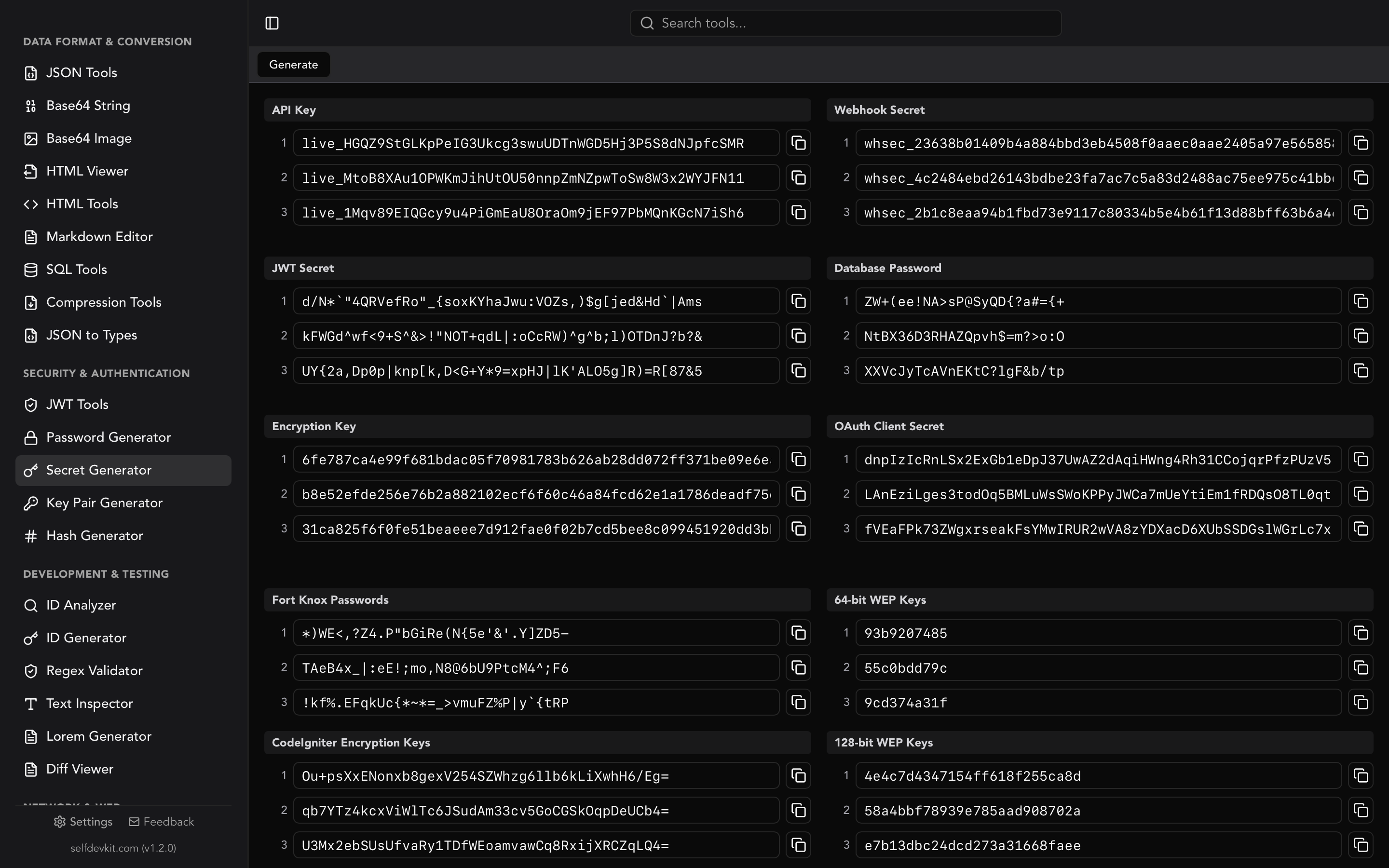
If you would rather not write throwaway scripts, SelfDevKit's secret generator produces these locally. The API Key preset outputs three 48-character alphanumeric keys with a live_ prefix at a time, and there are presets for webhook secrets (whsec_ plus 64 hex characters), OAuth client secrets, 256-bit encryption keys, and database passwords.
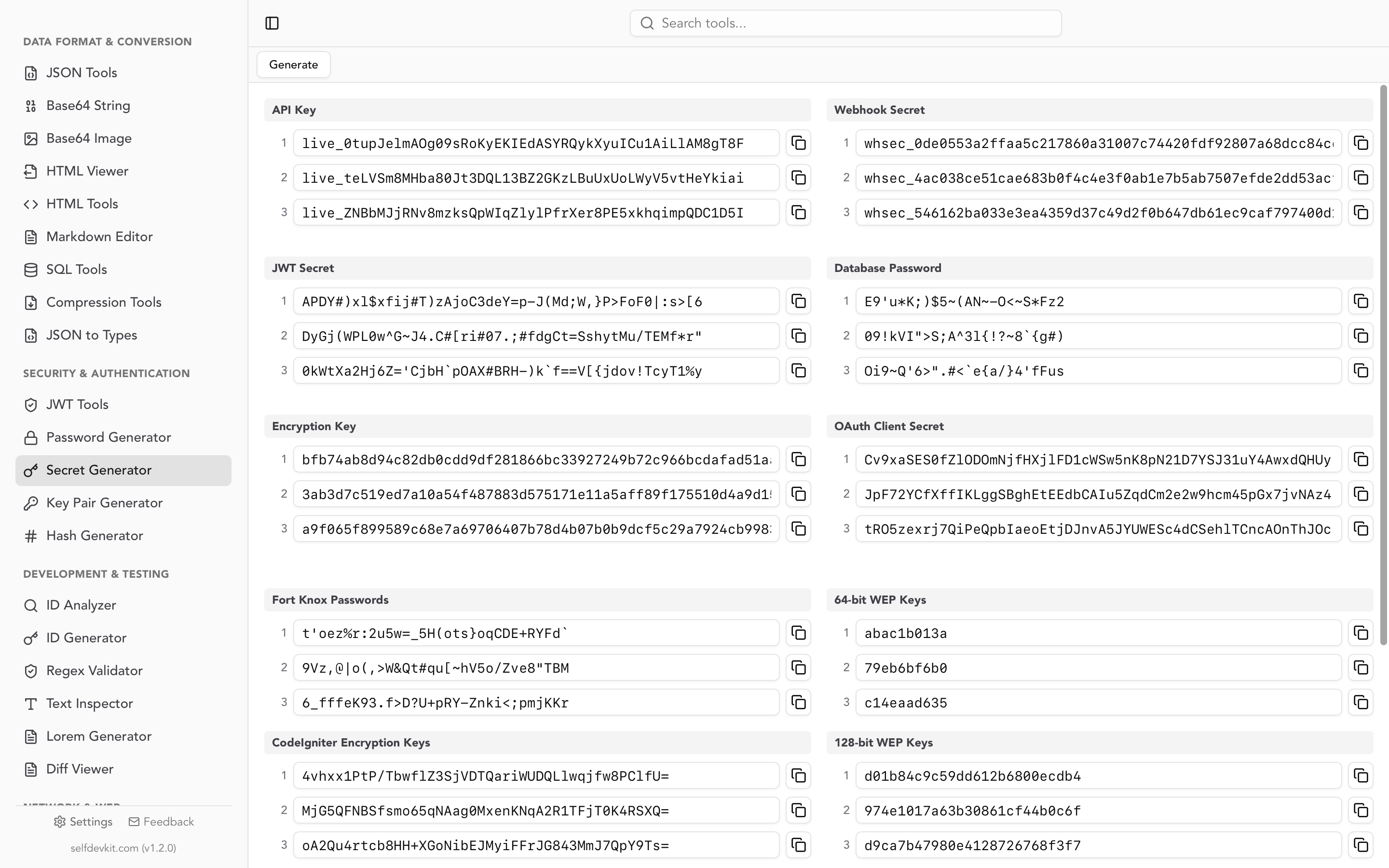
Everything is generated on your machine with no network call, which matters more than it sounds. Pasting "generate an API key" into a web tool means a server you do not control has seen a string you are about to trust with production access. For signing secrets specifically, our JWT secret key generator guide explains why key length has to match the algorithm, and the password generator guide breaks down how character count translates into real entropy.
Where the example key goes in your project
Example keys belong in files that are committed; real keys belong in files that are not. The cleanest pattern is a committed .env.example that documents every variable with a placeholder, alongside a git-ignored .env that holds the real values.
# .env.example  (committed to git)
STRIPE_SECRET_KEY=sk_test_your_key_here
OPENAI_API_KEY=sk-proj-your_key_here
INTERNAL_API_KEY=your_api_key_here
# .env  (listed in .gitignore, never committed)
STRIPE_SECRET_KEY=sk_test_BQokikJOvBiI2HlWgH4olfQ2
In CI, the example never appears at all. The value comes from the platform's secret store:
# .github/workflows/deploy.yml
- name: Run integration tests
  env:
    API_KEY: ${{ secrets.API_KEY }}
  run: npm test
And in an OpenAPI spec, the placeholder belongs in an example field, never in a default that a code generator might bake into the client it emits:
components:
  securitySchemes:
    ApiKeyAuth:
      type: apiKey
      in: header
      name: x-api-key
  schemas:
    ApiCredentials:
      type: object
      properties:
        apiKey:
          type: string
          example: sk_test_your_key_here # rendered in docs only
One gotcha that costs people an afternoon: reading a key from a file with $(cat key.txt) keeps the trailing newline, which the server sees as part of the credential and rejects. If a key that looks correct keeps returning 401, paste it into a text inspector and check the character count against the expected length in the table above. Thirty-three characters where thirty-two are expected is a newline.
Why a realistic example key can break your build
A convincing fake key committed to a repository can trigger secret scanning push protection and block your push outright. This is the failure mode nobody mentions when they tell you to use "realistic test data."
GitHub's secret scanning runs automatically and for free on public repositories, checking the entire Git history on every branch for known credential patterns. Push protection takes it a step further and rejects the push before the secret ever lands. It only runs patterns the scanner can identify with high confidence, which is precisely why the GitHub checksum and the Stripe prefix exist.
The other direction is worse. When a real partner secret is detected, GitHub's docs state: "When a partner secret is detected, we notify the provider so they can take action, such as revoking the credential." Push a live OpenAI or Stripe key to a public repo and it can be dead before you finish reading the alert email. That is the system working correctly, but it does mean a copy-paste accident becomes a production outage.
If your repo legitimately needs realistic-looking keys in fixtures, allowlist the paths rather than weakening the scan:
# .gitleaks.toml
[allowlist]
description = "Documentation examples and test fixtures"
paths = [
  '''\.env\.example$''',
  '''docs/examples/.*''',
  '''tests/fixtures/.*''',
]
regexes = [
  '''AKIAIOSFODNN7EXAMPLE''',
  '''your_api_key_here''',
]
Scoping the exception to specific paths keeps the rest of the codebase protected. Disabling the rule globally because one fixture file is noisy is how real keys slip through six months later.
Finding API keys in your codebase with regex
To audit a codebase for hardcoded keys, run the provider regex patterns against your source tree, then filter by entropy to catch the unprefixed ones. Start with a combined alternation:
(sk|pk|rk)_(test|live)_[0-9a-zA-Z]{24}|gh[pousr]_[A-Za-z0-9]{36}|AKIA[0-9A-Z]{16}|AIza[0-9A-Za-z\-_]{35}
Dropped into grep -rEn or a scanner config, this catches the four highest-value formats in one pass. Prefixed keys are the easy half of the job.
The hard half is everything else. A bare 32-character hex string could be an API key, a session token, a commit SHA, or a checksum, and no pattern distinguishes them reliably. That is where entropy heuristics come in, and where false positives multiply. Build the pattern incrementally against real samples rather than trusting a regex you copied from a gist.
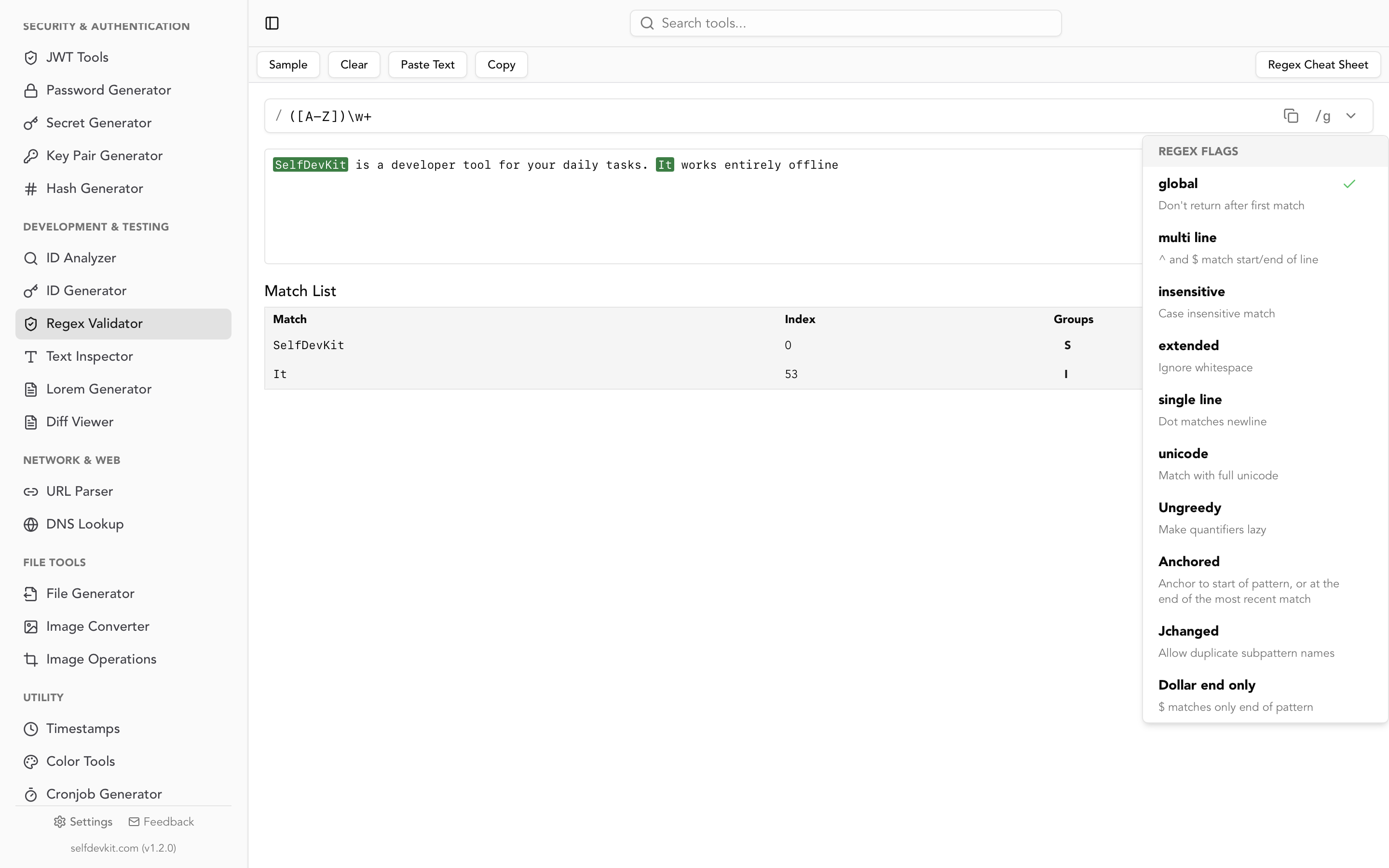
SelfDevKit's regex validator highlights matches as you type, so you can paste a handful of real and fake keys and watch which ones the pattern catches before you commit it to a CI job. Our guide to testing regex covers building a proper test corpus of positive and negative cases, which matters a lot here: a detection pattern that misses one key format is worse than no pattern, because it creates false confidence.
If you already store keys server-side, hash them before comparison so a database dump does not hand over working credentials. A plain SHA-256 is appropriate here because keys are high-entropy by construction, unlike passwords. Our SHA-256 generator guide walks through the details, and the hash generator computes digests locally.
Frequently asked questions
Are the API key examples in documentation real?
No. Values like AKIAIOSFODNN7EXAMPLE and Stripe's documented sample test key are deliberate placeholders that never authenticate against a real account. Stripe's sample test key does reach their sandbox, so treat it as functional-but-harmless rather than fully inert, and never send real data through it.
Can I invent my own API key example for a blog post or README?
Yes, and it is usually the better option. Use an obvious placeholder like YOUR_API_KEY where the format does not matter, and generate a random string with a matching prefix where it does. Avoid strings that look like a valid credential in a committed file unless you have allowlisted the path in your secret scanner.
What is the difference between a test API key and a live API key?
The prefix, and the data behind it. Test keys such as sk_test_ hit a sandbox where nothing is billed and no real records change; live keys such as sk_live_ operate on production. Both share the same length and character set, so a mismatch is easy to make and easy to miss. Keep them in separate environment files.
How can I tell whether a random string is an API key?
Check the prefix first against the table above, then the length. AIza plus 35 characters is a Google key; AKIA plus 16 is an AWS access key ID; ghp_ plus 36 is a GitHub token. If there is no prefix, look at what surrounds it. A high-entropy string assigned to a variable named token, key, or secret should be treated as live until proven otherwise.
Try it yourself
Whether you need a placeholder for a README or a real credential for production, the generation step should never involve a website you do not control. SelfDevKit's secret generator creates API keys, webhook secrets, JWT signing secrets, and encryption keys entirely offline, with prefixes that match the conventions above.
Download SelfDevKit for 50+ developer tools that run on your machine, not someone else's server.