
An API key generator is three things stacked together: a random number source, an encoding, and a format wrapper. Get the first one wrong and nothing else matters. This guide covers how to size a key, which output format to pick, the characters that quietly break your key downstream, one-line commands for four languages, and a short procedure for auditing any generator before you paste its output into production.
Most articles on this topic are attached to a text box that spits out a string. Very few tell you how to check whether that string was worth trusting.
What is an API key generator?
An API key generator is a tool that produces a random, unguessable credential string for authenticating API requests. It draws bytes from a cryptographically secure random number generator, encodes them into a safe character set such as hexadecimal or Base64URL, and usually prepends a short prefix that identifies the key type and environment.
Table of contents
- What an API key generator actually does
- How to audit an API key generator before you trust it
- How long should a generated API key be
- Choosing the output format
- Characters that break your key downstream
- Generate an API key from the command line and in code
- Building an API key generator into your own service
- Generating keys for multiple environments at once
- Frequently asked questions
What an API key generator actually does
An API key generator performs three separate jobs, and each one can fail independently. It pulls entropy from a random source, encodes those raw bytes into printable characters, then wraps the result in a format your system can recognize.
live_4fd9cf1c40e7fc8aeaee48b966df08d6
│     │
│     └── encoded body: 16 random bytes rendered as 32 hex characters
└──────── format wrapper: environment prefix, carries zero entropy
The middle piece is the only part that provides security. A prefix is a label, and a label is public information. Doubling the length of live_ adds nothing; adding four bytes to the body multiplies the search space by four billion.
The random source is where real failures happen. A generator built on JavaScript's Math.random() produces output that looks random to a human and is reconstructible by an attacker who has seen enough of it. MDN is unambiguous about this: Math.random() "does not provide cryptographically secure random numbers" and should not be used "for anything related to security." The correct primitive in a browser is crypto.getRandomValues(), in Node it is crypto.randomBytes(), in Python it is the secrets module, and in Go it is crypto/rand.
Everything else in this guide assumes you got that part right.
How to audit an API key generator before you trust it
You can audit any web-based API key generator in about ninety seconds using browser devtools, and the check is worth doing because the page looks identical whether or not it is safe. Here is the procedure.
1. Watch the network tab while you generate. Open devtools, switch to Network, clear it, click Generate. If a request fires, the key was either produced on a server or reported to one. Either way, that string is now in somebody's TLS terminator, load balancer log, or analytics pipeline. Treat it as burned.
2. Search the page source for the random call. In the Sources panel, use the file search for Math.random. Then search for getRandomValues. The first result set should be empty and the second should not. Bundled and minified code preserves both names, so this works even on production builds.
3. Check whether the key ends up in the URL. Some generators put the result in the query string or hash fragment so the output is shareable. That is a bad idea for a secret: URLs land in browser history, in Referer headers, and in server access logs. If you want to see exactly which components of a URL get transmitted where, our URL parser walkthrough breaks the anatomy down.
4. Look at what happens on reload. If the same key comes back after a refresh, the value is being cached or seeded deterministically. Fresh entropy on every generation is not optional.
5. Ask whether the page needs to be online at all. Generating random bytes requires no network access whatsoever. Any generator that fails when you go offline is doing something over the wire, and the burden of proof is on the tool.
That last point is the reason SelfDevKit's secret generator runs as a native desktop tool rather than a web page. It produces keys from the operating system's entropy pool through a cryptographically secure generator that reseeds itself periodically, and there is no network layer for the value to escape through. The same reasoning applies to the password generator and every other credential tool in the app.
One smaller concern that gets disproportionate attention: modulo bias. If a generator maps a 32-bit random value onto a 62-character alphabet with %, the first four letters of the alphabet become very slightly more likely than the rest, by about one part in seventy million. It is real, it is worth fixing with rejection sampling, and it is nowhere near as important as the source of the bytes. A biased CSPRNG is fine. An unbiased Math.random() is broken.
How long should a generated API key be
For a modern API key, generate at least 128 bits of entropy in the random body, and 256 bits if the key is long-lived or grants broad access. Length in characters depends entirely on the alphabet, which is why "32 characters" means three different things depending on the encoding.
| Body | Alphabet | Bits per character | Total entropy | Keys before a 50% chance of collision |
|---|---|---|---|---|
| 16 chars | alphanumeric (62) | 5.95 | 95 bits | 2.2 × 10¹⁴ |
| 24 chars | alphanumeric (62) | 5.95 | 143 bits | 3.2 × 10²¹ |
| 32 chars | alphanumeric (62) | 5.95 | 190 bits | 4.8 × 1028 |
| 32 chars | hexadecimal (16) | 4.00 | 128 bits | 1.8 × 10¹⁹ |
| 43 chars | Base64URL (64) | 6.00 | 256 bits | 3.4 × 1038 |
| UUID v4 | hex with fixed bits | n/a | 122 bits | 2.3 × 10¹⁸ |
The collision column is the birthday bound, the point at which you would expect two independently generated keys to be identical. Even the weakest row survives issuing hundreds of trillions of keys. Collision is not your problem. Guessing is.
Guessing is also easier to reason about than people assume. An attacker hammering your endpoint at a million attempts per second against a 95-bit key would need longer than the age of the universe. The practical attack is never brute force against a well-sized key; it is finding the key in a repo, a log file, or a screenshot. Our guide on what an API key is covers those leak paths in detail.
There is a second reason to go past 112 bits, and it is about storage rather than guessing. NIST SP 800-63B states that "look-up secrets having at least 112 bits of entropy SHALL be hashed with an approved one-way function," while lower-entropy secrets require a salted key derivation function instead. In plain terms: generate a high-entropy key and you can store a plain SHA-256 hash of it and verify in microseconds. Generate a short one and you are obligated to run a slow KDF on every single API request. Length at generation time buys you speed at verification time.
Below 64 bits, the same document requires rate limiting on failed attempts. Do not build an API key system that needs that clause.
Choosing the output format
Pick the encoding based on where the key will travel, not on which one looks best. All four common formats below are equally secure at equal entropy; they differ in character set and length overhead.
| Format | Example | Overhead | Best for |
|---|---|---|---|
| Hexadecimal | 4fd9cf1c40e7fc8aeaee48b966df08d6 |
2 chars per byte | Maximum compatibility, case-insensitive lookups |
| Base64 standard | n7p8ezu2j/wDY+JOxjl6+oUAMIeOMBqkUuPkuwXS5cA= |
~1.33 chars per byte | Legacy systems that already expect it |
| Base64URL | z-aYt79HcT5vzDpB9pWzTT9GmBq81xweA0yjlNko_gQ |
~1.33 chars per byte | Anything touching URLs, headers, or filenames |
| Alphanumeric | Opxhk7b8h6OD3EwecFNa7MTEZkVKnbfYKYHqdsyB8AfG |
~1.34 chars per byte | Keys humans occasionally retype or double-click |
Base64URL, defined in RFC 4648 section 5, swaps + and / for - and _ and drops the = padding. It is the sane default for a new API in 2026. Standard Base64 is the one to avoid: those three characters are exactly the ones that cause the problems in the next section. If you need a refresher on how the two alphabets differ, our Base64 encoder guide covers the mapping.
Alphanumeric output is what most commercial providers use, and the reason is human, not cryptographic. A key with no punctuation survives being double-clicked in a terminal, pasted into a spreadsheet cell, and read aloud over a call. That is why SelfDevKit's API key preset produces a 48-character alphanumeric body behind a live_ prefix rather than raw Base64.
UUIDs deserve a note. A v4 UUID carries 122 bits of entropy, which is enough, but it has two drawbacks as an API key: the hyphens waste four characters, and there is no prefix, so no secret scanner will ever recognize it in a leaked file. If you like the format anyway, use a UUID generator and prepend your own prefix.
Characters that break your key downstream
Certain characters in a generated key survive the generator and then break something three systems later. This is the failure mode nobody warns you about, because the key is technically valid and the bug looks like an authentication problem.
$ in a .env file consumed by Docker Compose. Compose performs variable interpolation on unquoted and double-quoted values, so a key containing $AB becomes an empty string or a partial value at container start. Docker's interpolation reference specifies $$ as the escape, and single-quoted values are taken literally. The symptom is a 401 from an API with a key that is provably correct in your editor.
+, /, and = in a URL. Standard Base64 uses all three, and all three are meaningful in URLs. A + in a query string decodes to a space on the server. This is precisely what Base64URL exists to prevent.
! in an interactive Bash shell. Inside double quotes, ! triggers history expansion, so export KEY="ab!cd" fails or silently substitutes a previous command. Single quotes are safe. This one bites people exporting a generated JWT signing secret, which is why our JWT secret key generator guide recommends restricting the alphabet for anything you will paste into a shell.
A trailing newline from a file or a command substitution. Shell command substitution such as $(cat key.txt) strips trailing newlines, but language-level file reads keep them: Python's open(path).read() and Node's readFileSync(path, 'utf8') both hand you the \n. A key with an invisible \n on the end fails every comparison. When a key that should work does not, paste it into a text inspector and compare the character count against what the provider says the length should be. A 41 where you expect 40 is your answer.
Ambiguous glyphs in keys people transcribe. 0/O and 1/l/I cause support tickets. Only worth excluding for keys a human will read off a screen, and remember that shrinking the alphabet slightly reduces entropy per character, so add a character or two to compensate.
Generate an API key from the command line and in code
Every mainstream platform ships a cryptographically secure random generator in its standard library. You do not need a dependency, and you do not need a website.
# 32 bytes, Base64URL, no padding (verified output shape: 43 chars)
openssl rand -base64 32 | tr '+/' '-_' | tr -d '='
# => v9Smm_F0_CEwOsR75EVLLSAcsf3YM8HM487wjHxIf74

# 16 bytes as hex with an environment prefix
printf 'live_%s\n' "$(openssl rand -hex 16)"
# => live_4fd9cf1c40e7fc8aeaee48b966df08d6

# 48 alphanumeric characters, unbiased because non-matching bytes are discarded
LC_ALL=C tr -dc 'A-Za-z0-9' < /dev/urandom | head -c 48
# => Opxhk7b8h6OD3EwecFNa7MTEZkVKnbfYKYHqdsyB8AfGTP32
Node.js, using crypto.randomBytes and the base64url encoding available on Buffer since Node 15.7:
const { randomBytes } = require('node:crypto');

function generateApiKey(prefix = 'live_', bytes = 32) {
  return prefix + randomBytes(bytes).toString('base64url');
}

// live_z-aYt79HcT5vzDpB9pWzTT9GmBq81xweA0yjlNko_gQ
Python, using the secrets module, which exists specifically because random is not safe for this:
import secrets

def generate_api_key(prefix: str = "live_", nbytes: int = 32) -> str:
    return prefix + secrets.token_urlsafe(nbytes)

# secrets.token_hex(32) if you prefer 64 hex characters instead
Go, using crypto/rand rather than math/rand:
import (
    "crypto/rand"
    "encoding/base64"
)

func GenerateAPIKey(prefix string, nBytes int) (string, error) {
    b := make([]byte, nBytes)
    if _, err := rand.Read(b); err != nil {
        return "", err
    }
    return prefix + base64.RawURLEncoding.EncodeToString(b), nil
}
Note the pattern across all three: request a number of bytes, not a number of characters. Thirty-two bytes is 256 bits regardless of how you print it. Reasoning in bytes makes the entropy explicit and stops you from accidentally shipping a 16-character "32-bit" key.
Building an API key generator into your own service
If you are issuing keys to your own users rather than consuming somebody else's, the generator is the smallest part of the job. A production key issuance flow has four steps.
- Generate at least 32 bytes from a CSPRNG.
- Prefix the encoded body with a type and environment marker, such as
sk_live_. This is what lets secret scanners identify a leaked key and what lets your own logs redact it. - Show once. Display the full key exactly one time at creation and never again. Storing a retrievable copy means a database read is a total compromise.
- Store a hash, not the key. Because a 256-bit random key has no guessable structure, a plain SHA-256 digest is appropriate and fast; you are not defending against a dictionary attack. Keep the prefix and last four characters in plaintext columns so users can identify keys in a list, and index the prefix for lookup.
const { createHash } = require('node:crypto');
const stored = createHash('sha256').update(apiKey).digest('hex');
Verification then becomes a hash of the incoming header value plus a constant-time comparison against the stored digest. If you want to sanity-check a digest by hand while debugging, a local hash generator gives you the same value without pasting a customer's credential into a website; the mechanics are covered in our SHA-256 guide.
Two extras worth adding once the basics work. A short checksum at the end of the key lets you reject typos before touching the database, which is exactly what GitHub does; our post on API key examples dissects that format. And an expires_at column costs almost nothing to add on day one and is nearly impossible to retrofit once customers depend on non-expiring keys.
Generating keys for multiple environments at once
Every environment needs its own key. Sharing one key across development, staging, and production means a laptop compromise is a production compromise, and it makes revocation an all-or-nothing decision.
for env in dev staging prod; do
  printf '%s_%s\n' "$env" "$(openssl rand -base64 24 | tr '+/' '-_' | tr -d '=')"
done
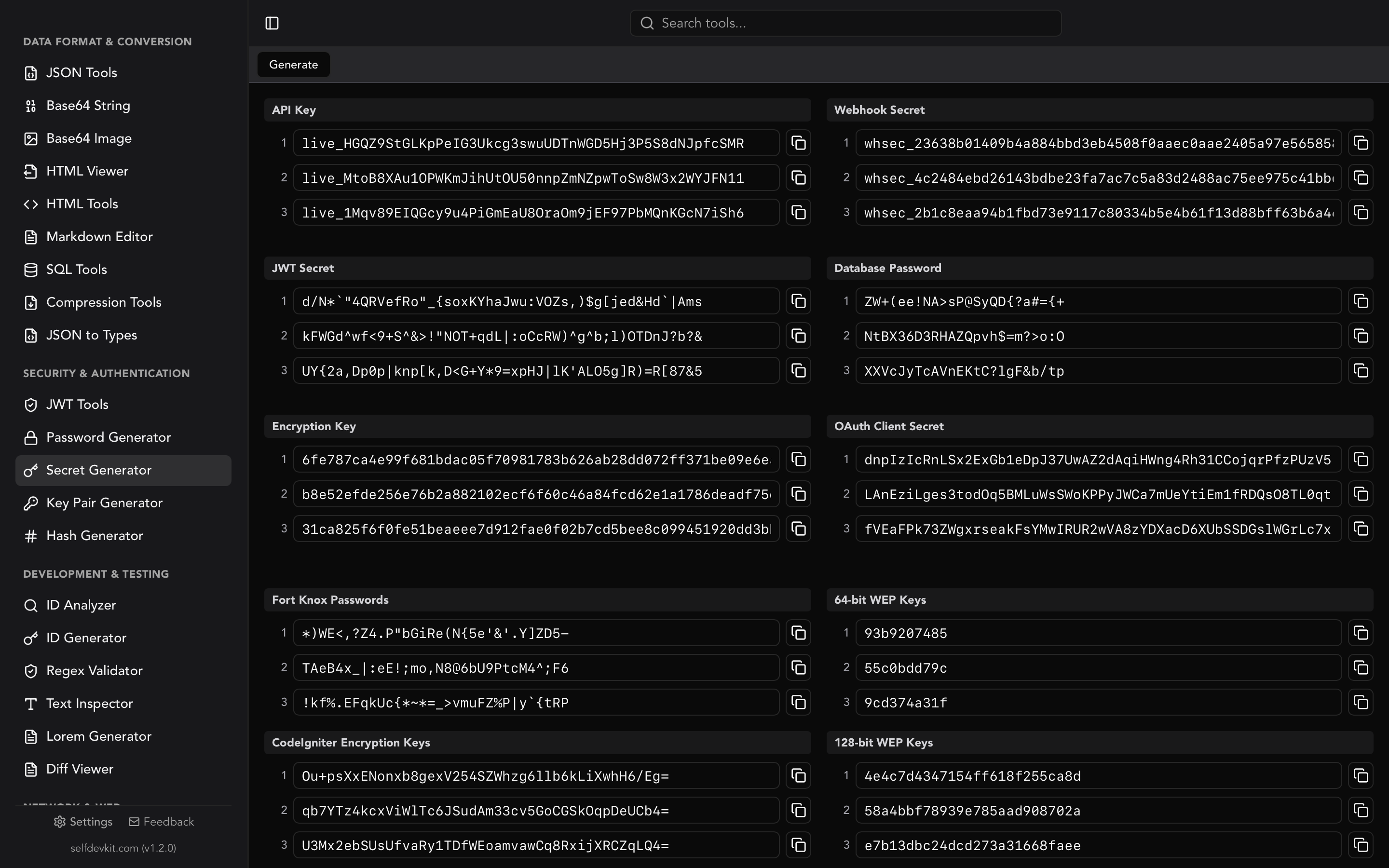
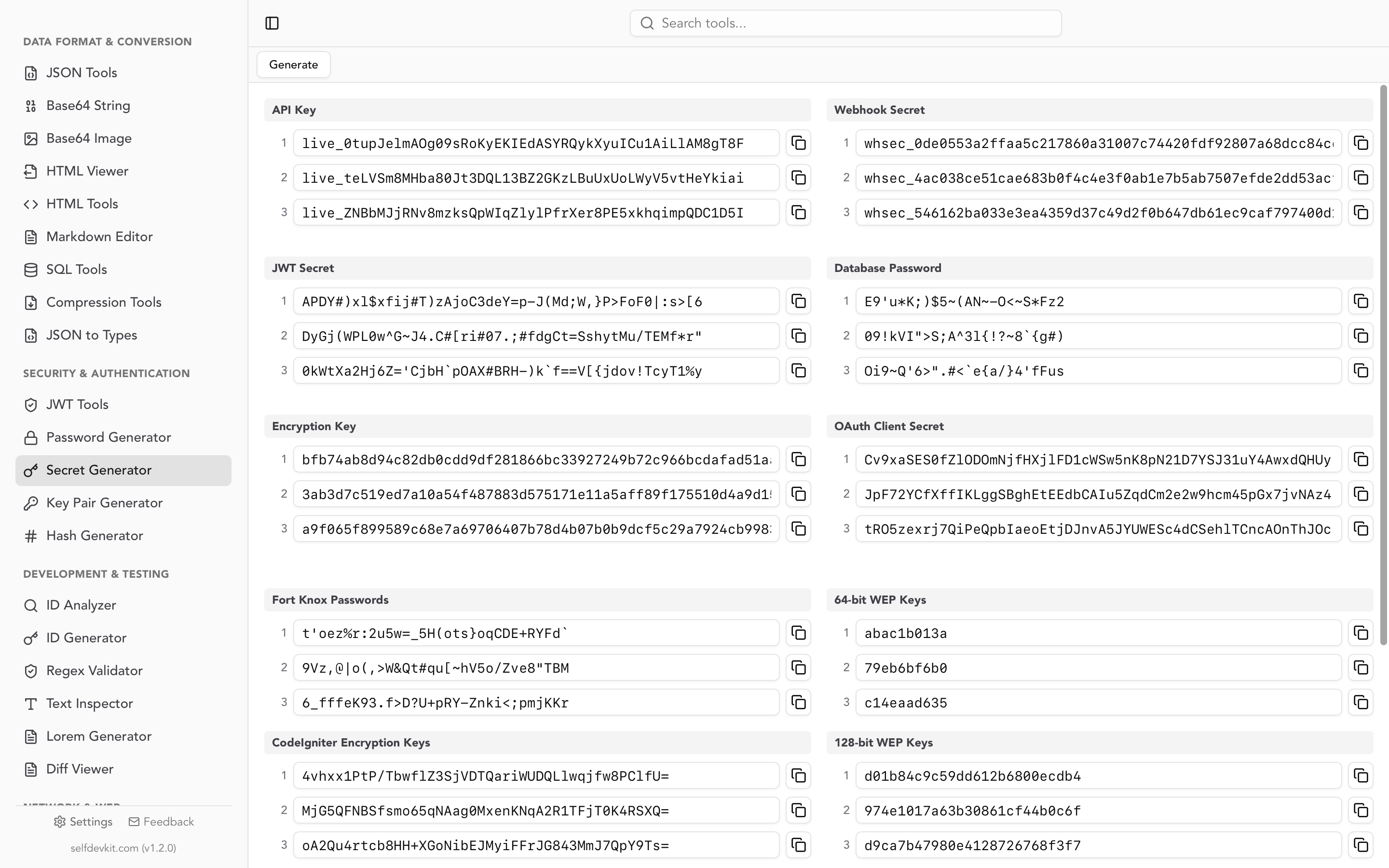
That shell loop is fine for a scratch script. For anything you are actually going to deploy, a generator that produces several distinct credential types in one pass is faster, because a real service rarely needs only an API key. It needs the API key, a webhook signing secret, a JWT signing secret, and a database password, all different, all at once.
SelfDevKit generates all of those together in a single click, each with the conventional format for its purpose: a prefixed alphanumeric API key, a whsec_ hex webhook secret, a JWT secret with symbols, a 256-bit hex encryption key, and an OAuth client secret. Three of each, so you can fill dev, staging, and production in one pass. Nothing leaves the machine, which matters more than usual here, because these are the values that will sit in your production secret manager for the next two years.
If you also need non-secret identifiers to go alongside them, the ID generator handles UUIDs and other formats in the same app.
Frequently asked questions
Is it safe to use an online API key generator?
It depends entirely on the implementation, and you cannot tell by looking. Run the devtools audit above: watch the network tab, search the bundle for Math.random versus getRandomValues, and check whether the key appears in the URL. For a production credential, generating locally with openssl, your language's standard library, or an offline tool removes the question.
How long should an API key be?
Aim for at least 128 bits of entropy in the random portion, which is 32 hexadecimal characters, 22 Base64URL characters, or 22 alphanumeric characters. Most providers use more: Stripe's secret keys carry a 24-character alphanumeric body at roughly 143 bits, and 256-bit keys are common for long-lived credentials.
Can I use a UUID as an API key?
Yes, technically. A v4 UUID has 122 bits of entropy, which is sufficient. The drawbacks are practical rather than cryptographic: no prefix means secret scanners cannot detect it in a leaked repository and your provider cannot auto-revoke it, and the hyphens waste four characters. Prepend your own prefix if you go this route.
Should the API key generator run on the client or the server?
For your own service, always the server, at the moment the user requests a key. For your own local use, generate on your own machine. The rule underneath both cases is the same: the fewer systems that ever see the plaintext key, the smaller the surface area. Sending it to your API to be echoed back is the worst of both.
Try it yourself
A good API key generator is boring by design. Cryptographically secure bytes, enough of them, encoded into characters that will not break in a .env file, wrapped in a prefix your tooling can recognize. Do that and the key is the strongest link in your authentication chain, which is exactly where you want it.
SelfDevKit's secret generator does all of it offline, alongside 50+ other developer tools including a JWT decoder for inspecting the tokens those keys end up minting.
Download SelfDevKit and generate production credentials on a machine that never phones home.